The most secure VPN services in 2026: stay private and safe online



Every year cyber threats are becoming more dangerous to network users, with increasingly sophisticated methods targeting data and personal privacy. In 2026, cyberattacks on critical infrastructure remain a major concern, while AI-driven threats and evolving ransomware continue to pose serious risks for everyday internet users. Luckily, your online security can be greatly enhanced by using a robust VPN to protect your sensitive data from hacking, data privacy concerns, and government surveillance.
In March 2026, I set out to test the most popular VPN providers in search of the most secure VPN services. I put the VPNs through rigorous testing, overlooking their privacy policies, security features, and how well they are capable of protecting you online. In this guide, you will find the help needed to make an informed choice when selecting the most secure VPN services for 2026, so continue reading to learn more.
🏷️ LIMITED OFFER: NordVPN deal! Get 76% OFF NordVPN + 3 months FREE 🏷️
Top 3 most secure VPNs to use in 2026
- ExpressVPN – the most secure VPN with premium security and verified infrastructure. ExpressVPN leads with a security-first architecture that’s built around its Lightway protocol and TrustedServer (RAM-only) technology, so no data is ever stored on disks. Its no-logs policy is backed by 20+ independent, component-based audits covering apps, infrastructure, and protocols. It also includes an Advanced Protection suite to block trackers, malicious sites, and ads. You can test ExpressVPN with a 3-day free trial on mobile or a 30-day money-back guarantee.
- NordVPN – one of the best secure VPNs, thanks to its feature-rich approach to online protection. NordVPN has an independently audited no-logs policy and regular security updates that demonstrate a strong commitment to user privacy. Your IP will always be protected by a well-functioning kill switch, while obfuscated servers hide your VPN usage. Additionally, NordVPN comes with the Threat Protection feature suite to block ads and trackers, and includes malware scanning. You can try this safe VPN for free during the 3-day free trial and 30-day money-back guarantee period.
- Proton VPN – a Swiss-based, open-source, third-party audited VPN that’s known for its airtight security. Plus, it’s one of only a handful of VPN services that fully support GUI and Linux. With features such as IP & DNS leak protection, modern AES-256 encryption, and Tor over VPN, Proton VPN is one of the most secure VPNs in the industry. You can try its free version or use the 30-day money-back guarantee to test it out.
Recent updates: During the latest March 2026 update, I added renewed information on the VPN provider’s no-logs and privacy policies. Additionally, I thoroughly tested the reliability of their IP leak protection and internet censorship bypassing capabilities.


Since 2018, VPNpro has delivered unbiased, expert-backed insights through in-house research and thorough VPN testing. Our team ensures every review is fact-checked and reliable. Learn how we maintain these high standards in our testing methods.
Safe VPN services in 2026: detailed list
Before compiling this list of the most secure VPN services in 2026, I set out to test over 20 of the most popular VPNs. My trials included IP, DNS, and WebRTC leak tests, auditing no-logs policies, overlooking the security features they offer, and their capabilities of bypassing internet censorship. After my tests were complete, the top 5 of the most secure VPN services in 2026 emerged. Continue reading to find my in-depth reviews of these services.
Top 1. ExpressVPN – overall best VPN for security and privacy
![ExpressVPN mobile logo [IN USE]](https://media.vpnpro.com/images/170x89/expressvpn2.png)


105

3000

24/7, email
-
RAM-only infrastructure ensures no data retention
-
20+ independent, component-based audits
-
Strong transparency via the ExpressVPN Trust Center
-
Simultaneous device connection limits are tiered
ExpressVPN is the overall best VPN for security and privacy, offering a security-first architecture designed to minimize risks and protect user data. Its proprietary Lightway protocol now includes post-quantum protection and has been rewritten in Rust for improved memory safety. On top of that, ExpressVPN uses TrustedServer (RAM-only) technology to ensure no data is ever stored locally.
Testing ExpressVPN security features
I began my evaluation with ExpressVPN’s encryption and connection protocols. Since it uses AES-256 encryption and the Lightway protocol, I found ExpressVPN’s core security to be highly reliable. To ensure the kill switch (Network Lock) worked as intended, I interrupted the connection multiple times and can confirm it worked consistently with zero accidental data leaks.
Next, I used ipleak.net and dnsleaktest.com to check for IP and DNS leaks while connected to different servers in different locations, and my IP address stayed hidden at all times. Based in a privacy-friendly British Virgin Islands, ExpressVPN maintains a strict no-logs policy that’s been verified through 20+ independent, component-based audits. These audits, along with detailed reports available via the ExpressVPN Trust Center, prove the service’s transparency and commitment to user privacy.
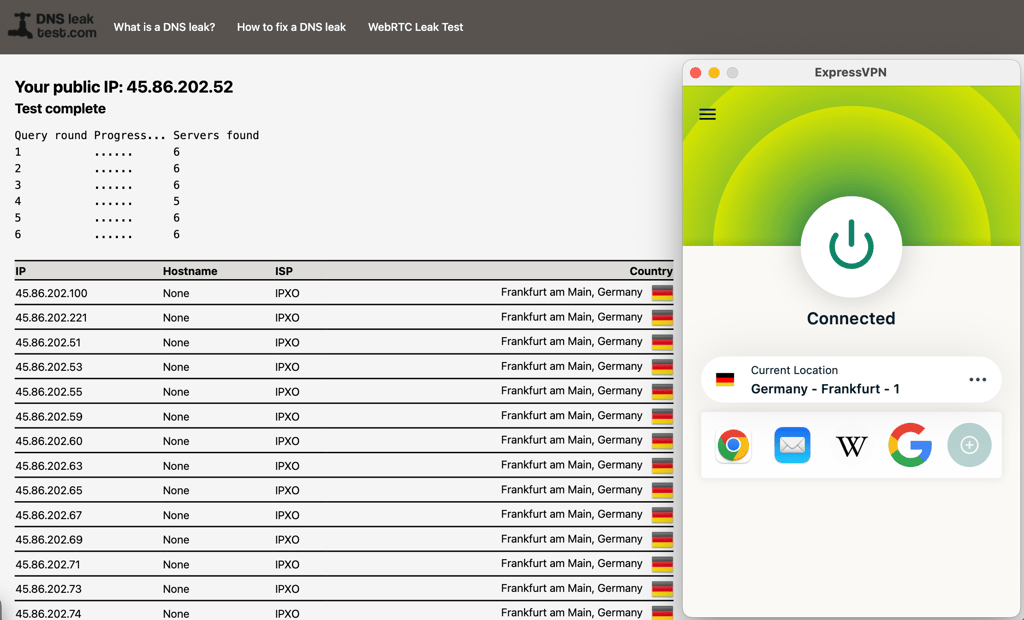
I also tested additional features like Lightway Turbo, which delivered fast connection speeds and stable performance. On top of that, ExpressVPN’s Advanced Protection feature effectively blocked ads, trackers, and malicious domains during browsing.
Lastly, ExpressVPN has over 3,000 servers in 105+ countries, ensuring reliable connections worldwide. Pricing starts at $2.79/month, and you can test it with a 3-day free trial on mobile and a 30-day money-back guarantee.
Who should pick ExpressVPN?
ExpressVPN is ideal if you want the most secure VPN without dealing with complex settings. Its RAM-only servers, audited no-logs policy, and modern protocol design make it a strong choice for users who value reliability and simplicity for everyday browsing or streaming. Overall, I’d recommend ExpressVPN for those who prefer a “set-and-forget” VPN that works consistently across all devices.
For more information, read our in-depth ExpressVPN review.
Top 2. NordVPN – highly secure VPN with advanced privacy features
![NordVPN mobile logo [IN USE]](https://media.vpnpro.com/images/170x89/2025/08/nord-rreview.jpg)
137
9300
24/7, email
-
Modern encryption and tunneling protocols
-
Verified no-logs policy
-
Additional security features
-
Tor over VPN could be in a better working order
NordVPN is one of the most secure VPNs for security and privacy, ensuring your safety with modern encryption and tunneling protocols. Additionally, it offers a lot of useful additional security features, such as obfuscation, double-hop, and Tor over VPN. Lastly, NordVPN performed the best during my in-house security tests.
Testing NordVPN security features
Before setting out to do my tests, I evaluated the encryption and tunneling protocols used by NordVPN. Upon finding AES-256 and the proprietary NordLynx protocols, I knew the ground base was already very secure. Then, I went on to test the kill switch by manually terminating the internet connection and checking its responsiveness each time. I was glad to find that it worked flawlessly.
With all of this out of the way, I headed to ipleak.net and dnsleaktest.com and checked the service’s leak protection. I tried out several servers and each time my real IP address was kept safely hidden. I also found that NordVPN has a third-party audited no-logs policy and is based in a user-data friendly jurisdiction of Panama – all of which are great news concerning data privacy.
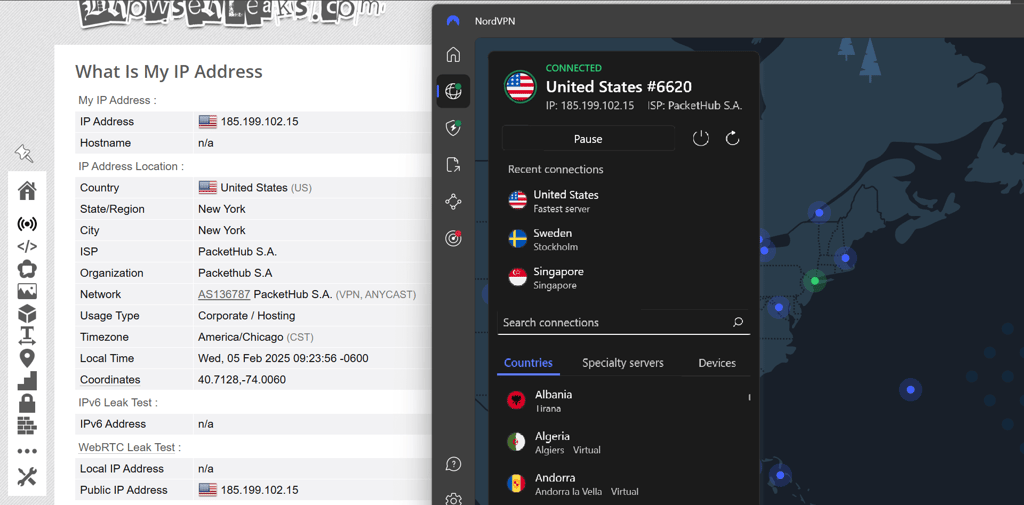
I also inspected the additional features offered by NordVPN, such as obfuscated servers, DoubleVPN, and Tor over VPN. I had no issue with connecting to and using the obfuscated servers, which are located in 16 countries, including the UAE. The same was true with the DoubleVPN servers; although I did experience a bit slower connections with them, that is to be expected. However, I was slightly disappointed with the Tor over VPN servers. I only found five of them located in the Netherlands, Sweden, and Switzerland, and I couldn’t get them to work properly. I asked a company representative for a comment on this and was informed that NordVPN has yet to fully develop the Tor over VPN feature. If you need a VPN for Tor over VPN specifically, I found the Proton VPN version of this feature to be in better working order. Alternatively, you can use the Tor browser while connected to standard NordVPN servers.
Last but not least, NordVPN has over 9,300 servers in 137+ countries. Such a large server network ensured I could always find a server close to me for optimal performance or a distant server to access region-specific content. Plus, NordVPN includes a Threat Protection Pro feature, which keeps its users safe from malicious websites, pop-ups, and even malware. If you’re interested in trying NordVPN, subscriptions start at $3.09/month and come with a 3-day free trial and a 30-day money-back guarantee.
Who should pick NordVPN?
In my opinion, NordVPN is one of the best secure VPNs on the market, combining security, safety, and speed in one service. The verified no-logs policy and strong encryption cater to privacy-conscious users, while obfuscation and DoubleVPN are very useful for those wishing to bypass government censorship. Lastly, NordVPN has the fastest connection speeds in the industry, which makes it perfect for streaming, torrenting, gaming, and casual browsing.
For more information, read our in-depth NordVPN review.
Top 3. Proton VPN – secure VPN software with a free version
![Proton VPN mobile logo [IN USE]](https://media.vpnpro.com/images/170x89/proton-vpn-review-logo-2.jpg)
145
20075
-
Annually reviewed no-logs policy
-
Secure Core and Tor over VPN servers
-
Bare-metal servers with full-disk encryption
-
Pricier than average
Proton VPN is a security-first VPN that offers both paid and free versions. This Swiss-based provider goes the extra mile in ensuring the safety of user data by relying on transparency and modern technologies, while its free version is the most functional and secure in the industry. However, the full-featured paid version is a bit pricier than average, starting at $2.99/month.
Testing Proton VPN security features
First off, Proton VPN is based in Switzerland, a country that is not in any of the Eyes intelligence-sharing alliances. To further prove its commitment to user data safety, the provider’s no-logs policy is reviewed by third parties at least once a year. And since we’re talking about data security, Proton VPN relies on AES-256 encryption and modern tunneling protocols, like OpenVPN, IKEv2/IPsec, and WireGuard. Lastly, I also found an interesting detail of Proton VPN using encryption suites with forward secrecy, which means that each time you connect to this VPN, a new encryption key is generated for your session.
Proton VPN operates bare-metal servers with full-disk encryption, unlike NordVPN or ExpressVPN which use RAM-only servers. This means that all of the service’s 20,075+ servers are non-virtual and protected against encryption keys leak. Naturally, I had to test how well these servers perform in real-life situations and put them through DNS, WebRTC, and IP leak trials. Unsurprisingly, my real IP address was kept tight under a lock, and the tests did not catch any leaks.
Besides the obvious strong encryption, IP & DNS leak protection measures, and a kill switch, Proton VPN also offers additional security features. For instance, you can choose to route your traffic through one of the Secure Core servers. Based in countries with strong privacy laws, like Iceland and Switzerland, these servers work as a middleman between you and your exit server, providing an additional layer of encryption and security. Basically, this is an enhanced double-hop version. Additionally, it has a NetShield feature to block ads, pop-ups, and trackers, and, as I mentioned before, Proton VPN has a Tor over VPN feature with lots of servers to choose from. Remember, though, that using Tor over VPN connections significantly slows down the speeds and is generally used only in situations where top secrecy is required.

Proton VPN is a security-first VPN, and it does a great job at that. However, in my opinion, the service underperforms in connection speeds, which average at around 428Mbps with 85% retention rate, even if you use the VPN Accelerator feature. While such speeds are still suitable for all sorts of online activities, they are significantly lower than NordVPN or Surfshark.
Who should pick Proton VPN?
I recommend Proton VPN to users who want utmost security and the highest-level of data safety. Plus, Proton VPN offers a very secure free version that comes with unlimited data and bandwidth. However, if your primary use for a VPN is gaming and downloading, this service might not be the best choice due to a bit slower speeds and retention rates.
For more information, read our in-depth Proton VPN review.
Top 4. Surfshark VPN – most secure VPN service with affordable price
![Surfshark mobile logo [IN USE]](https://media.vpnpro.com/images/170x89/surfshark-review-logo-2.jpg)
100
4500
24/7, FAQ
-
Unique Nexus technology
-
Robust encryption and modern tunneling protocols
-
CleanWeb feature to block ads
-
Some features cost extra
Surfshark is the most secure VPN for users who want an affordable service that does not compromise on security features. Surfshark is famous for its stable connections, hardiness against IP leaks, and lots of additional features such as the CleanWeb and NoBorders mode. Plus, at $1.99/month, it’s one of the most affordable premium VPNs, which also offers unlimited simultaneous connections.
Testing Surfshark security features
Before all the security tests, I wanted to highlight the unique Surfshark Nexus innovation. Basically, this is an SDN-based technology that connects all 4,500 Surfshark’s servers into one network. While at first, this sort of unification might seem opposite to safe, it actually allows Surfshark to better streamline the user connections and roll out new security features, such as Rotating IP or Multi-Hop, much more easily and effectively. This alone shows the service’s dedication to the upkeep of its security features. However, Surfshark’s security features do not end with Nexus as it also uses modern AES-256 encryption, and you can choose between OpenVPN, IKEv2/IPsec, and WireGuard tunneling protocols, which are all known for their security.
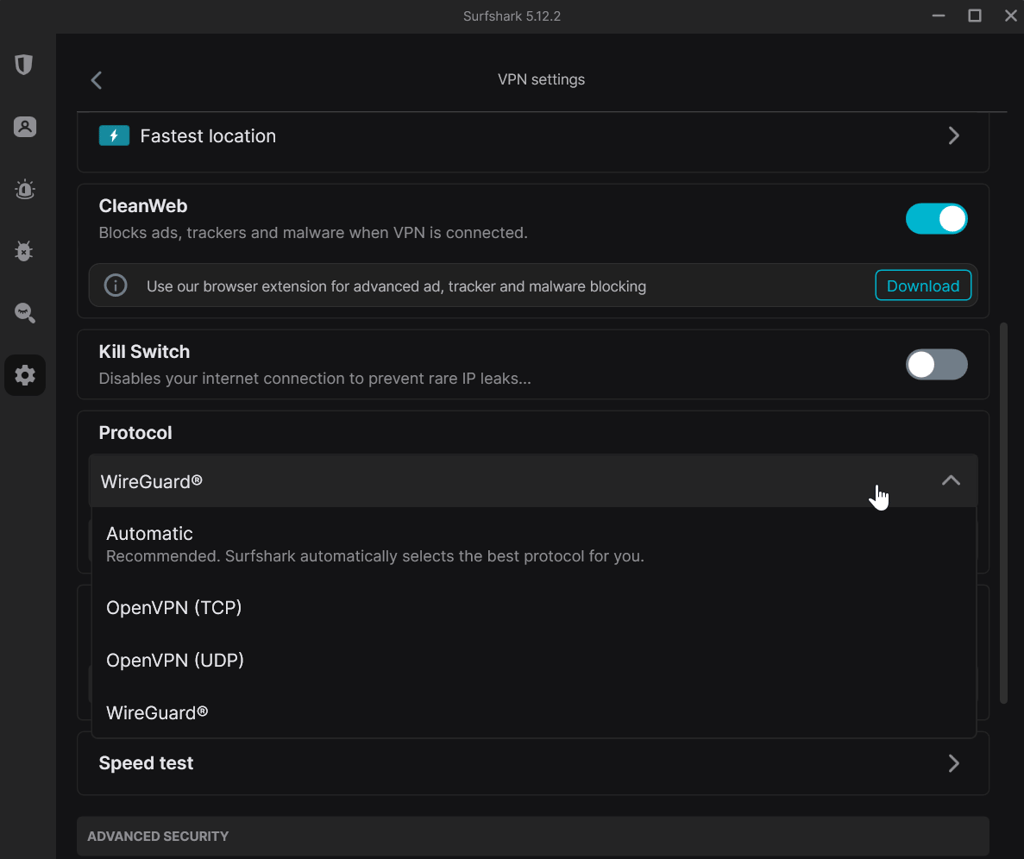
After reviewing the above, I performed my IP, DNS, and WebRTC leak tests and was not surprised to find that Surfshark kept it all airtight at all times. Here, a kill switch also plays an important role, and during my manual tests, I did not run into any issues, like lagging or ineffectiveness.
Surfshark is based in the Netherlands, and while the country is a part of the Eye Alliances, the provider has a strict and verified no-logs policy. So, you can be sure all your activities are never tracked or logged while using Surfshark.
Lastly, I looked for useful, security-related additional features and found that Surfshark offers obfuscation, double-hop (called Dynamic MultiHop), and even a CleanWeb feature to block annoying adds, pop-ups, and tracker. Plus, I found out that, according to user reviews, Surfshark is one of the few VPNs that work in China, proving again that it’s great against internet censorship and geo-restrictions.
Probably my only issue with Surfshark, which I found out about with earlier speed tests, is the lower average upload speeds with some servers. However, that does not compromise this VPN's security, which remains top-notch.
Who should pick Surfshark?
I recommend Surfshark to anyone looking for a robust, safe VPN that’s also very affordable and offers unlimited device connections. This VPN is also suitable for casual use, such as smooth streaming, and it’s just as excellent at bypassing internet censorship and geo-restrictions. Plus, you can use it with as many devices as you like, which makes it a great choice for a family VPN.
For more information, read our in-depth Surfshark review.
Top 5. PrivateVPN – simple and safe VPN service for everyday privacy
![PrivateVPN mobile logo [IN USE]](https://media.vpnpro.com/images/170x89/PrivateVPN-1.jpg)
63
200
24/7
-
Customizable encryption levels
-
Stealth VPN helps bypass network restrictions
-
Port forwarding available on selected servers
-
Smaller server network compared to top providers
PrivateVPN is a reliable VPN for security and privacy, especially if you’re after a service that focuses on core protection. It offers essential security features, supports multiple tunneling protocols, and includes Stealth VPN for bypassing network restrictions. Additionally, PrivateVPN is very easy to use and provides stable performance across its server network.
Testing PrivateVPN security features
Like other VPNs on this list, PrivateVPN uses AES-256 encryption and supports multiple connection protocols, including OpenVPN, IKEv2/IPsec, and WireGuard. It also offers older protocols like L2TP and PPTP, but I’d advise you to avoid using them, as they are less secure and generally not recommended for everyday use.
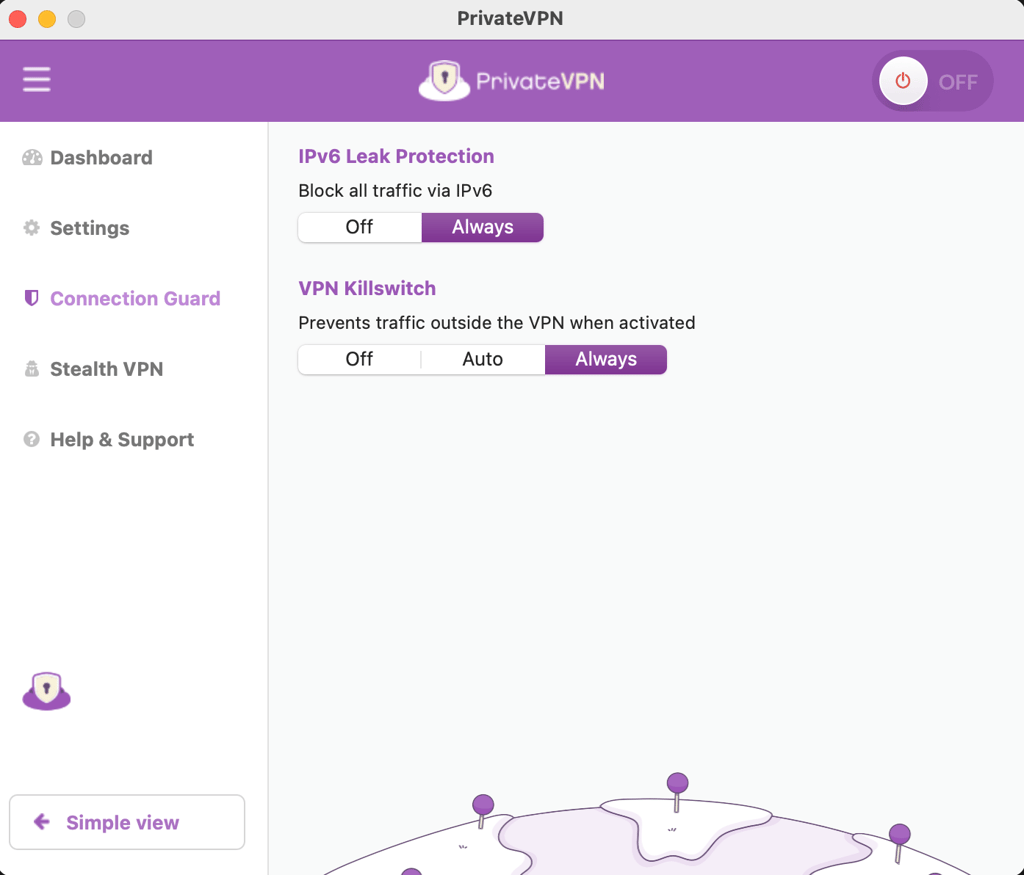
I performed IP, DNS, and WebRTC leak tests using different protocols and servers across multiple locations. Ultimately, the connection stayed stable, and my real IP address remained hidden. The kill switch worked as expected, preventing accidental data exposure during connection drops.
PrivateVPN is based in Sweden, which isn’t a privacy-friendly jurisdiction, as the country is part of the Fourteen Eyes alliance. Still, PrivateVPN maintains a clear no-logs policy, and while it hasn’t undergone a third-party audit, it has built a solid reputation over time for protecting user privacy.
I also tested additional features, such as Stealth VPN, which provides obfuscation and helps disguise VPN traffic. As a P2P-friendly VPN, PrivateVPN comes with the port forwarding feature, which is available on selected servers and protocols. Additionally, PrivateVPN allows users to choose between different encryption levels, offering more control over performance and security.
Lastly, PrivateVPN operates around 200+ servers in over 63 countries. While this is a smaller server network when compared to other providers on this list, it’s more than sufficient for everyday use. You can get PrivateVPN for only $2.00/month or try it out with a 7-day free trial or during the 30-day money-back guarantee period.
Who should pick PrivateVPN?
PrivateVPN is a good choice for users who want a simple, privacy-focused VPN without unnecessary extras. It’s especially useful if you need reliable obfuscation and basic security features without dealing with a complex interface. While it doesn’t offer as many advanced features or audits as higher-ranked providers, it remains a solid option for everyday browsing and P2P use.
For more information, read our in-depth PrivateVPN review.
Comparison of the safest VPN services
| Most secure VPN |
VPN ranking |
Encryption type | VPN protocol | Kill switch | DNS leak protection | Jurisdiction | Price | Free trial |
| 1. ExpressVPN | 8.4 ⭐⭐⭐⭐ | AES-256 | Lightway, WireGuard, OpenVPN, IKEv2, L2TP/IPsec |
✅ Yes | ✅ Yes | British Virgin Islands (BVI) |
8.4/month | ✅ Yes, 3-day free trial |
| 2. NordVPN | 9.8 ⭐⭐⭐⭐⭐ | AES-256 | OpenVPN, IKEv2/IPsec, NordLynx (WireGuard), NordWhisper |
✅ Yes | ✅ Yes | Panama | $3.09/month | ✅ Yes, 3-day free trial |
| 3. Proton VPN | 8.6 ⭐⭐⭐⭐ | AES-256 | OpenVPN, IKEv2/IPsec, WireGuard, Stealth |
✅ Yes | ✅ Yes | Switzerland | $2.99/month | ✅ Yes, free version |
| 4. Surfshark | 9.5 ⭐⭐⭐⭐⭐ | AES-256 | OpenVPN, IKEv2/IPsec, WireGuard | ✅ Yes | ✅ Yes | Netherlands | $1.99/month | ✅ Yes, 7-day free trial |
| 5. PrivateVPN |
8.7 ⭐⭐⭐⭐ | AES-256 | AnyConnect, IKEv2, IPSec, OpenVPN, WireGuard, L2TP, PPTP |
✅ Yes | ✅ Yes | Sweden | $2.00/month | ✅ Yes, 7-day free trial |
How the VPN security was tested
At VPNpro, we have developed our own in-house process for VPN testing that is in tune with strict industry standards. For our reviews to be as thorough as possible, we review security and privacy features, test leak protection, and verify the reliability of the kill switch. Then, we also verify if the advertised speeds are real and how capable the VPN is at bypassing geo-restrictions and censorship. Below, you’ll find more detailed information on our VPN security testing process and methods.
Analyzing the most secure VPN encryptions
Strong and secure encryption is the most critical aspect of a truly safe VPN. It protects user data from surveillance, unauthorized access, and cyber threats. Among encryption protocols, AES-256 (Advanced Encryption Standard, 256-bit) stands out for its robustness and efficiency. Here’s how it compares to other encryptions:
- AES-256 vs. AES-128 vs. AES-192. AES comes in three key sizes: 128-bit, 192-bit, and 256-bit. AES-128 is still very secure and faster due to its smaller key size, but AES-256 offers superior protection against brute-force attacks while maintaining optimal speed. AES-192 is secure but less common, as it provides neither the highest security nor the fastest performance.
- AES-256 vs. Blowfish. Developed in 1993, Blowfish was once popular for its variable key length (32 to 448 bits). However, it is slower and less optimized for modern hardware, struggling with large datasets.
- AES-256 vs. 3DES. 3DES (Triple DES) encrypts data three times for added security. However, it is much slower than AES and more vulnerable to meet-in-the-middle attacks.
- AES-256 vs. ChaCha20. Both are modern and highly secure. AES-256 is a block cipher optimized for hardware acceleration, while ChaCha20 is a stream cipher designed for speed. ChaCha20 performs better on modern devices, while AES-256 excels on hardware with dedicated encryption support. Both use 256-bit keys and while AES-256 remains the gold standard, ChaCha20 is gaining popularity, especially in mobile VPN apps.

Does encryption key length matter? To hack an encryption protocol, the bad actor must find a key to it. The longer the key, for instance, is 256-bit, the more possible the keys are. Today, it is virtually impossible to crack the 256-bit key with all its possible combinations, but with advancing technologies, encryption protocols with longer codes may be developed.
Choosing VPNs with the most secure protocols
If encryption protocols protect your data, then tunneling protocols must ensure your data is safely transmitted over the network. Tunneling protocols can establish encryption methods, authentication processes, and data integrity checks. Ultimately, every tunneling protocol used by VPN services has its own pros and cons, affecting the speed, security, and compatibility of a VPN connection. Here’s a more in-depth look into some of the most popular tunneling protocols:
- PPTP (Point-to-Point Tunneling Protocol). Developed by Microsoft in 1999, PPTP was the first widely used VPN protocol. It’s easy to configure and fast, but highly vulnerable due to its 128-bit MPPE encryption and MS-CHAP v2 authentication, which are easily cracked by modern tools. In 2026, it’s mostly used with legacy systems and is not recommended for any modern privacy or security use case.
- L2TP/IPsec (Layer 2 Tunneling Protocol with IPsec). Since L2TP provides no encryption by itself, it’s always paired with IPsec. While it’s much more secure than PPTP, it’s slower due to “double encapsulation” – wrapping your data in two layers of headers. Once a staple for corporate remote access, it was officially deprecated by Microsoft in 2026 in favor of more modern standards. Its primary weakness today is its reliance on Pre-Shared Keys (PSKs), and if these keys are weak or intercepted, the connection becomes vulnerable to Man-in-the-Middle (MITM) attacks.
- SSTP (Secure Socket Tunneling Protocol). Another Microsoft protocol that uses SSL/TLS for encryption. When paired with AES-256, it’s highly secure and effective at bypassing firewalls acting as standard HTTPS traffic. However, it is a closed-source protocol, meaning its code isn't publicly audited. That said, Microsoft has begun retiring it in favor of more modern standards. While it’s generally resistant to MITM attacks due to certificate authentication, it remains vulnerable if certificates are misconfigured or ignored.
- SoftEther (Software Ethernet). A multi-protocol VPN solution supporting SSL-VPN, L2TP/IPsec, OpenVPN, and WireGuard. It’s open-source, flexible, and widely compatible, making it ideal for advanced users and businesses that need to bypass restricted firewalls via HTTPS. However, while it uses strong AES-256 encryption, it has not undergone a full independent security audit since 2017. And due to its complex nature, manual configuration by an expert is required for optimal security.
- IKEv2/IPsec (Internet Key Exchange version 2 with IPsec). A fast and secure tunneling protocol, favored by mobile users for its ability to quickly reconnect after interruptions. While the protocol itself is an open standard with many open-source implementations (like strongSwan), many commercial VPNs use proprietary versions that are closed-source and lack independent security audits.
- Proprietary Protocols. Custom-built VPN protocols optimized for performance and security. Examples include NordLynx (based on WireGuard) and Lightway (ExpressVPN’s custom protocol written in Rust). By 2026, many such protocols have integrated Post-Quantum Encryption to protect against future quantum computing threats. While these protocols are often significantly faster and more secure than older standards, they may lack the transparency of fully open-source protocols if the provider does not release the code for public audit.
- WireGuard. A modern, open-source tunneling protocol designed for speed, efficiency, and security. With a minimal codebase, it offers a significantly reduced attack surface and lower latency compared to legacy protocols. It relies on state-of-the-art cryptography, which includes ChaCha20 for encryption (rather than AES-256), Curve25519 for key exchange, and Poly1305 for authentication. On top of that, as of 2026, many leading VPNs have integrated Post-Quantum Protection into WireGuard using the ML-KEM algorithm, making it the fastest and one of the most future-proof protocols available.
- OpenVPN. Long considered the “Gold Standard” for security, it combines AES-256 encryption, SSL/TLS key exchange, and open-source transparency. It’s exceptionally resilient, flexible, and remains the best protocol for bypassing internet censorship. However, it is slightly slower than WireGuard and has a much larger codebase, which means more frequent audits to remain as secure as its modern, leaner counterparts.
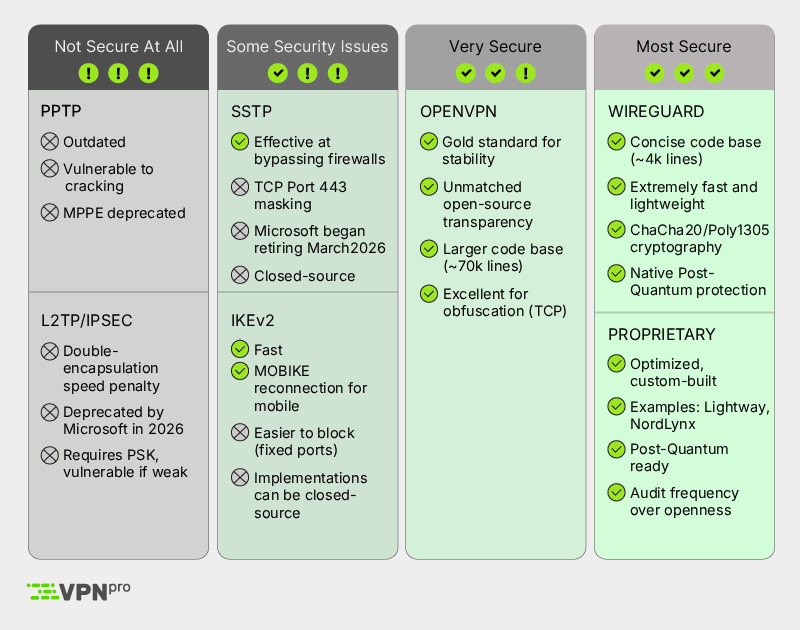
If you’re looking for the most secure VPN tunneling protocol, use WireGuard or modern, post-quantum proprietary protocols (like Lightway or NordLynx). If you need unmatched censorship resistance or a legacy connection that has stood the test of time, OpenVPN is the second best choice.
Exploring additional VPN security features for better protection
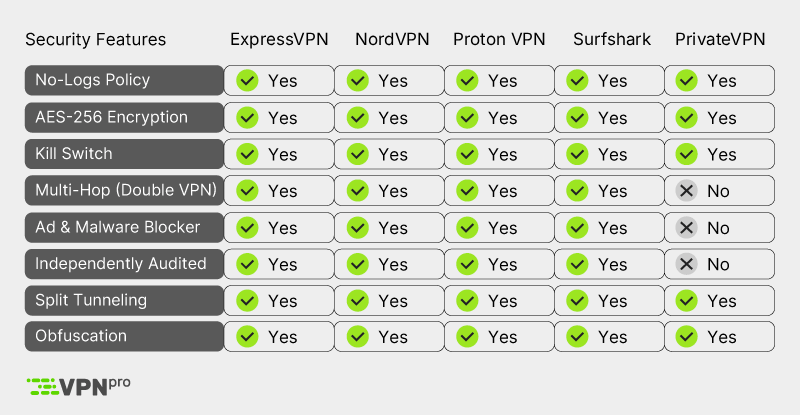
Besides secure encryption and an efficient tunneling protocol, reliable VPN services usually offer additional features to ensure the safety of your data. Such features include a kill switch, split tunneling, leak protection, and multi-hop connections, just to name a few. Let’s take a look at these security features, how they work, and their importance:
- Kill switch. A kill switch is meant to terminate your internet connection the instant your VPN connection is interrupted. If the kill switch works in a reliable way, it protects your sensitive data from leaking, further ensuring your security online.
- Split tunneling. This feature allows users to direct some of their traffic through a VPN connection while other traffic is sent through the regular network connection. This smart routing of traffic is very helpful when you want to protect just some of your online activities while the rest can be accessed faster but unencrypted.
- Leak protection. Additional leak protection measures can ensure that none of your sensitive data, including DNS queries or IP addresses, is ever accidentally exposed outside the VPN tunnel. Features with this capability include DNS leak protection and IPv6 leak protection.
- Multi-Hop Connections. The Multi-Hop or Double VPN feature reroutes your traffic via two or more VPN servers, which adds an extra layer of encryption and security to your network traffic. The use of a Multi-Hop connection makes it nearly impossible to track down your real IP address, which is especially useful if maintaining anonymity is your primary goal.
- Obfuscation. This feature masks your VPN traffic, making it look like regular network traffic, which can be achieved with specific servers or tunneling protocols. It’s particularly useful if you’re using a VPN in countries where its use is highly restricted or if you need to bypass VPN blocks and internet censorship.
- Tor over VPN. A handful of VPNs offer integration with The Onion Router (Tor), which allows users to route their traffic via a VPN and Tor simultaneously for maximum anonymity. This feature is most often used by journalists or whistleblowers who seek to maintain the highest level of anonymity. However, using Tor over VPN slows down the connection quite significantly, and thus is not often used by regular people.
Testing how secure a VPN is in different scenarios
We always test the best VPNs in real-life situations and evaluate their security for torrenting, streaming, bypassing censorship, and using public WiFi. For every situation, we have developed different testing methods:
- Torrenting. P2P file sharing requires a secure VPN connection and excellent speeds. For these tests, we download the latest Linux Ubuntu version using qBitTorrent, document the highest speed in Mbps, and mark how long it took to download the file. If the VPN performs well in this regard and shows a minimum of 75% initial speed retention rate, then we check if it’s truly leak-proof and whether it offers the WireGuard tunneling protocol, which is widely regarded as the best for torrenting due to speediness and security.
- Streaming. When we test a VPN’s suitability for streaming, we also begin with speeds and the stability of the connection. We test the connection stability by connecting to several servers at different times of day and putting the connection under stress with varying traffic loads. This way, we can get a fair idea of the functionality and stability of the servers. Additionally, streaming often means accessing geo-locked content, so we also test how capable a VPN is of bypassing it while being leak-proof enough to always hide your true IP location.
- Bypassing censorship. These tests are simple and involve us connecting to servers in the country where we want to unlock geo-restricted content and checking if the VPN can let us in on the first try or only after reconnecting to a server several times. We usually check unblocking capabilities with the most popular streaming platforms, like Netflix, Amazon Prime Video, Hulu, HBO Max, BBC iPlayer, and more; we also check news publications, social media platforms, and other websites that certain governments might censor. Of course, VPNs' hardiness in keeping your IP address safe and features like obfuscated servers are also considered when evaluating censorship bypassing capabilities.
- Using public WiFi. In this scenario, robust encryption and IP & DNS leak protection features are of the utmost importance. So, to check if the VPN is good enough to protect you while using public connections, we first evaluate if it uses strong encryption, like AES-256 or ChaCha20, and perform several IP and DNS leak tests. Additionally, we check the reliability of the kill switch by manually terminating the network connection and checking if it acts accordingly. If we’re sure the VPN will keep our data secure, we head to a local public WiFi spot, connect, and see how the VPN performs in a field test.
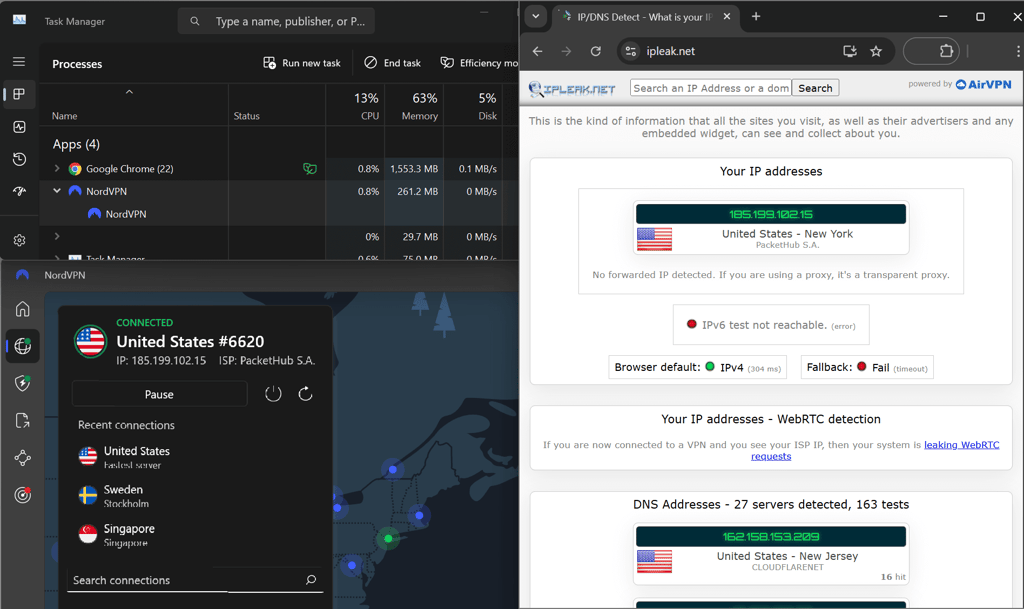
You can do your own IP leak tests at home by heading to the ipleak.net page to check how safe your VPN is. You can also check its DNS leak-proof qualities by performing a test on dnsleaktest.com.
Can a secure VPN effectively bypass government censorship?
Yes, a secure VPN can effectively bypass government censorship by encrypting traffic and hiding internet users' true identities. This is especially useful in countries where internet censorship is very stringent, like China, Russia, and the United Arab Emirates. VPNs can do it in several ways, including re-routing your traffic through a country where censorship does not apply, re-routing your traffic twice for greater anonymity, or making it look like you’re not using a VPN at all with obfuscation.
Obfuscation masks your VPN use by removing all VPN-related data from user traffic. This seemingly simple attribute makes it very hard for authorities to detect VPN usage and can be very handy in countries where VPNs are restricted or even illegal, like Russia, Turkey, and Belarus.
Double-hop, also sometimes called multi-hop or double VPN, routes network traffic via two or sometimes more servers, adding extra layers of encryption and protection. Ultimately, this makes it very hard, if not impossible, for the government or censors to track down user activity to its origin.
Unfortunately, we cannot travel to any of these countries to perform in-house tests and must rely on user reviews when it comes to bypassing government censorship in Russia, UAE, and China. So far, the commenters usually favor NordVPN and ExpressVPN to be used in these restrictive regions, naming their reliability and bypassing capabilities as their strongest suit for the task.
Bypass government censorship with NordVPN
Does a VPN protect you from your ISP?
Yes, a VPN can protect your online privacy and safeguard you from ISP (Internet Service Provider) interventions or tracking. ISPs can easily monitor your online activities, including the websites you access, the content, and the services you use. What’s even worse, some countries, including the US, UK, and most EU countries, have laws allowing the ISPs to give up their users’ data to the government if such a need arises. Lastly, ISPs can throttle your internet speeds based on your activities, with primary targets for throttling being streaming, gaming, and torrenting. This is done to enforce data limits or manage network congestion.
A VPN can easily solve this problem by encrypting your traffic and routing it through a secure server. This prevents your ISP from seeing the specific sites you visit or files you download. In turn, this stops content-based throttling, where ISPs slow down specific services like 4K streaming or gaming.
Ultimately, by using a VPN, you’re not only protecting your data, but it can potentially help you maintain stable connection speeds. This is particularly useful if your primary online activities are gaming, streaming, or torrenting, all of which require fast and stable internet speeds.
Is there a safe free VPN?
No, most free VPNs are not safe to use. First off, free VPNs usually do not have a full package of security features, often offering outdated encryption and tunneling protocols. Using outdated technologies cannot ensure the security of your data and activities. Plus, the very same outdated technologies often mean your real IP address will be leaking and visible to anyone wishing to take a look. Additionally, free VPNs still need to make money somehow for server upkeep, and they often do so by monetizing user data. Lastly, some free VPNs may even carry malware within their apps, and using them will do absolutely nothing to protect your sensitive data.
Instead of risking it with suspicious free VPNs, I always recommend trying out premium VPN services, like NordVPN or ExpressVPN, and taking advantage of their free trials. Premium VPNs come with all the latest security features and verified no-logs policies, and by relying on them, you can always be sure none of your data ever gets into the hands of malicious actors.
Final thoughts
Chances are, you use the internet every day for various activities, including browsing, streaming, gaming, torrenting, or performing various tasks that require the use of your personal data, like shopping and banking. Because all of this sensitive data is kept online, using a secure VPN is a smart thing to do to protect it from leaks and exploitation. A VPN encrypts your network traffic, prevents your activities from being visible to ISPs or any onlookers, and protects your real IP address from falling into the hands of hackers. But, to choose a truly safe VPN, security should always be the number one priority for a VPN in 2026.
After performing in-house tests with the most popular VPN services, I found out that ExpressVPN, NordVPN, and Proton VPN are the most secure VPNs in 2026. These service passed all the IP leak tests, showed great capability at bypassing internet censorship, while ensuring the safety of your data with modern encryption and tunneling protocols. Lastly, all 3 VPNs constantly update their security features to stay up to date with the ever-evolving cyber threats.

![Surfshark weekly deals logo [IN USE]](https://media.vpnpro.com/surfshark-weekly-deals.svg)
![Proton VPN winner logo [IN USE]](https://media.vpnpro.com/2025/05/protonvpn-winner.png)
Most secure VPN FAQs
How do I check if my VPN is secure?
To check if your VPN is secure, pay attention to the encryption and tunneling protocols it uses and perform IP and DNS leak tests with ipleak.net and dnsleaktest.com tools. Alternatively, you can rely on our in-house testing and recommendations and choose the most secure VPN in 2026 – ExpressVPN – to protect your activities and data.
Which is the safest VPN?
ExpressVPN is the safest VPN in 2026, thanks to its RAM-only TrustedServer technology, audited no-logs policy, and secure Lightway protocol with post-quantum protection. It also passed IP and DNS leak tests and includes a reliable kill switch to keep your data protected at all times.
How does a VPN help you stay secure when working from home?
A VPN encrypts your traffic making it imperceptible to ISPs and any onlookers. Because your activities are encrypted, no one can intercept your traffic and steal the data you’re dealing with. I recommend choosing ExpressVPN to stay secure when working from home, as it is a robust, speedy VPN service that’s also very easy to use.
Can a VPN be hacked?
Although VPNs are designed to protect you from hackers, some of them can still become compromised. The most vulnerable VPNs are those that use outdated encryption and tunneling protocols that are not resistant to modern hacking attacks. However, premium VPNs, such as ExpressVPN, invest a lot of funds to develop and renew their security features to keep such possibilities at a minimum.
What encryption do the safest VPNs use?
Up to date, the safest VPN encryption protocols are AES-256 and ChaCha20. AES-256 is widely regarded as the safest encryption and is trusted by governments, banks, and militaries alike. ChaCha20 is also very safe and most often used for VPNs with mobile apps due to its fast performance. Anything other than these two modern encryption protocols is considered to be unsafe to use.


