NordVPN review 2026: fast and secure, feature-packed VPN
 Rated #1 out of 54 VPNs
NordVPN is a top-tier service with the fastest connection speeds in the industry, excellent security, and superb usability. Thanks to its use of military-grade AES-256 encryption, a third-party audited no-logs policy, and a vast global server fleet, NordVPN ensures iron-clad privacy and performance. Meanwhile, the consistently high connection speeds are great for all online activities, including streaming, torrenting, and casual browsing. Lastly, NordVPN’s affordable pricing and 30-day money-back guarantee give it excellent value.


NordVPN, founded in 2012 by Tomas Okman and Eimantas Sabaliauskas, is based in privacy-friendly Panama and is part of the NordSecurity brand, which also owns NordPass, NordLocker, NordStellar, NordLayer, NordProtect, and Saily.
As of today, NordVPN is one of the most well-known VPN providers, frequently ranking at the top of VPN comparison lists. In addition to millions of real-life users, NordVPN is also recommended by top YouTube stars like PewDiePie and Gus Johnson.
| NordVPN rating: | 9.8/10 ⭐⭐⭐⭐⭐ |
| Servers: | 9,300+ servers in 137 countries |
| Supported platforms: | Windows, macOS, Linux, iOS, Android, Android TV, routers, browser extensions |
| Simultaneous connections: | Up to 10 |
| Logging policy: | No-logs (independently audited) |
| Best for: | Streaming, torrenting, privacy, and bypassing geo-restrictions |
| Price: | From $3.09/month (now 76% off) |
| Free trial: | ✅ Yes, 3 days (Android only) |
| Official website: | www.nordvpn.com |
The VPNpro team and I have tested and reviewed every aspect of NordVPN. To get real information, we ran numerous speed tests, evaluated performance across various streaming platforms, tested the service with real-life scenarios, and checked every possible security feature. In addition to the tests, we also dug deep into NordVPN’s privacy practices and rated the responsiveness and knowledge of customer support to cover all possible client needs.
Read on for our in-depth NordVPN review, test results, evaluations, and final verdict on this top-tier VPN service.
Recent updates
- January 2026: NordVPN launched the Call Protection feature for Android.
- December 2025: NordVPN added nearly 30 new virtual locations, bringing the total to 79.
NordVPN pros and cons
Pros
- Highest league privacy and security
- The fastest connection speeds in the industry
- Excellent for geo-unblocking and streaming
- Massive fleet with 8,400 servers in 129 countries
Cons
- Short, Android-only free trial
- Torrenting supported only on P2P-optimized servers
Our test results confirm that NordVPN is the best VPN provider in 2026, offering excellent connection speeds, a global server coverage, and superb geo-unblocking capabilities. Additionally, NordVPN is compatible with numerous devices, works great for streaming, gaming, and torrenting, all while keeping your data private and secure.
How much does NordVPN cost per month?
NordVPN’s pricing starts at $3.06/month but can increase to $7.89/month if you opt for a plan with the most features. Currently, NordVPN offers 4 plans – Basic, Plus, Complete, and Prime (US only):
- Basic (from $3.09/month) includes the VPN essentials, but lacks Threat Protection Pro for blocking malware, trackers, and ads.
- Plus (from $3.59/month) builds on the Basic plan, adding Threat Protection Pro and NordPass password manager with data breach alerts.
- Complete (from $4.99/month) includes everything from the Plus plan and adds 1TB of encrypted cloud storage with NordLocker.
- Prime (from $6.99/month) is a US-only plan, which includes everything from the lower-tier plans and adds the identity theft protection bundle called NordProtect. It includes identity recovery and restoration, secure credit monitoring, and dark web monitoring, and up to $1 million insurance in identity theft cases.
| NordVPN Basic plan | NordVPN Plus plan | NordVPN Ultimate plan | NordVPN Prime plan | |
| Price for a monthly plan | $12.99 | $15.29 | $18.69 | $25.29 |
| Price for annual plan | $4.99 per month | $5.49 per month | $6.99 per month | $8.99 per month |
| Price for a two-year plan | $3.09 per month | $3.59 per month | $4.99 per month | $6.99 per month |
NordVPN free trial and money-back guarantee
NordVPN used to offer a 7-day free trial, but now it has been shortened to 3 days only. I do not see this as a good change, as new users have much less time to test the service before purchasing a subscription. Also, I find it disappointing that currently, the NordVPN free trial is only available for Android devices.
However, NordVPN offers a solid 30-day money-back guarantee for all plans longer than one month. This guarantee is applicable no matter the device or platform you are using it with.
You’ll have to provide payment details for the NordVPN free trial, but you can cancel before you’re charged. To cancel your NordVPN trial, log into your Nord Account and go to the Billing section, then find your subscription and turn off Auto-renewal. If you subscribed via Apple/Google Play, cancel directly in the App Store or Google Play settings, and contact support for refunds if needed.
Is NordVPN a safe VPN?
Despite recent claims about a Salesforce breach, NordVPN confirmed that no production systems or customer data were compromised, and the leaked files came only from a temporary test environment containing no real credentials. So, NordVPN is a completely safe VPN that uses all of the key security features, such as AES-256 encryption, an audited no-logs policy, a kill switch, and split tunneling, to protect you.
These features work together to ensure your IP and true identity remain hidden. As a result, NordVPN suffers zero IP, DNS, IPv6, or WebRTC leaks, demonstrating comprehensive protection even under complex conditions. While doing so, it also successfully unblocks every website and streaming service I’ve tested.
NordVPN privacy policy analysis
NordVPN does not collect, sell, or monitor your browsing data. In NordVPN’s Privacy Policy, it is clearly stated that the only information that’s collected includes your username and email address, a timestamp, and connectivity information. There’s nothing that could truly be tracked to you, and it’s even safer if you use a throwaway email address service. RAM-only servers offer further protection, as they’re incapable of data storage, so they can’t log your traffic. Lastly, NordVPN operates out of Panama, a country where data retention is not mandatory, so it does not keep any logs of your online activity.

NordVPN’s no-log policy has been independently audited for the fifth time as recently as 2025. I was also relieved to see that the provider is headquartered in Panama, outside the 14-Eyes Alliance, so it is not forced to gather data or spy on users.
In January 2026, online forum posts alleged that data from a NordVPN-related Salesforce development environment had been exposed. NordVPN investigated the claims and confirmed that its live systems and customer data were unaffected, explaining that the materials originated from a short-term third-party test setup and did not contain real user credentials or sensitive information. So, despite the false claims, NordVPN proved its dedication to user privacy again.
Does NordVPN effectively hide your IP address?
NordVPN will effectively hide your IP address and location by replacing it with the IP address of the VPN server you connect to, increasing your privacy when using the internet. Here’s how NordVPN hides your IP address:
- Encryption: Encryption uses data scrambling to make it unreadable, including your IP. NordVPN uses AES-256-bit encryption, widely regarded as one of the most secure methods. This encryption method is very efficient and doesn’t greatly impact connection speeds.
- Tunneling protocols: When you connect to NordVPN, your traffic is routed through a secure tunnel, making it unreadable. Your IP address is replaced with a new one by your VPN server, hiding your actual address. NordVPN uses standard OpenVPN and IKEv2/IPsec tunneling protocols, as well as a proprietary WireGuard-based protocol, called NordLynx. Use it if you want both security and speed combined.

- Kill switch: A kill switch disconnects you from the internet if your VPN connection drops for any reason. If you don’t have one, your true IP address will become visible to websites you visit. During our manual connection termination tests, NordVPN’s Kill Switch acted as it should, preventing any IP slips.

I tested NordVPN’s encryption, protocols, and kill switch with browserleaks.com. This free and highly reliable service comprehensively checks for any IP, DNS, or WebRTC leaks on your internet connection. NordVPN consistently passes every test, shielding your true IP address without fault.
Is NordVPN good for torrenting?
NordVPN fully supports torrenting and is the safest VPN for P2P file sharing. You’ll find dedicated torrenting servers in the NordVPN server list that have faster speeds and enhanced security. They’ll keep you safe from DDoS attacks or being tracked by other users in your torrent swarm. However, I found that I couldn’t use just any server for P2P activities, and had to select from the optimized servers; otherwise, I couldn’t proceed with downloading.

When using NordVPN’s P2P servers, I noticed they have features to improve my safety as well as my torrenting experience. For example, the Automatic rerouting connects you to the highest-speed P2P server if yours slows down. The provider also optimized bandwidth for P2P traffic, and these servers have the same powerful 256-bit AES encryption and kill switch as any other NordVPN server.
I also checked how fast you can download a file using NordVPN’s P2P servers. So, I proceeded to download a 5.98GB file and got it in under 5 minutes and 30 seconds. Meanwhile, my IP address was secure, and my traffic was invisible to my ISP, thanks to the encryption I mentioned before.
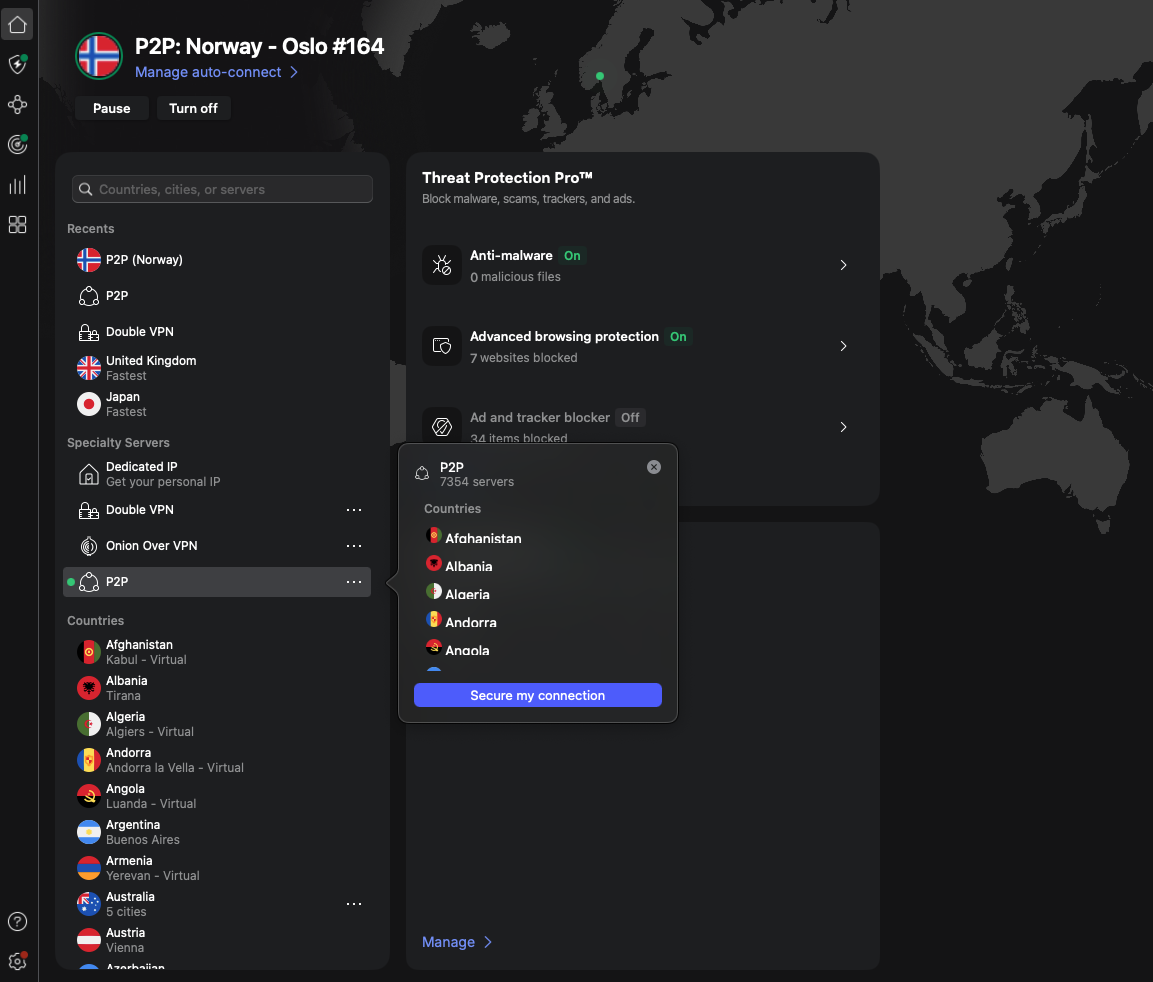
You can find NordVPN’s dedicated torrenting servers in the VPN client by scrolling down the left-hand side of your dashboard, beside the server map. Click on “P2P” to immediately connect to the best torrenting server available, or click the three dots to view tens of different servers across different countries.
NordVPN speed test
Based on our tests, NordVPN is currently the fastest VPN, with an average of 817Mbps download speed, outperforming competitors between 29Mbps and 92Mbps, per West Coast Labs' independent testing. The NordLynx protocol also demonstrated excellent latency performance, adding only 3 ms of latency to the base connection. However, remember that your VPN connection’s speed can be affected by your own network, any congestion on your network, and your own ISP throttling (slowing down) your connection, among other factors.
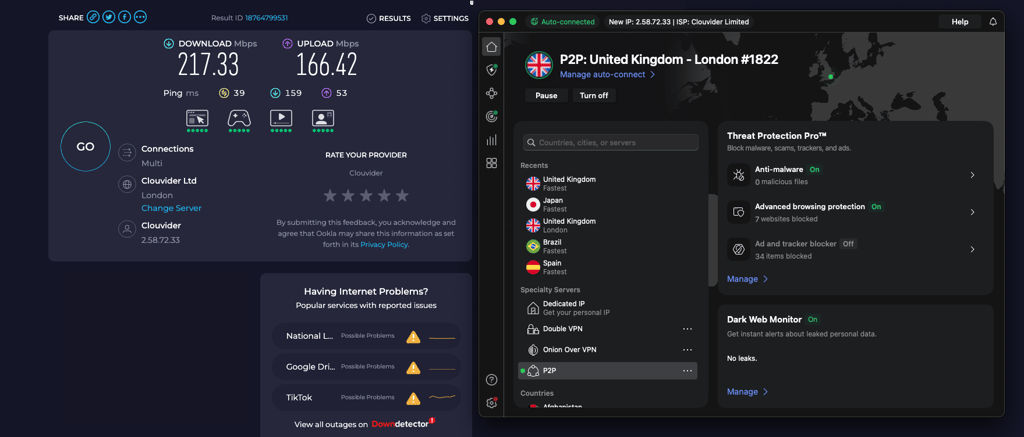
To confirm NordVPN’s speeds, I performed my own tests using speedtest.net, which provides reliable speed readings:
| NordVPN server location | NordVPN download speed | NordVPN upload speed |
| US | 769Mbps | 451Mbps |
| UK | 863Mbps | 491Mbps |
| Australia | 689Mbps | 278Mbps |
| Canada | 717Mbps | 343Mbps |
| Germany | 840Mbps | 480Mbps |
| France | 841Mbps | 448Mbps |
| Japan | 685Mbps | 305Mbps |
| Netherlands | 849Mbps | 557Mbps |
| Sweden | 899Mbps | 566Mbps |
| Singapore | 647Mbps | 491Mbps |
These impressive speeds make NordVPN a solid choice regardless of your needs, whether browsing, torrenting, streaming, or gaming. I’ve played the latest Black Ops 6 shooter and streamed international content libraries from Netflix and Prime Video without lag or disconnects.
NordVPN streaming sites unblocking results
NordVPN can unblock every streaming service, including Netflix, Disney+, Max, Sling TV, Peacock, BBC iPlayer, ITVX, and numerous others. Even Netflix’s anti-VPN software is no match for NordVPN’s unblocking capabilities, thanks to IP cloaking features, a working kill switch, and obfuscated servers.
| Streaming site | Does it work with NordVPN? |
| Netflix | ✅ Yes |
| Disney+ | ✅ Yes |
| HBO Max | ✅ Yes |
| Sling TV | ✅ Yes |
| Peacock | ✅ Yes |
| ESPN+ | ✅ Yes |
| BBC iPlayer | ✅ Yes |
| ITVX | ✅ Yes |
| Apple TV+ | ✅ Yes |
| YouTube TV | ✅ Yes |
| Optus Sport | ✅ Yes |
| Stan Sport | ✅ Yes |
I tested Netflix first, and I could access and stream other content libraries in the US, Europe, and even Japan from my location in the UK.
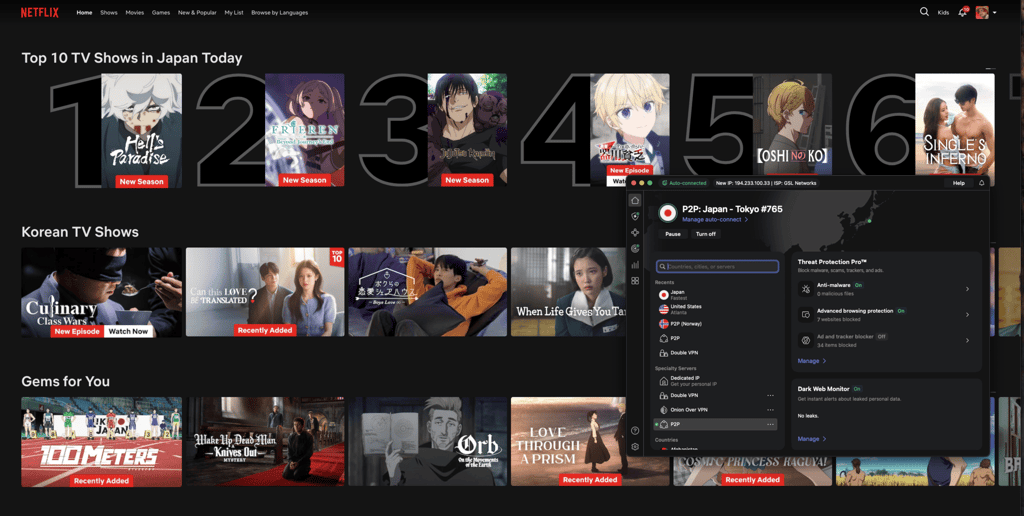
Since NordVPN is the fastest VPN available, with a speed retention of 96% in my tests, all streams loaded quickly and played without lag or buffering. Sports users will be relieved – NordVPN works with NBA, NFL, and MLB streams on ESPN+, Sling TV, and other top sports streaming platforms. For example, I easily unblocked Peacock from outside the US and streamed all the Winter Olympics events without any issues.
How many servers does NordVPN have?
NordVPN has over 9,300 servers in over 137 countries around the world, including the most popular ones, such as the United States, the United Kingdom, Germany, Canada, and Japan. Additionally, in some regions, such as the US and the UK, you can even choose servers in specific cities, including Los Angeles, Denver, New York, Edinburgh, and London. This extensive network also now includes 79 virtual locations, added recently to give users even more connection options.
Besides, connecting to them is a breeze, as NordVPN demonstrates exceptional connection speeds, averaging just 0.66 seconds across all tested locations, according to West Coast Labs' independent evaluation.
| NordVPN server regions | Countries |
| Americas | 1,860+ |
| Europe | 2,000+ |
| Asia Pacific | 380+ |
| The Middle East and Africa | 100+ |
In addition to standard VPN servers, NordVPN also offers a selection of specialized servers, designed for specific privacy, security, and performance needs. I found these servers to be a great addition to the fleet, making it easier to find the best-performing servers for specific activities:
-
Double VPN – these servers route your internet traffic though two VPN servers instead of one, encrypting it twice. This setup makes it even harder for onlookers to trace the original connection location, which is very useful in restrictive regions and for people handling sensitive data, such as activists and journalists.

- Onion Over VPN – this setup combines NordVPN encryption with the Tor network, routing traffic through multiple Tor nodes after it leaves the VPN server. Using these servers, you will get an extra layer of anonymity, without having to use the Tor browser. Ultimately, this is the most anonymous you can get from a VPN, but remember that using these servers may significantly slow your connection speeds.
- Obfuscated servers - these servers disguise VPN traffic to look like regular HTTP traffic. I recommend using these servers when trying to access sites with robust VPN detection methods or in countries or networks that detect and restrict VPN usage.
-
P2P servers – this type of server is specially designed for peer-to-peer traffic. By using these servers, you can expect high-speed downloading, a stable performance, and efficient IP address masking.

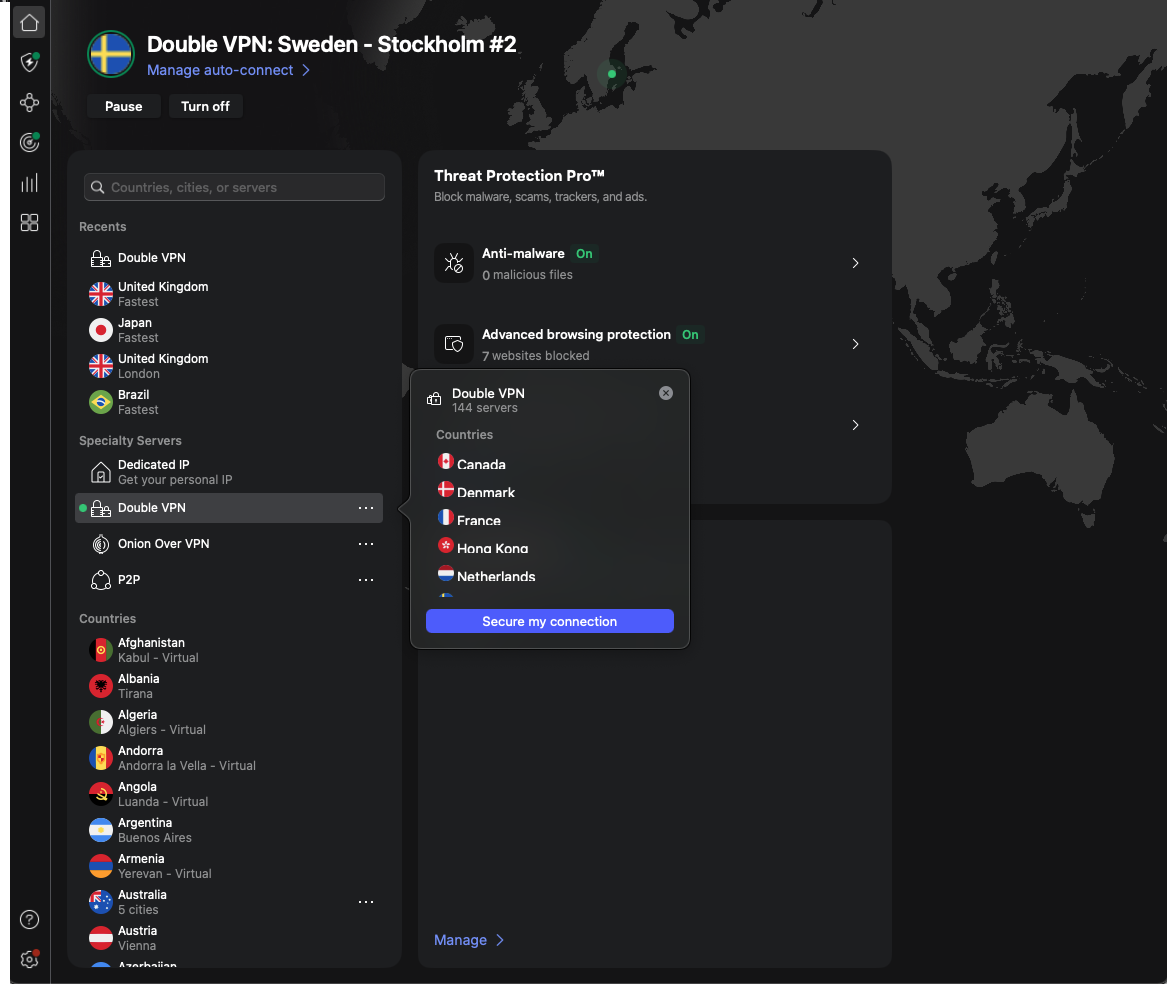
NordVPN app interface on different devices
NordVPN supports a large range of devices, including Android and iOS, Windows and macOS, and numerous smart TVs, game consoles, TV sticks, and routers. Even better, it can be used simultaneously on anything from a single device to ten/10 devices, allowing families to protect everyone’s phone, computer, or console. Installing the software is easiest on an everyday device like a laptop, desktop computer, or smartphone. However, the process to install NordVPN on a router is more complicated. Read our guide for step-by-step instructions.
Since NordVPN has a dedicated app for Apple, Android, and Fire TVs, you can simply download it from the app store for your TV. This will either be the App Store or Google Play Store, or you can search for it by name on a Fire TV to connect your device.
I’ve tested NordVPN on various devices, including those mentioned above – Android, Windows, iPhone, and Mac. Below, I’ll share my findings for each device.
NordVPN for Android and iPhone
I tested NordVPN on an iPhone 15 Pro Max and Google Pixel 9. The mobile version of the VPN looks largely the same as the desktop version, making for a consistent and user-friendly experience across platforms. The server map is present on mobile just like a desktop, allowing you to quickly scan the globe and click on a server.
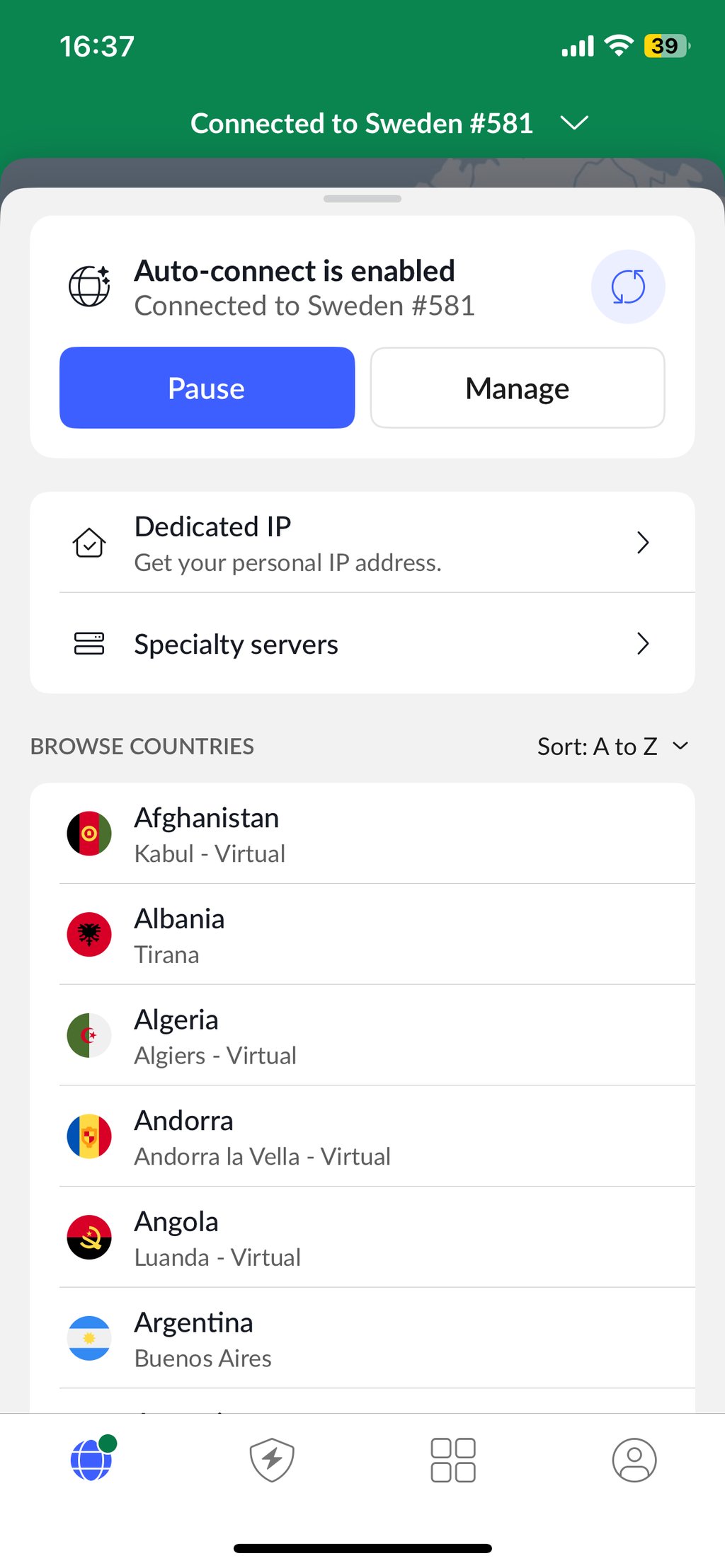
There are two differences between the Android and iOS NordVPN apps, namely, the Android app has split tunneling and call blocking, which are unavailable in the iOS app. I particularly liked the call blocking function, which scans and blocks all scam and telemarketing calls, without them ever reaching you. While the function is now available in the US, UK, Canada, and Japan only, word is that the feature will have broader availability. Besides the two missing features, the iOS app has everything else the same as in the Android app.
Most settings are in the small cog menu, which is visible when entering your profile. Here, you can change your VPN protocol and decide whether auto-connect is enabled so your connection is always on. If you need to access a specialty P2P or Onion over a VPN server, these are found beneath the server map on the dashboard, under “Specialty servers.” All in all, I found it very easy to work my way around and find the servers I needed.
NordVPN for Windows and Mac
NordVPN works seamlessly across both Windows and Mac computers – I tested the app on a MacBook Air (2024) 13-inch M3 computer and an Alienware PC running Windows 11. The interface looks practically identical on both devices, with the server map occupying most of the UI on both operating systems.
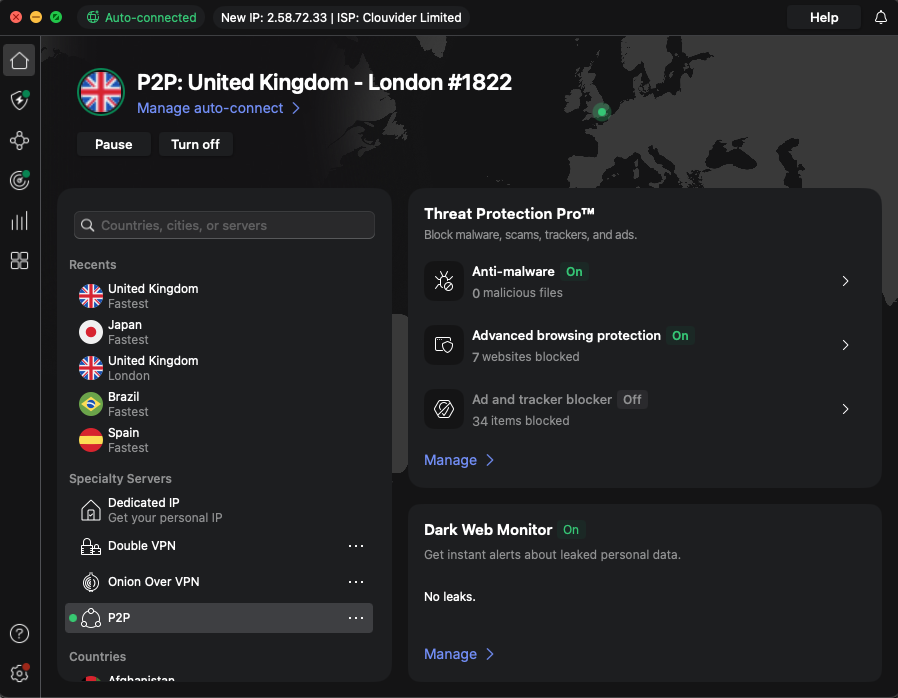
The differences between Windows and macOS versions of NordVPN are a little broader due to Apple’s vice grip over what developers can do on iOS. As well as missing split tunneling, macOS users have fewer VPN Protocol options – though NordLynx is present on both versions and is the fastest protocol anyway.
Aside from those minor differences, the experience was very similar across all major platforms – iOS, macOS, Windows, and Android. Additionally, you can connect up to 10 devices simultaneously, making the user journey feel smooth even if you’re bouncing from one operating system to another throughout the day.
Additional features you get with NordVPN
Beyond the advanced VPN protection offered by all plans, NordVPN includes additional features that strengthen your online security further:
- Threat Protection Pro: Automatically scans files you download for malware, and blocks access to malicious websites, to protect you from phishing and other threats.
- Dark Web Monitor: Always-on monitoring for the dark web checks if your personal information has been compromised.
- Meshnet: Establishes secure connections between your devices so you can share files and collaborate cross-device without risk.
- Split tunneling: Lets you specify which apps use the VPN connection while others connect directly to the internet, offering speed and flexibility perks.
- NordProtect: Integrated identity theft protection service available to NordVPN users in the US. Since December 10, 2025, NordProtect includes 3-Bureau credit monitoring, TransUnion Credit lock, Short-term loan monitoring, and Financial account monitoring features.
- NordStellar: Cybersecurity platform providing real-time monitoring and response to online threats directed at your company or personal use.
Depending on the plan you choose, these features could be unavailable. So, I recommend opting for the NordVPN Plus or NordVPN Ultimate plans for optimum security at great value for money.
Video review
Is NordVPN good enough in 2026: final verdict
NordVPN is the best VPN you can get in 2026. The service is excellent for all online activities, including streaming, gaming, and torrenting. NordVPN is also unbeatable in the level of security and privacy it offers, and can be used even in very restrictive regions, such as China and Iran. Lastly, real-life users on Reddit agree to our findings, naming NordVPN a very secure, capable, and fast VPN for 2026.
NordVPN for torrenting ⭐⭐⭐⭐⭐ (5/5) – supports torrenting on its P2P-optimized servers
NordVPN is fully optimized for torrenting and doesn’t block P2P traffic. Every NordVPN server is capable of delivering the high speeds needed for torrenting. Enjoy robust protection from malware threats and tracking while connecting to file-sharing communities.
NordVPN for streaming ⭐⭐⭐⭐⭐ (5/5) – capable of unlocking every streaming platform
NordVPN can unblock every streaming platform I’ve tested, including Netflix, Disney+, Hulu, Sling TV, Peacock, and Max. It can unblock BBC iPlayer, ITVX, and others outside the US. Unblock live sports and international content libraries with ease.
NordVPN for gaming ⭐⭐⭐⭐⭐ (5/5) – provides the fastest VPN experience with unlimited bandwidth
Enjoy stable pings and lightning-fast connections as you decimate the competition – NordVPN is well-suited to fast-paced online gaming, with zero lag and DDoS protection. You can even bypass skill-based matchmaking and find bot lobbies in COD.
NordVPN for betting ⭐⭐⭐⭐⭐ (5/5) – successfully unblocks sports betting and casino platforms
NordVPN unblocked every sports betting and casino site I tested, including DraftKings, FanDuel, William Hill, Bet365, and PokerStars. You need to change your IP address and bypass statewide gambling bans or place bets while on vacation.
You may also like to read:
NordVPN vs PIA
NordVPN vs AtlasVPN
Proton VPN vs NordVPN
ExpressVPN vs NordVPN
Best NordVPN alternatives
NordVPN not connecting
NordStellar review

![Surfshark weekly deals logo [IN USE]](https://media.vpnpro.com/surfshark-weekly-deals.svg)
![Proton VPN winner logo [IN USE]](https://media.vpnpro.com/2025/05/protonvpn-winner.png)
FAQ about NordVPN
Is NordVPN free?
No, NordVPN is not free, but it offers a free trial and a money-back guarantee. The 3-day free trial is available for Android devices only; however, the 30-day money-back guarantee applies to all subscriptions longer than a month, no matter the OS you are using.
How much is NordVPN?
NordVPN subscription prices start at $3.09/month for the Basic plan and run up to $6.99/month for the Prime plan. The cheapest NordVPN subscription is the 2-year Basic plan, priced at $3.09/month, and it includes all the essential VPN features, except for Threat Protection ad and malware blocker. The most expensive Prime plan, available in the US, is priced at $6.99/month with the 2-year plan, and includes identity theft protection tools, Threat Protection, NordPass password manager, and additional features.
Does NordVPN have a free trial?
Yes, NordVPN has a 3-day free trial for Android devices. To access it, head to the Google Play Store, download the app, and set up an account. The free trial activation requires payment details, so if you find NordVPN unsatisfactory and want to cancel auto-renewal, head to your NordVPN account on the official website, head to Billing, and toggle off auto-renewal to cancel the payment.
How to use NordVPN?
To use NordVPN, first download and install the app. You can get the app from the official website, the Apple App Store, or the Google Play Store, depending on your device. Once you have the app, install it by following the onscreen instructions. Then, launch the app and select a server you want to connect to from the server list, or simply click the Quick Connect button, which will pair you with the fastest available server. After the connection is established, your IP address will be masked and your network traffic encrypted.
Who owns NordVPN?
NordVPN is owned by NordSecurity. The brand was established in 2012 by Tomas Okman and Eimantas Sabaliauskas and is based in privacy-friendly Panama. NordSecurity also owns NordPass, NordLocker, NordStellar, NordLayer, NordProtect, and Saily.
Does NordVPN work in China?
Yes, NordVPN works in China. However, as with any VPN in severely restrictive environments, you may need to do some manual IKEv2/IPsec tunneling protocol configuration or use the Obfuscated servers in combination with the OpenVPN protocol. Ensure you download and set up the VPN app before you travel to China, as you won’t be able to download the app within the country.
Is NordVPN worth it?
Yes, NordVPN is absolutely worth it if you are looking for a fast, reliable, and secure VPN service. NordVPN consistently ranks at the top of various VPN comparison lists, which further solidifies its position as the top VPN currently on the market. Additionally, NordVPN offers the fastest connection speeds for smooth online activities and ensures your privacy even in restrictive environments, thanks to advanced security features.
Does NordVPN work with Netflix?
Yes, NordVPN works with Netflix. The service easily unblocks various Netflix libraries, such as the US, UK, or Japan, and stays undetected by the service. Additionally, thanks to its extremely fast connection speeds, streaming on Netflix with NordVPN is very smooth and lag-free.

