Best residential VPNs in 2026



In 2026, I tested over 20 providers, and Surfshark VPN, PIA, and NordVPN stood out as the best residential VPNs thanks to dedicated IP support and strong security features, all at an affordable price. Each of these services will help you avoid detection and remain completely anonymous online.
As online surveillance and geo-restrictions increase, residential VPNs are gaining popularity. Unlike standard VPNs, residential VPNs provide IP addresses tied to real devices with a physical location, making them hard to detect and blacklist. This gives you enhanced privacy and security compared to a standard VPN connection, while helping you to more effectively unblock online content.
🏷️ LIMITED OFFER: Surfshark VPN Deal! Now up to 87% OFF Surfshark + 3 months FREE 🏷️
Top 5 residential VPN providers
-
The best residential VPN
-
Robust security features for total anonymity
-
Fast and reliable residential IP VPN to secure manual connections
-
User-friendly residential VPN with a massive server network
-
Affordable VPN with residential IP options
![Surfshark mobile logo [IN USE]](https://media.vpnpro.com/surfshark-60x60-1.jpg)
![PIA mobile logo [IN USE]](https://media.vpnpro.com/PIA_60x60.jpg)
![NordVPN mobile logo [IN USE]](https://media.vpnpro.com/Nord-VPN-review.jpg)
![CyberGhost mobile logo [IN USE]](https://media.vpnpro.com/CyberGhost-VPN-small.jpg)
![PureVPN mobile logo [IN USE]](https://media.vpnpro.com/PureVPN-mini-2.png)


Since 2018, VPNpro has delivered unbiased, expert-backed insights through in-house research and thorough VPN testing. Our team ensures every review is fact-checked and reliable. Learn how we maintain these high standards in our testing methods.
What is a residential VPN and how does it work?
Residential VPNs are virtual private networks that route your internet traffic through a physical, residential IP address tied to a device, rather than a VPN server. By assigning an IP address from a regular ISP (internet service provider) instead of a data center, the connection appears more authentic and is harder to detect as a VPN. This lets residential VPN users connect to the internet with real IP addresses from around the world. As a result, unblocking websites and accessing geo-restricted video content is more reliable.
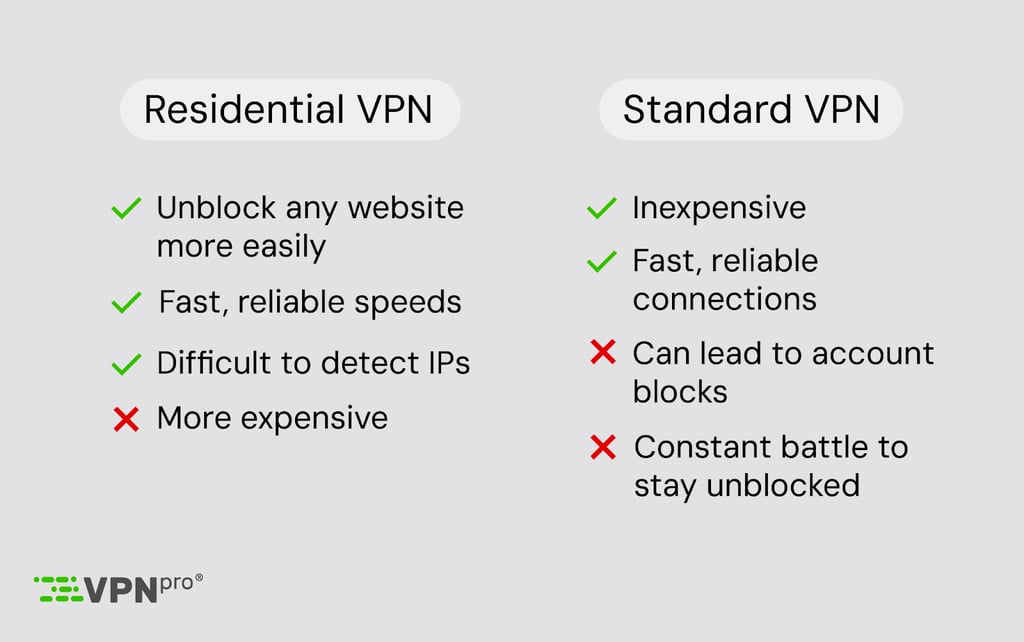
Why should you use a residential IP address?
Residential IP addresses are assigned to real devices like computers and smartphones, giving them a higher IP trust score in the eyes of the websites that you visit. As a result, you can unblock websites more easily, avoid detection for VPN usage, and improve your privacy. Here’s how that works:
- Bypassing geo-restrictions: Some standard VPNs have started to struggle in unblocking websites that use geographical restriction software. However, using a residential VPN IP address emulates a real user on a real device, which tricks websites more easily.
- Avoiding detection by websites: Some websites, like Netflix, have started using advanced detection methods to identify and block you if you’re using a non-residential, data center IP address. A residential VPN easily slips past detection software by simulating an ordinary internet connection.
- Improving your gaming experience: By using a residential IP, you can trick geo-restriction software used by online gaming providers and access multiplayer lobbies in other countries. I’ve used this trick while testing to secure easy bot lobbies in COD: Black Ops 6 and play on busier servers in other games while my local servers were empty.
Unlock websites and avoid detection online
Best residential VPN services – detailed list
To choose the best residential VPN servers, I tested over 20 providers with a focus on security, speed, and affordability. However, the most important criterion was to make sure that the VPN provider offered residential IP or at least dedicated IP addresses. Here are the top 3 residential IP providers currently available:
Top 1. Surfshark – best residential VPN in 2026
![Surfshark mobile logo [IN USE]](https://media.vpnpro.com/images/170x89/surfshark-review-logo-2.jpg)

100

4500

24/7, FAQ
-
Dedicated IP address support
-
Unlimited simultaneous connections
-
CleanWeb 2.0 ad blocker included
-
Some features cost extra
Surfshark is the best residential VPN for 2026, offering residential-like IP services at one of the lowest prices available. It doesn’t have true residential IPs, but it offers dedicated IP addresses that have the same effect.
Surfshark residential VPN features
Surfshark's dedicated IP addresses are a standalone add-on, too, giving you a stable IP address that is unchanging and not shared with other users. These IPs have strong AES-256 encryption and a kill switch that ensures your true location won’t leak. Thanks to these features and others like dynamic Multi-Hop, which routes your connection via multiple VPN servers, your anonymity will remain airtight.
What I liked
Surfshark is one of the few VPN providers offering unlimited device connections, making it well-suited to families or individual users like me with multiple phones, tablets, and laptops. Dedicated IPs cost $3.75, resulting in an overall very affordable subscription cost for Surfshark and a dedicated IP. Surfshark easily bypassed geo-restrictions on Netflix, Hulu, and BBC iPlayer during my tests, with speeds of up to 763Mbps. I also easily accessed Netflix libraries in the US, UK, and Japan without detection. Features like the CleanWeb 2.0 ad blocker and obfuscated servers were privacy bonuses that left me feeling impressed with the overall offering during in-house tests.
What I disliked
Dedicated IPs are sold separately to your main subscription, but this tends to be the case with all premium VPN providers, and the cost isn’t excessive. That said, these IPs tend to only be available in a handful of locations – I tested the US, UK, and Germany. While these are not true residential VPN connections, they mimic the same security benefits and unblocking power.
Price
Surfshark is one of the most affordable residential VPN alternatives, with plans starting from $1.99/month for the best-value two-year subscription. Add on a dedicated IP address, and you’ll pay a little over $6/month for residential VPN features without the exorbitant price tag that usually comes with them.
Top 2. Private Internet Access – residential IP VPN ensuring anonymity
![PIA mobile logo [IN USE]](https://media.vpnpro.com/images/170x89/PIA_520x520.jpg)
90
35000
-
Robust security features
-
Offers unlimited connections
-
NextGen servers
-
Speed isn’t always consistent
PIA is an excellent choice for people seeking a residential VPN. While it lacks residential IPs, it has dedicated IPs, which perform a similar function. Additionally, it offers powerful privacy features that easily avoid detection for VPN usage.
PIA residential VPN features
Instead of residential IPs, PIA offers a dedicated IP feature, which is not shared with others, offering better access to restricted networks. PIA’s server fleet uses colocated NextGen servers, ensuring user privacy by having sole access to their servers. It’s backed up by security features that emulate residential VPNs, including strong AES-256 encryption, secure VPN protocols like WireGuard, a kill switch, and always-on VPN settings. Tor over VPN servers allow you to leverage further anonymity granted by the super-secure Tor network, and PIA's no-logs policy can be trusted.
What I liked
PIA offers unlimited connections, which is rare to come by, especially at this price. It also has a massive network of 35,000 servers in 90 countries, which translated into excellent unblocking power and speeds during my in-house tests. I saw 723Mbps average speeds while using the secure WireGuard protocol, which meant I could stream and game without connection issues. This allowed me to unblock Netflix (US, UK, and Japan), Hulu, Disney+, and Amazon Prime Video without obstacles. I also noted privacy extras like MACE, which blocks ads, trackers, and malware.
What I disliked
PIA is based in the United States, a member of the 14 Eyes alliance. While this jurisdiction allows the government to force companies to share collected user data, PIA mitigates this risk through its strict, independently audited no-logs policy. As with previous providers, PIA’s dedicated IP option also has to be purchased separately (from $2.50/month). That said, it remains one of the most affordable add-ons on the market.
Price
PIA’s plans start at $2.03/month (billed annually), with a budget-friendly price tag for the security features packed into its dashboard. A dedicated IP address will cost you an additional $2.50/month. If you’re interested in trying it out, PIA also offers a 7-day free trial and a 30-day money-back guarantee.
Top 3. NordVPN – fast and reliable residential VPN in 2026
![NordVPN mobile logo [IN USE]](https://media.vpnpro.com/images/170x89/2025/08/nord-rreview.jpg)

137
9300
24/7, email
-
Dedicated IP addresses
-
96% download speed retention
-
AES-256 encryption and kill switch
-
Limited to 10 simultaneous connections
NordVPN is a fast and reliable residential VPN for 2026, helping you improve anonymity and bypass restrictions by securely routing your traffic and masking your IP address. While it doesn’t offer true residential IPs, its dedicated IP addresses simulate the same features.
NordVPN residential VPN features
NordVPN’s robust security toolbox allows it to achieve the same unblocking and anonymity benefits as a residential VPN, but without the price tag. Dedicated IP addresses can be added to your subscription for a one-off fee, ensuring your IP remains fixed and unchanging, even through your VPN protection. Meanwhile, military-grade encryption and a kill switch make sure you won’t be detected by preventing IP leaks and anonymizing your data.
NordVPN has an airtight no-logs policy, meaning your data and online activities won’t be stored. The best VPN providers should ideally be audited as a mark of trust, and NordVPN’s no-logs policy has been independently audited year-on-year by auditing giants like Deloitte, so it can be trusted. Nothing in the company’s privacy policy raises concerns either.
What I liked
NordVPN’s connections are the fastest in the industry; I saw average speeds of up to 809Mbps, a speed retention of around 96%. This allowed it to support streaming, gaming, and torrenting securely during my tests. It also could easily bypass geo-restrictions on platforms like Netflix, Hulu, BBC iPlayer, and Disney+. Even the strictest geo-blocks are no match for NordVPN’s robust security tools, with double VPN and obfuscated servers for the toughest challenges.
What I disliked
NordVPN’s dedicated IPs are charged separately (from $4.19/month) as an add-on and not part of your main subscription cost. However, the cost is very low compared to residential VPNs that start at around $40-50/month, so it’s still not a notable drawback. That said, NordVPN isn’t the cheapest dedicated IP provider – Surfshark is cheaper for example. You also get fewer dedicated IP location options than you would with regular VPN server connections.
Price:
NordVPN’s standard plan starts at $3.09/month – this is the best-value two-year plan, which also comes with a 30-day money-back guarantee so that you can effectively try the service out for free if you like. Dedicated IP addresses cost $4.19/month in addition to your plan, making this an overall very inexpensive way to get the benefits of a residential VPN.
Top 4. CyberGhost – private and user-friendly residential VPN
![CyberGhost mobile logo [IN USE]](https://media.vpnpro.com/images/170x89/CyberGhost-VPN.jpg)
100
9887
24/7
-
Offers dedicated IPs
-
Budget-friendly
-
Strong focus on privacy
-
Lacks obfuscation features
CyberGhost is a top residential VPN for 2026, combining a massive server fleet with a focus on user privacy. While it doesn't offer residential IPs, the dedicated IP you can purchase separately performs the same function.
CyberGhost residential VPN features
CyberGhost makes up for the lack of a residential IP with a token-based dedicated IP feature, which ensures that even the provider cannot link your IP to your account. Based in privacy-friendly Romania, it secures all traffic with AES-256 encryption and an automatic kill switch. Its independently audited no-logs policy and transparency reports ensure that your data remains private and untraceable.
What I liked
CyberGhost is user-friendly, with servers clearly labeled for different uses, like streaming, gaming, and torrenting. During my tests, the servers also showed fast performance, supporting 4K streaming on Netflix, Hulu, and Amazon Prime Video. I especially liked that CyberGhost has unique privacy-focused features like the NoSpy servers, which are privately operated, providing superior privacy and reduced monitoring risk by third parties.
What I disliked
CyberGhost lacks obfuscation, which may make it a less reliable choice for bypassing strict geo-blocks, censorship, and firewalls. It’s also not ideal that CyberGhost’s simultaneous connection limit is 7, and that the dedicated IP is a paid add-on, though its price remains highly competitive compared to other providers on this list.
Price
CyberGhost’s plans start at $1.75/month. This comes with a generous 45-day money-back guarantee, which gives you plenty of time to test it risk-free. Dedicated IP addresses cost an extra $2.50/month, making it one of the most affordable ways to secure a private IP address.
Top 5. PureVPN – affordable VPN with residential IP options
![PureVPN mobile logo [IN USE]](https://media.vpnpro.com/images/170x89/PureVPN-review-new-2.png)
71
6500
24/7
-
Offers residential and dedicated IPs
-
Built-in tracker blocker
-
Obfuscated servers
-
The residential IP comes with limitations
PureVPN is a standout residential VPN in 2026 for users seeking an affordable VPN with residential IP and dedicated IP options. These specialized connections make your access to restricted sites more reliable and interruption-free, perfect for those who are tired of their VPN getting blocked by websites.
PureVPN residential VPN features
PureVPN offers both residential and dedicated IPs, each being effective for accessing location-restricted content that blocks typical VPN services. They work alongside PureVPN’s encrypted tunnel, which employs AES-256 encryption, making sure your privacy and security are sound. PureVPN has also implemented quantum-resistant encryption keys to protect user data against potential quantum attacks.
What I liked
PureVPN has an impressive privacy package that includes an audited no-logs policy, built-in tracker blocker, obfuscated servers, an automatic kill-switch, and quantum-resistant servers. It’s also effective at unblocking popular streaming platforms like Netflix, BBC iPlayer, and YouTube, while maintaining a solid 72% speed retention and average connection speeds of 583Mbps. Additionally, PureVPN allows up to 10 simultaneous device connections, making it a practical choice for households or multi-device users.
What I disliked
The residential IP add-on comes with some significant limitations. Its coverage is mainly focused on the US, restricting its use for geo-blocked content in specific locations. Plus, the 12GB monthly data allowance can be exhausted quickly, especially if you use the VPN for streaming. While you can purchase extra data, the price can add up quickly.
Price
PureVPN offers affordable plans starting from $1.49/month for its longest-term subscription. Adding on a residential IP address will cost you at least another $17.77/month, while a dedicated IP address is available for $2.66/month, making it a more cost-effective alternative.
Key steps to test a residential VPN
The essential features of a residential VPN include a kill switch, zero IP leaks, and robust encryption. All of the VPNs I’ve recommended come with these features as well as a 30-day money-back guarantee. Below, I’ve provided key steps for testing a residential VPN – these are the steps that I followed, but they’re easy to replicate if you’d like to test for yourself:
- Sign up for a residential VPN. I recommend NordVPN, now 76% OFF, which surpassed the competition in all areas during my tests.
-
Verify your IP address. I used whatismyipaddress.com to confirm that my assigned IP address was not linked to a data center or virtual server.

- Run speed tests on your connection. By visiting speedtest.net, I could confirm whether my connection was fast enough for streaming, gaming, torrenting, and any other activities.
-
Check for IP leaks. Next, I used browserleaks.com to make sure that my VPN connection wasn’t leaking my true IP address, which can expose your real location.

- Check if you can unblock content. Now, it’s time to verify whether your residential IP can unblock the sites you need. I verified this by visiting Netflix, Prime Video, and other streaming platforms and seeing whether I could log in, as well as checking whether the content had updated to reflect what’s available in my chosen location.

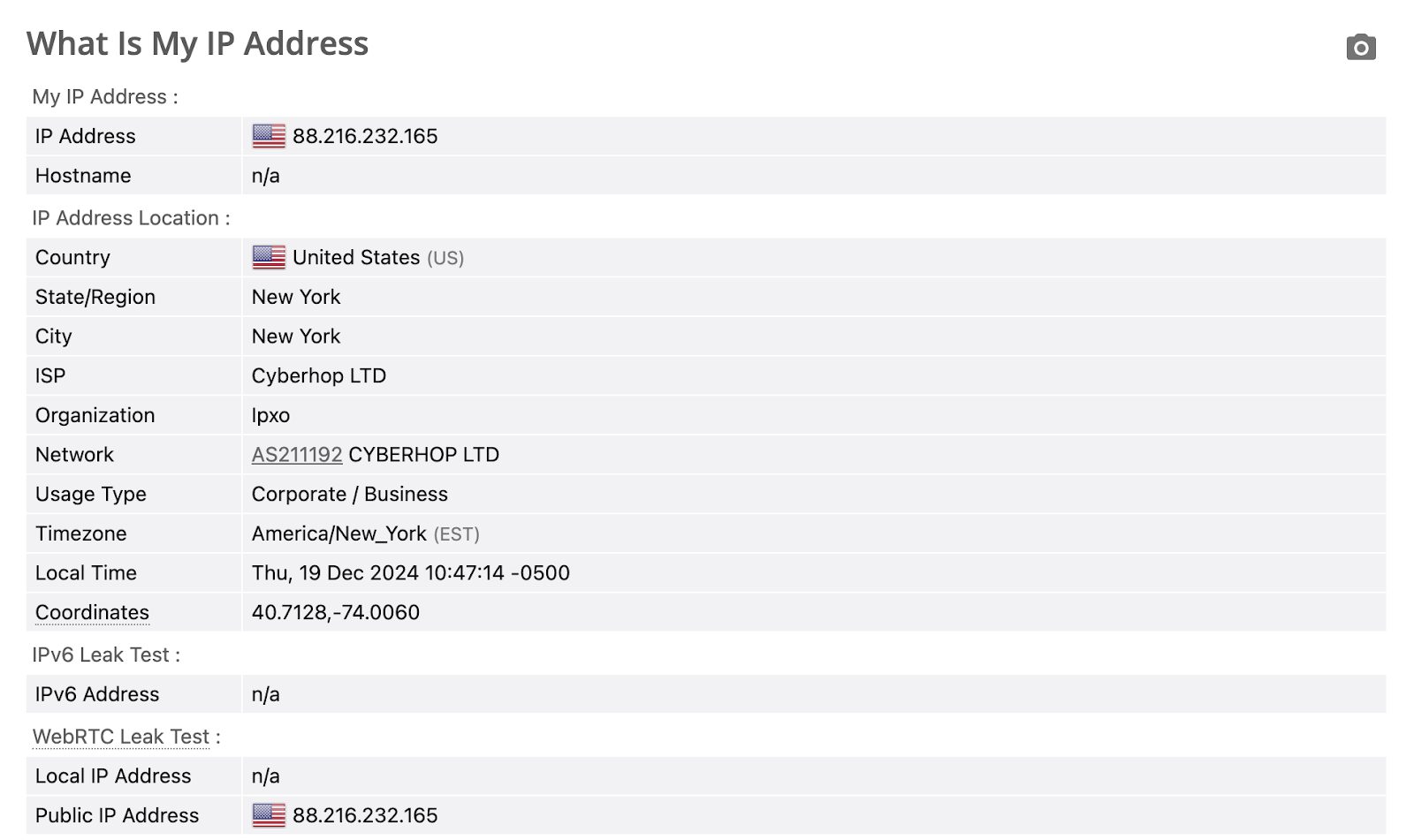
The best way to get started is with a free trial and money-back guarantee. I recommend choosing NordVPN’s 7-day trial on Android as well as its 30-day money-back guarantee so that you can test out the service for yourself without commitment.
Get Surfshark – best residential VPN for anonymity and unblocking
Compare best VPNs with residential IP
| Best residential VPN | VPN rating | Residential IP options | Dedicated IP locations | Number of servers | Price (monthly) | Free trial |
| 1. Surfshark | 9.5 ⭐⭐⭐⭐⭐ | ✅Yes, via dedicated IPs | 13 countries, including United States, United Kingdom, Amsterdam, Germany, France, Australia, Japan, Italy, Canada, South Africa, Hong Kong | 4,500 | $1.99/month | ✅ Yes (7 days, Android and iOS) |
| 2. PIA | 8.1 ⭐⭐⭐⭐ |
✅Yes, via dedicated IPs | 10 countries, including Australia, Belgium, Canada, Germany, Japan, Singapore, Switzerland, Sweden, the UK, and the US |
35,000 | $2.03/month | ✅ Yes (7 days, Android and iOS) |
| 3. NordVPN | 9.8 ⭐⭐⭐⭐⭐ | ✅Yes, via dedicated IPs | 18 countries, including the United States (6 cities), United Kingdom, Germany, Japan, Spain, South Africa | 9,300 | $3.09/month | ✅ Yes (3 days, Android only) |
| 4. CyberGhost | 8.9 ⭐⭐⭐⭐⭐ |
✅Yes, via dedicated IPs | 12 countries, including Australia, Belgium, Canada, France, Germany, Japan, the Netherlands, Singapore, Spain, Sweden, the United Kingdom, and the United States | 9,887 | $1.75/month | ✅ Yes (7 days) |
| 5. PureVPN | 8.5 ⭐⭐⭐⭐⭐ |
✅Yes, via residential and dedicated IPs | 8 countries, including the USA, the UK, Canada, Germany, Malta, Hong Kong, Australia, and Singapore | 6,500 | $1.49/month | ✅ Yes (7 days) |
The main difference between a residential and regular VPN is the type of IP address assigned to you. Residential IP address providers route your traffic through a residential IP belonging to a real user. In this way, it works in a similar way to a P2P network that you'd use while torrenting. Because you aren’t using a shared IP address from a data center, you’re much less likely to get detected and blocked.
However, it can have an impact on speed and security. Using a regular VPN service with a dedicated IP address can remove these drawbacks. Instead, your traffic is routed through servers that have been specifically set up to optimize and handle VPN traffic. This means generally better speeds with less security pitfalls associated with using somebody else's connection. NordVPN performed best in these areas in my in-house tests, delivering the fastest speeds and most robust security toolkit.
![Surfshark winner logo [IN USE]](https://media.vpnpro.com/images/160x40/2025/04/surfshark-160x40.png)
Residential proxy vs VPN
A residential proxy uses IP addresses assigned to real, physical homes by ISPs (Internet Service Providers). These proxies route your traffic through real devices, making it seem more natural to websites. A VPN (Virtual Private Network), on the other hand, encrypts your internet connection and routes your traffic through a server in a different location. However, VPNs generally use data center IPs – these can be detected by websites as belonging to known VPN providers, which can lead to being blocked.
While both tools boost anonymity, the VPN provides additional security because it encrypts your entire connection as opposed to a single application. This makes VPNs a better choice for tasks involving sensitive data or accessing the internet on public networks. Residential proxies are focused more on anonymity and location-spoofing, and they don’t encrypt traffic, which makes them less secure.
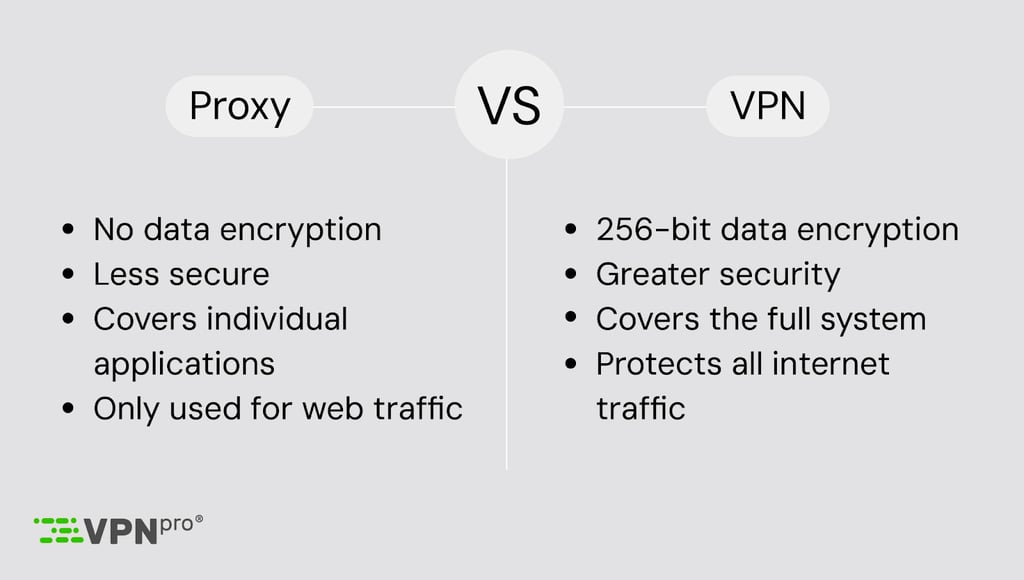
I recommend choosing a residential VPN service for streaming, gaming, data scraping, or anything else. However, since residential VPNs are extremely expensive, I recommend choosing a VPN offering dedicated IPs that work the same way and provide the same benefits, but for far cheaper.
Get the best residential VPN – Surfshark
Why should you use a residential VPN?
Residential VPNs combine the privacy benefits of typical VPN services with the advantage of remaining undetected by using an IP tied to a real, physical device. Since you’re not using a shared data center IP address, you can bypass restrictions and avoid detection far more easily. If you’re the kind of person who wants to keep up with their usual streaming habits while on vacation, a residential VPN can help you to stay connected to Netflix, HBO, Sling TV, and more, without the risk of being blocked.
That aside, they can even help you to secure better prices on travel essentials. Different countries pay different amounts for flights and hotels purely based on location. By connecting to a residential VPN and changing your IP address, it’s possible to make savings on flight and hotel bookings. However, a residential VPN doesn't necessarily have to provide a residential IP address. Premium VPN features like dedicated IP addresses and obfuscated servers help you avoid detection by websites. These can successfully change your IP address so that you appear to be in a country where geo-blocks don’t apply or where services can be purchased at a lower price.
Get Surfshark: Inexpensive residential VPN alternative
Can I get free residential VPN IP?
While free standard VPN services exist, finding a free residential VPN is nigh-on impossible. My tests turned up no reliable providers, and none of the free VPNs I checked offered free dedicated IP addresses. What’s more, they were riddled with performance issues that meant they weren’t suited for most tasks I tested them with. For example, low data usage limits and slow speeds made them ineffective for streaming, gaming, and torrenting. In more than one case, my true location was exposed due to IP leaks and generally poor security practices that can also include excessive data harvesting on your activities.
Instead of free residential VPNs, I recommend trying out a premium provider like Surfshark. It offers a 7-day free trial on mobile devices, as well as a 30-day money-back guarantee that’ll let you try the service out for a whole month without commitment.
Final thoughts
The best residential VPNs give you greater online anonymity and privacy, while making it easier to unblock your preferred websites from abroad. However, the cost of residential VPN services can be very high. Instead, it’s much easier to get a dedicated IP address from a leading VPN provider, which simulates the same connection and gives you all of the same benefits.
After testing over 20 residential VPNs, including those with dedicated IP addresses, I personally recommend getting Surfshark at 87% OFF with a dedicated IP. It’ll only cost around $7/month by comparison, while ensuring you can avoid IP leaks, remain undetected, and unblock any site from anywhere in the world.

![Surfshark weekly deals logo [IN USE]](https://media.vpnpro.com/surfshark-weekly-deals.svg)
![Proton VPN winner logo [IN USE]](https://media.vpnpro.com/2025/05/protonvpn-winner.png)
FAQ
Can a residential VPN be detected?
Yes, a residential VPN could be detected in theory, but it's far less likely than when you're using a standard VPN. Using a dedicated IP address helps with this problem by assigning you a fixed, unique IP address that simulates a permanent, physical device. Surfshark is the best residential VPN that offers dedicated IP addresses.
Are residential VPNs safe?
Yes, residential VPNs are the safest VPN service to use because they don't utilize public data centers that can be hacked. They are also less likely to be detected, which is a huge positive for people living in countries with government-controlled internet, like Russia and China.
How do I get a residential IP address?
Residential IP addresses are assigned by internet service providers, but if you're not located in the country where you need a connection, sign up for a residential VPN service. I recommend choosing Surfshark – while not technically a residential VPN, its security features work the same way, and it costs around a tenth of the price. Simply sign up for Surfshark and add a dedicated IP address at checkout to enjoy the benefits of a residential IP!
Is dedicated IP the same as residential IP?
No, a dedicated IP is not the same as a residential IP, but it comes with the same benefits. Dedicated IP addresses are not shared with other users, unlike standard VPN IPs. This means you’re less likely to have your IP blacklisted and more likely to fly under the radar as an individual, home user on an unchanging device.
Can I use a residential VPN for Netflix?
Yes, you can use a residential VPN for Netflix and will face less chance of being blocked by Netflix’s anti-VPN software. While the platform is known for being tough on VPNs, residential IP addresses evade detection and allow you to continue unblocking and watching international content libraries.
How much is a residential VPN?
Purpose-built residential VPNs can cost anywhere from around $50/month up to $300/month. That’s why I recommend getting a VPN like Surfshark, NordVPN, or PIA that offer dedicated IP addresses instead. Dedicated IPs give you the same benefit as a residential VPN, but they’ll cost around $10–$15/month by comparison.


- Top 3 residential VPN providers
- What is a residential VPN and how does it work?
- Why should you use a residential IP address?
- Best residential VPN services: detailed list
- Key steps to test a residential VPN
- Compare best VPNs with residential IP
- Residential proxy vs VPN
- Why should you use a residential VPN?
- Can I get free residential VPN IP?
- Final thoughts
- FAQ