Best VPN for Discord in 2026


Short summary: As of June 2026, the best VPN for Discord is NordVPN. It offers consistently fast speeds, low latency, and a large global server network, making it well-suited to voice chat and avoiding IP-based restrictions or speed throttling.
As of June 2026, NordVPN remains the best VPN for Discord, as it offers great geo-unblocking capabilities, strong security features, and high-speed servers in locations where Discord is available.
Discord is a hugely popular online community platform with around 200 million active monthly users. However, using Discord to stay connected and share media isn’t always as simple, as the platform is blocked in several countries around the world, including Turkey, Russia, China, Iran, and the UAE, to name a few. This means that users located in those regions cannot access Discord.
Luckily, a reliable Discord VPN can help you bypass geo-restrictions and internet censorship and unlock Discord in banned countries. A VPN can change your IP address to a country where the platform is available while encrypting your traffic and securing your online activities. Continue reading this article to learn which VPN is best for Discord and how to bypass Discord bans using it.
🏷️ LIMITED OFFER: NordVPN deal! Get 76% OFF NordVPN + 3 months FREE 🏷️
Top 5 VPNs for Discord: shortlist
-
Best overall Discord VPN with fastest connection speeds
-
Fast and affordable Discord VPN
-
Freemium VPN for Discord with advanced security
-
Easy to use VPN with good all-round protection
-
Cheap and beginner-friendly Discord VPN
![NordVPN mobile logo [IN USE]](https://media.vpnpro.com/Nord-VPN-review.jpg)
![Surfshark mobile logo [IN USE]](https://media.vpnpro.com/surfshark-60x60-1.jpg)
![Proton VPN mobile logo [IN USE]](https://media.vpnpro.com/ProtonVPN-small.jpg)

![TotalVPN mobile logo [IN USE]](https://media.vpnpro.com/totalvpn-mobile.png)


Since 2018, VPNpro has delivered unbiased, expert-backed insights through in-house research and thorough VPN testing. Our team ensures every review is fact-checked and reliable. Learn how we maintain these high standards in our testing methods.
Why do I need a VPN for Discord?
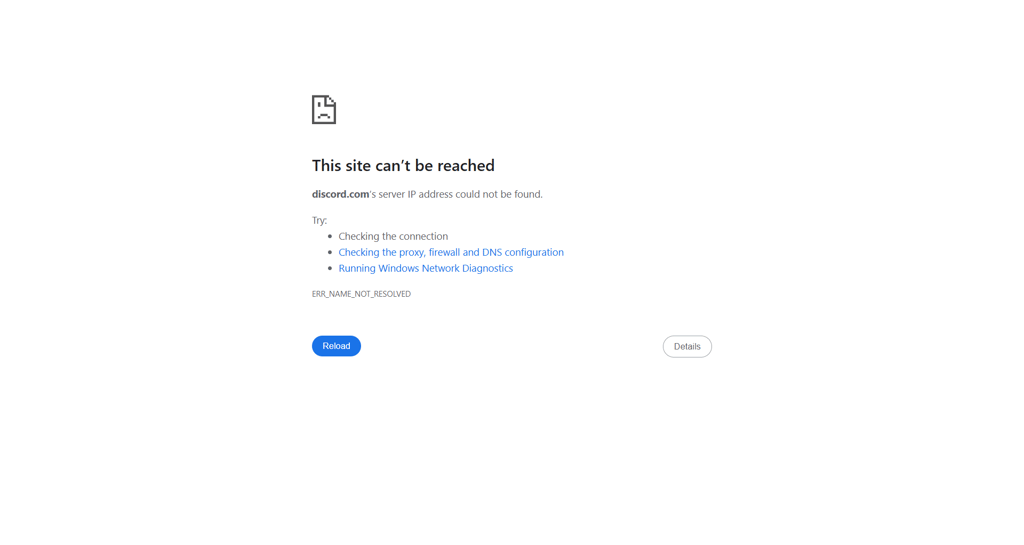
A VPN for Discord is essential for privacy and security, as well as bypassing Discord bans in countries where the platform is prohibited. Numerous countries, including Turkey, Russia, the UAE, and more, have banned access to Discord, and the only way to bypass these restrictions is by using a VPN to change your IP address and encrypt your traffic. However, using a Discord VPN offers more benefits, such as:
- Bypass Discord bans. Currently, Discord is banned in Turkey, Russia, Oman, Iran, Mainland China, the United Arab Emirates, and North Korea, meaning users located there cannot access the platform. Using a VPN and connecting to a server where Discord is available, like the US or Canada, will change your IP address and unblock the platform even if you’re in restricted areas.
- Secure your online activities. In addition to changing your IP address, a VPN encrypts your traffic and channels it through secure tunneling protocols. Any sensitive activities you perform on the net, like financial transactions or storing private information, will be secured.
- Avoid ISP throttling. Some internet service providers are known to purposely throttle connection speeds for users who engage in bandwidth-heavy activities. A VPN can help bypass this by encrypting your traffic and masking your activities.
- Evade government and ISP surveillance. Using Discord in locations where it is restricted may lead to legal issues. However, a VPN can help you hide your activities from the government and ISP by encrypting your traffic.
Make sure to choose a truly reliable and robust VPN to access Discord. My personal choice is NordVPN as it offers an advanced security features package, works great at unblocking Discord, and has the fastest connection speeds in the industry for a smooth browsing experience.

Best Discord VPNs in 2026: detailed list
- NordVPN – the best overall VPN for Discord
- Surfshark VPN – fast Discord VPN with affordable subscriptions
- Proton VPN – secure freemium VPN for Discord
- Norton VPN – beginner-friendly VPN with slick apps and solid protection
- TotalVPN – cheapest premium Discord VPN
To find the best VPNs for Discord, I tested around 20 of the most popular providers, checking their geo-unblocking capabilities, performing IP leak and speed tests, and reviewing their security features, no-logs policies, and server networks. Ultimately, I found the top 5 Discord VPNs that work flawlessly at unblocking the platform and securing your traffic – read their reviews below.
Top 1. NordVPN – best VPN for Discord overall
![NordVPN mobile logo [IN USE]](https://media.vpnpro.com/images/170x89/2025/08/nord-rreview.jpg)


137

9300

24/7, email
-
Excellent at geo-unblocking
-
High-speed servers in Discord locations
-
Extremely secure service
-
Only up to 10 simultaneous connections
The best VPN for Discord is NordVPN because it offers the utmost security with a third-party verified no-logs policy and ensures online anonymity and privacy with robust security features. Additionally, NordVPN has the fastest connection speeds in the industry and is great at geo-unblocking.
NordVPN server network
Currently, NordVPN operates 9,300 servers in around 137 countries, with thousands in the US, and hundreds in the UK, where Discord is freely available. All of NordVPN’s servers are RAM-only for enhanced data security and with the proprietary NordLynx protocol, you can expect average connection speeds to reach 468Mbps with an 96% initial speed retention rate.
Streaming and torrenting with NordVPN
Besides easily unblocking Discord, NordVPN also unlocks all of the most popular streaming services, including Netflix, HBO Max, Paramount+, Amazon Prime Video, and BBC iPlayer. Plus, with the ultra-fast connection speeds, I got seamless, lag-free streaming. The service is also excellent for torrenting, especially if you use P2P-optimized servers.
Security and privacy features
NordVPN has a five-time third-party audited no-logs policy, which means none of your data is ever logged, tracked, or misused in any way. Furthermore, your privacy and security are enhanced with AES-256 encryption, a kill switch, and additional IP, DNS & WebRTC leaks. Plus, you can use the Nord Threat Protection ad, tracker, and malware blocker to stop malicious ads from reaching and profiling you. For ultimate privacy, choose NordWhisper tunneling protocol, Tor over VPN, or obfuscated servers.
Compatibility and price
NordVPN is compatible with all major OSs, including Windows, macOS, Android, iOS, and Linux, and can be used with a variety of devices, such as smartphones, laptops, routers, smart TVs, gaming consoles, and more. You can subscribe to NordVPN for $3.09/month or try it out first during the 7-day free trial available for Android devices. Lastly, all your NordVPN purchases are protected with a 30-day money-back guarantee.
For more information, read our in-depth NordVPN review.
Top 2. Surfshark - fast and affordable VPN to unblock Discord
![Surfshark mobile logo [IN USE]](https://media.vpnpro.com/images/170x89/surfshark-review-logo-2.jpg)
100
4500
24/7, FAQ
-
Advanced security features
-
Servers in Discord locations
-
High connection speeds
-
Some features cost extra
Surfshark is a great Discord VPN, especially if you’re looking for something affordable, yet very powerful. Surfshark’s Nexus network allows the service to enroll new functionalities fast and efficiently, making constant security feature updates easy to introduce.
Surfshark server network
Surfshark operates a good-sized fleet of 4,500 servers in around 100 countries, with plenty of them in the UK, US, and Canada for accessing Discord. Surfshark relies on RAM-only servers, and if you use them with the WireGuard tunneling protocol, your connection speeds should average at 466Mbps with a 94% initial speed retention rate.
Streaming and torrenting with Surfshark
Due to its high connection speeds and excellent geo-unblocking capabilities, Surfshark is great for streaming and torrenting. For instance, I easily got into BBC iPlayer, Amazon Prime Video, Netflix, and more when connected to its servers. As for torrenting, Surfshark offers P2P-optimized servers and whenever you start torrenting, the VPN instantly connects you to one of such servers.
Security and privacy features
Surfshark comes with a third-party verified no-logs policy and ensures your privacy and security with AES-256 encryption, a kill switch, and additional IP, DNS & WebRTC leak prevention measures. It also offers several unique features, such as the IP Rotator that changes your IP address every 5-10 minutes, Split Tunneling, and the NoBorders mode for when you need to bypass extreme internet censorship.
Compatibility and price
Surfshark can be used with various devices, such as smartphones, laptops, and gaming consoles, operating on all major OSs. Surfshark subscriptions start at $1.99/month and cover unlimited devices. Before committing, you can try it out with the 7-day free trial or extend the period of free use with the 30-day money-back guarantee.
For more information, read our in-depth Surfshark review.
Top 3. Proton VPN – secure freemium Discord VPN
![Proton VPN mobile logo [IN USE]](https://media.vpnpro.com/images/170x89/proton-vpn-review-logo-2.jpg)
145
20075
-
Offers paid and free version
-
Robust security features package
-
Great at bypassing geo-blocks
-
Pricier than average
Proton VPN is a great Discord VPN, especially if you’re looking for something extremely secure. Plus, Proton VPN also offers a reliable free version with unlimited bandwidth and 5 connection spots.
Proton VPN server network
Proton VPN operates a massive fleet of 20,075 servers across 145 countries, with plenty of them in Canada, the US, and the UK to unblock Discord securely. To get the potentially highest connection speeds, I used the WireGuard tunneling protocol, which fetched me an average connection speed of around 428Mbps with an 88% initial speed retention rate.
Streaming and torrenting with Proton VPN
In addition to unblocking Discord, Proton VPN is also great at unblocking popular streaming platforms, such as the US Netflix library, HBO Max, Disney+, and others. Plus, the good average connection speeds meant I was able to stream my shows lag- and buffer-free. Although Proton VPN does not advertise itself as a torrenting VPN, it does have several P2P-optimized servers. I had no issues in using them and downloaded my files smoothly.
Security and privacy features
Proton VPN undergoes yearly no-logs policy audits and is based in Switzerland, which is known for its utmost data security. Additionally, your privacy is further protected with modern tunneling protocols, military-grade encryption, a reliable kill switch, and leak protection measures. As for additional features, Proton VPN offers a NetShield ad & tracker blocker, well-functioning Tor over VPN servers for total anonymity, and a VPN Accelerator feature to boost the speeds of faraway connections.
Compatibility and price
Proton VPN has apps for Windows, macOS, Android, iOS, and Linux operating systems and works with smartphones, laptops, smart TVs, and more. Its slightly pricier subscriptions start at $2.99/month and cover up to 10 simultaneous connections. Although the provider does not offer a free trial, you can test out its free version, and if you do decide to go premium, your purchase will be protected by a 30-day money-back guarantee.
For more information, read our in-depth Proton VPN review.
Top 4. Norton VPN – easy to use VPN with solid protection and antivirus integration

65
2000
24/7 live chat
-
Affordable subscriptions
-
Strong encryption and automatic Wi-Fi security
-
Simple beginner-friendly apps for non-technical users
-
Fewer servers than competitors
Norton VPN is one of the best Discord VPNs if you want simple, affordable protection from a well-known cybersecurity brand. It doesn’t offer particularly extensive customization or advanced tools, but it offers good privacy, strong AES-256 encryption, and integration with Norton’s other products if you already have Norton 360 for example.
Norton VPN server network
Norton VPN has a server network comprising 2,000 servers in 65 countries, a respectable number though less than other premium Discord VPNs. During my speed tests, I averaged Norton VPN at around 746 Mbps, peaking at 800-880 Mbps on many servers. These tests were possible with the fastest WireGuard protocol, making for lag-free VoIP chat, online gaming, and streaming activities.
Streaming and torrenting with Norton VPN
Norton VPN has mixed performance when it comes to unblocking streaming platforms. Unfortunately, our latest tests reveal that Norton VPN can't unblock US Netflix. It also struggles to unblock Hulu and Peacock, but it can unblock BBC iPlayer, ITVX, HBO Max, and YouTube TV. Norton VPN has streaming optimized servers that can boost performance while streaming, but if you specifically want to access Netflix, you’d do better choosing another of our top Discord VPNs.
Security and privacy features
Norton VPN has solid basic security, which includes AES-256 encryption, a kill switch, leak protection, and automatic Wi-Fi security for unsecured public networks. It also has built-in tools that block malicious websites and trackers. However, it doesn’t have many advanced features you’d see in NordVPN, such as obfuscation, multi-hop connections, or advanced malware protection.
Compatibility and price
Norton VPN has native apps for Windows, macOS, Android, and iOS, and I found each of them to be slick and beginner-friendly. Pricing starts from around $39.99/year, or $3.33/month, with an up to 54% off Norton VPN coupon code, and all plans include a 30-day free trial and a 60-day money-back guarantee.
For more information, read our in-depth TotalVPN review.
Top 5. TotalVPN – cheapest VPN to access Discord from anywhere
![TotalVPN mobile logo [IN USE]](https://media.vpnpro.com/images/170x89/totalvpn.jpg)
90
1800
24/7, email
-
Unlimited connections
-
Malware protection
-
Independently-audited no-logs policy
-
No anonymous payments
TotalVPN is a good VPN for Discord with low subscription prices and easy-to-use apps. Despite its price, TotalVPN is still very capable of unblocking Discord from anywhere and protecting your privacy with a comprehensive security features selection.
TotalVPN server network
Although TotalVPN operates a minimal fleet of 1,800+ servers in 90+ countries, it still covers all the Discord locations, and I never had any issues with congestion or poor performance. The service offers WireGuard tunneling protocol for Android devices and OpenVPN for all others, and with it, I got a 417Mbps average connection speed with an 84% initial speed retention rate.
Streaming and torrenting with TotalVPN
TotalVPN unlocks Discord quite easily, but sometimes struggles to unblock popular streaming services. For this reason only, I’m more inclined to recommend TotalVPN as a VPN for casual browsing, as it performs the best in such circumstances. Regarding torrenting, the service does not have any P2P-optimized servers but allows such traffic. Without the optimized server,s torrenting is still very much possible, but the download speeds will reflect the server connection speeds.
Security and privacy features
TotalVPN relies on AES-256 encryption, a kill switch, and IP & DNS leak protection features to ensure your privacy and security. The service does not offer a lot of advanced features, but its Ad Blocker is probably one of the best I've tried. That said, you won’t find obfuscation or double-hop connections with TotalVPN.
Compatibility and price
TotalVPN is compatible with Windows, macOS, Android, and iOS operating systems and offers native apps for smartphones, laptops, tablets, and a few more devices. However, its price is simply unbeatable at $1.59/month. If you don’t want to commit to it without trying, you can take advantage of the 30-day money-back guarantee offered by TotalVPN.
For more information, read our in-depth TotalVPN review.
Best Discord VPNs compared
| Best Discord VPN | VPN Rating | Unblocks Discord? | Speed | Price | Free version? |
| 1. NordVPN | 9.8 ⭐⭐⭐⭐⭐ | ✅ Yes | 756 Mbps | $3.09/month | ✅ Yes, 7-day free trial |
| 2. Surfshark | 9.5 ⭐⭐⭐⭐⭐ | ✅ Yes | 763 Mbps | $1.99/month | ✅ Yes, 7-day free trial |
| 3. Proton VPN | 8.6 ⭐⭐⭐⭐⭐ | ✅ Yes | 737 Mbps | $2.99/month | ✅ Yes, free version |
| 4. Norton VPN | 7.3 ⭐⭐⭐⭐ | ✅ Yes | 746 Mbps | $3.33/month | ✅ Yes, 60-day money-back guarantee |
| 5. TotalVPN | 8.2 ⭐⭐⭐⭐ | ✅ Yes | 706 Mbps | $1.59/month | ✅ Yes, 30-day money-back guarantee |
![NordVPN winner logo [IN USE]](https://media.vpnpro.com/images/160x40/2025/01/NordVPN-winner-banner-logo.png)
How I tested and selected the best VPNs for Discord in June 2026
I tested and reviewed around 20 services to find the best Discord VPNs. My research included speed tests, IP & DNS leak tests, and reviews of security features, server networks, and no-logs policies. See the list below for a more detailed look at how I tested and selected the best VPNs for Discord:
- Server network (15%). I ensured that my chosen VPNs offer numerous servers in locations where Discord is freely available, like the US and Canada.
- Speed tests (15%). I favored a VPN with faster connection speeds than 400Mbps and got my connection speed test results using the Speedtest by Ookla tool.
- IP & DNS leak test. To find if my chosen VPNs keep your IP & DNS addresses well hidden, I performed tests on ipleak.net and dnsleaktest.com website tools.
- Geo-unblocking capabilities (20%). I simply connected to one of the servers and tried entering Discord to verify this. I also checked these VPNs with a popular streaming platform to see the scope of their performance.
- Server performance (10%). To determine the reliability of the connections, I connected to several servers and looked for discrepancies in speed and performance at different times of day.
- Security features analysis (20%). To ensure the security of my chosen VPNs, I looked for robust encryption, like AES-256 or ChaCha20, modern tunneling protocols, a kill switch, and IP, DNS, and WebRTC leak protection. I also evaluated whether they offer additional features, like ad blockers, obfuscation, and double-hop connections.
- No-logs policy (20%). I reviewed the providers’ no-logs policies and preferred those with third-party audits. These audits confirm that such VPNs do not log, track, or misuse your data in any way.
Access Discord securely with NordVPN
What countries is Discord banned in?
Discord is banned in several countries worldwide, most recently in Turkey, for different reasons, including concerns about sharing illegal content on the platform. However, others suspect Discord is being banned simply as part of a broader internet censorship attempt. Be as it may, accessing Discord is currently prohibited in these countries:
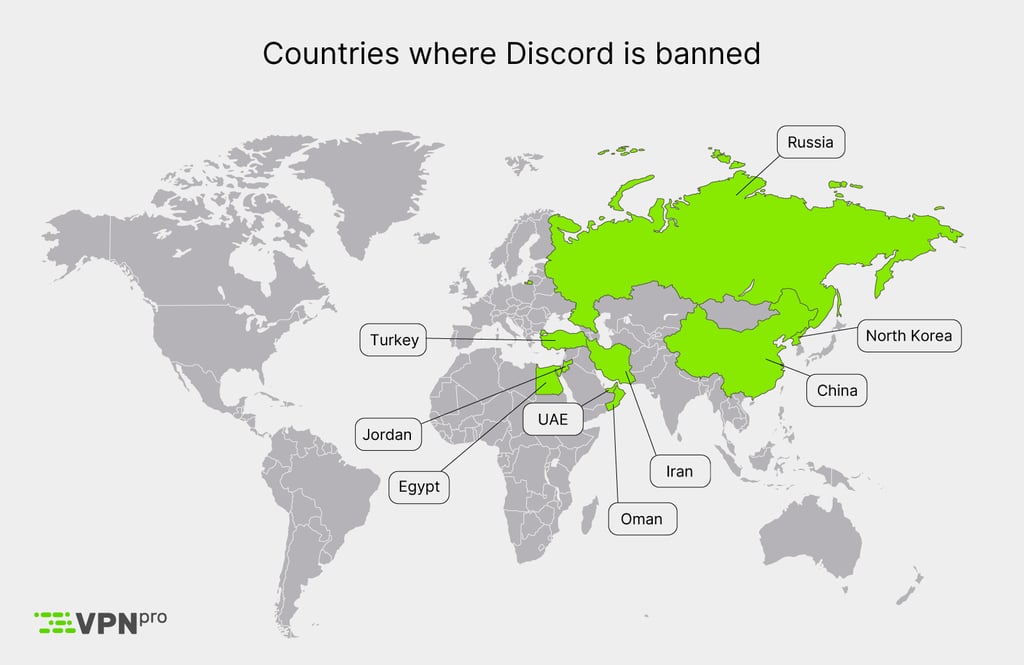
If you’re located in one of these countries, the only way to bypass local Discord bans is by using a reliable VPN service and connecting to a server to change your IP address. I recommend choosing NordVPN, as it has a third-party verified no-logs policy and a robust security features package, and it has never let me down in bypassing geo-locks.
Is Discord banned in Egypt?
Yes, Discord is facing a new, widespread ban by numerous major Egyptian internet service providers, including WE and Vodafone. This is cutting off user access and causing people to turn to using Discord VPNs to bypass restrictions and regain access. This comes in the footsteps of previous temporary restrictions that were aimed at preventing the online coordination of protests and other activism.
Fortunately, you can still access Discord in Egypt by using a VPN to change your IP address. This reroutes your network traffic through a secure server in another country, bypassing network blocks put in place by your internet service provider. It also hides your online activity so that you can’t be tracked. My tests with numerous premium VPNs have revealed that NordVPN is the best VPN to access Discord in Egypt.
Unlock Discord in restricted regions with NordVPN
How to unblock Discord with a VPN
Using a VPN to change your IP address is the easiest and most secure way to unblock Discord in restricted regions. The process isn’t complicated and requires only a few steps:
Step 1. Get a VPN with servers in accessible Discord regions
Choose a reliable VPN like NordVPN, which has servers in countries where Discord isn't restricted. For example, the United States, Canada, France, and Germany offer VPN servers that let you access Discord without any limitations.
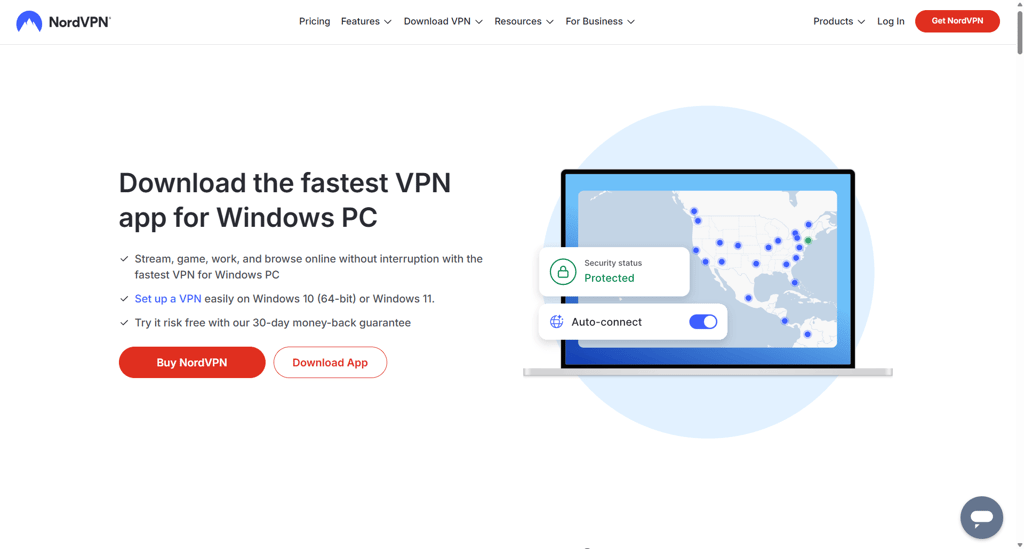
Step 2. Download and install the app
You can download the VPN app from its official website if you’re using a laptop, from the Apple App Store if you have an iOS device, or from the Google Play Store if you own an Android device.

Step 3. Select a server where Discord is not blocked
Connect to a server in an unrestricted location, like the US, France, Germany, or Canada, to get an accessible IP address that can access Discord without any kind of limitations or blocks.

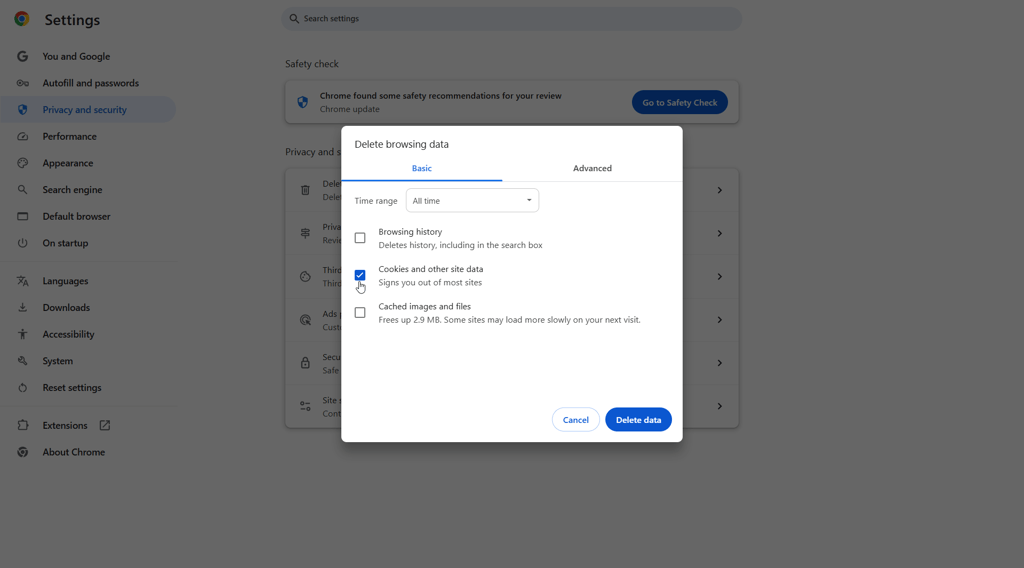
Step 4. Clear your browser's cookies
Clearing cookies ensures that your location information isn’t stored, which helps prevent detection.
Step 5. Disable your device’s GPS
Turn off GPS to ensure location services don’t reveal your real location.

Step 6. Access Discord as usual
You can now use Discord seamlessly, even in regions where it’s blocked.
Is Discord VPN legal to use?
Yes, using a Discord VPN is legal in most countries worldwide, including the US and Canada. However, to be on the safer side of things, I recommend checking our article explaining VPN legality in different countries around the world.
While using a VPN to unblock Discord is okay in most countries, using the technology to commit illegal acts, such as downloading pirated content or cybercrimes, is illegal almost everywhere in the world and might get you into legal trouble.
Discord VPN not working: a step-by-step fix
Because VPNs use very complex technologies, even the best of them might occasionally stop working properly. If you’re experiencing VPN connectivity issues, the most common culprits might be overloaded servers or the wrong tunneling protocol choice. For more causes and quick fixes, refer to the list below:
- Overcrowded or blacklisted server. The server you’re connected to might be congested with a lot of people trying to connect at the same time. If that’s the case, try another server in the same location and see if it helps. The same goes for blacklisted server IP addresses – switching to a different one should solve the issues.
- IP or DNS leaks. Your VPN might be causing your IP and DNS addresses to leak. To check if that’s the case, head to ipleak.net and dnsleaktest.com. If you find a leak, try using a different tunneling protocol and see if it helps.
- Browser cookies and cache are giving away your location. Browser cookies and cache are great at making your browser experience smoother, but if you’ve neglected to clear them in a while, they may be exposing your location even with a VPN. Clear the cookies, reconnect to a VPN server, and see if it helps.
- Your tunneling protocol choice might be incompatible with your activities. Try using a different tunneling protocol, for instance, instead of choosing WireGuard, try OpenVPN, and see if it changes the current situation.
- Check for VPN connectivity issues. If your VPN connection keeps dropping, simply try to quit the app, launch it again, and see if it helps. Alternatively, check if your VPN app does not have any pending updates.
If you keep running into issues with your current VPN service, it may be time to switch to a premium VPN service. I recommend trying NordVPN or Surfshark during their 7-day free trials and see if a premium VPN might not be a better choice for you.
Enjoy seamless VPN service with NordVPN
Can I use a free VPN for Discord?
I do not recommend using a free VPN for Discord for many reasons. For starters, free VPNs often have only a few available servers that are likely to be constantly congested and blacklisted. Furthermore, they usually come with crippling data caps, insufficient for anything other than a couple of hours of casual browsing. Lastly, some free VPNs are known to monetize user data by selling it to suspicious third parties. And, on top of it all, some such apps may be infected with malware, and you would be risking the integrity of your device by downloading them.
Of course, there are a few trustworthy free VPNs around, like the free Proton VPN version. This version comes without any data or bandwidth caps but does lack advanced features available with the premium version and offers only 5 connection points. If you’d rather use a fully-featured premium VPN for free, I recommend taking advantage of the 7-day free trials offered by NordVPN and Surfshark.
Conclusion
Discord is banned in several countries around the world, with Egypt and Turkey prohibiting access to the platform the most recently. This Discord ban leaves millions of users without any access to it. Luckily, you can bypass the Discord ban and access the platform from anywhere in the world by using a VPN for Discord. A VPN can change your IP address to a country where Discord is available, granting you access to the platform.
After conducting my research and tests, I found that NordVPN is the best Discord VPN. The service is excellent at geo-unblocking, and you can securely access prohibited content without exposing your activities to ISPs or the government. Additionally, NordVPN offers the fastest connection speeds in the industry, perfect even for bandwidth-heavy activities.

![Surfshark weekly deals logo [IN USE]](https://media.vpnpro.com/surfshark-weekly-deals.svg)
![Proton VPN winner logo [IN USE]](https://media.vpnpro.com/2025/05/protonvpn-winner.png)
FAQ
How can I get a Discord VPN?
To get a Discord VPN, head to your chosen VPN's official website and download the app. For Android devices, head to the Google Play Store, and for iOS – Apple App Store. Once you get the app, install it on your device, log in to your account, and connect to a server where Discord is available. Head to the platform and enjoy unrestricted access.
What is the best VPN for Discord?
The best VPN for Discord is NordVPN. The provider ensures your privacy with robust security features and protects your real IP address with leak prevention measures. Additionally, the service is excellent at unblocking Discord from anywhere, and you can enjoy NordVPN’s high connection speeds for all your network activities.
Is there a free VPN for Discord?
If you need a free Discord VPN, I recommend using Proton VPN’s free version or taking advantage of NordVPN and Surfshark's 7-day free trials. However, I do not recommend downloading suspicious free VPNs, as you might be risking your privacy while using them.


- Top 5 VPNs for Discord: shortlist
- Why do I need a VPN for Discord?
- Best Discord VPNs in 2026: detailed list
- Best Discord VPNs compared
- What countries is Discord banned in?
- How to unblock Discord with a VPN
- Is Discord VPN legal to use?
- Discord VPN not working: a step-by-step fix
- Can I use a free VPN for Discord?
- Conclusion