Best VPN for Warzone bot lobbies in 2026


NordVPN is the best VPN for Warzone in May 2026, as it has servers in 126 countries, allowing you to access easier bot lobbies. It also delivers fast speeds for a smooth gaming experience with the lowest latency possible.
🏷️ LIMITED OFFER: NordVPN deal! Get 76% OFF NordVPN + 3 months FREE 🏷️
A robust Warzone VPN will not only protect your privacy online but can also enhance your gaming experience. By changing your IP address to one from a region with lower player activity, you can get access to easier bot lobbies. My tests have revealed that the best VPN locations for Warzone bot lobbies are Kenya, Nigeria, Cambodia, Taiwan, and India. A VPN is also a crucial tool if you want to bypass ISP throttling, reduce lag when gaming, or need protection against DDoS attacks.
I’ve tested over 25 VPN providers to find the top five Warzone VPNs that will truly enhance your Warzone gaming experience. NordVPN, Surfshark, Proton VPN, TotalVPN, and Norton VPN proved to be the best VPNs for Warzone in 2026. Continue reading and learn more about the best VPN locations for Warzone.
Top 5 Warzone VPNs for bot lobbies
-
The best VPN for Warzone bot lobbies in 2026
-
COD Warzone VPN with the biggest country selection
-
Highly secure VPN for Warzone for easier bot lobbies
-
Cheapest and user-friendly VPN for Call of Duty Warzone
-
Reliable COD VPN to bypass geo-restrictions
![NordVPN mobile logo [IN USE]](https://media.vpnpro.com/Nord-VPN-review.jpg)
![Surfshark mobile logo [IN USE]](https://media.vpnpro.com/surfshark-60x60-1.jpg)
![Proton VPN mobile logo [IN USE]](https://media.vpnpro.com/ProtonVPN-small.jpg)
![TotalVPN mobile logo [IN USE]](https://media.vpnpro.com/totalvpn-mobile.png)

How to get bot lobbies in Warzone with a VPN
- Get the best VPN for Warzone. My recommendation is NordVPN, available for 76% off
- Download and install a VPN app on your gaming device. You can also configure it on the router to use the VPN on a console.
- Connect to a VPN server in a low-population region for easier bot lobbies. Currently, the best VPN locations for Warzone bot lobbies are Kenya, Nigeria, and Cambodia.
- Start playing and enjoy easier bot lobbies!
Why do you need a VPN for COD Warzone
Using a VPN for Warzone can help you access easier bot lobbies and enhance your overall gaming experience. By changing your IP address, a VPN makes it appear as if you’re playing from a different region. When you connect to Warzone servers in countries with lower average player skill or activity, you’re more likely to get easier matches - giving you a better chance to dominate and rack up more wins with less effort.
Apart from easier matches, a COD Warzone VPN is necessary for a smooth and uninterrupted gaming experience, as it can improve your connection and ping by routing your traffic through a faster server route. A VPN can also protect you from DDoS attacks, which are very common when gaming, as your traffic will be routed through a secure and encrypted path, meaning that it will be difficult to track you online.
Best VPN location for Warzone bot lobbies
The best VPN countries for Warzone bot lobbies are less-populated regions, such as Singapore, Kenya, and Nigeria. I tallied more easy bot games here than anywhere else. However, I also had some success with Cambodia thanks to the time zone differences compared with the UK.
| Best VPN country for Warzone | Recommended time to connect | Best VPN provider | Notes |
| 1. Kenya | 9:00 PM ET | ✅Yes, NordVPN, Proton VPN | Small player population and less skilled players online early morning |
| 2. Nigeria | 12:00 AM ET | ✅Yes, NordVPN, Surfshark, Proton VPN, Norton VPN | A less competitive region with fewer active players |
| 3. Cambodia | 5:00 AM ET | ✅Yes, NordVPN, Surfshark, Proton VPN | Greater chance of an easier lobby with fewer players |
| 4. India | 12:30 AM ET | ✅Yes, NordVPN, Surfshark, Proton VPN, Norton VPN | More skilled players are offline at this time |
| 5. Taiwan | 4:00 AM ET | ✅Yes, NordVPN, Surfshark, Proton VPN, TotalVPN, Norton VPN | Stable connection and less skilled players |
| 6. Vietnam | 5:00 AM ET | ✅Yes, NordVPN, Surfshark, Proton VPN, Norton VPN | Fewer players overall early in the morning |
| 7. Sweden | 10:00 PM ET |
✅Yes, NordVPN, Surfshark, Proton VPN, TotalVPN, Norton VPN | Less skilled players, increased chances of easier bot lobbies |
| 8. Singapore | 4:00 AM ET | ✅Yes, NordVPN, Surfshark, Proton VPN, TotalVPN, Norton VPN | Low ping and fewer players early in the morning |
| 9. South Africa | 9:00 PM ET | ✅Yes, NordVPN, Surfshark, Proton VPN, TotalVPN, Norton VPN | Off-peak hours mean fewer local players |
Keep these key tips in mind when testing VPN locations for Warzone bot lobbies:
- Connect to a different time zone. Regions in different time zones, especially the Middle East and Central Africa, have fewer skilled players and players overall. By connecting to a VPN server in such regions, you’re most likely to end up in COD Warzone bot lobbies, leading to easier matches, which will allow you to win matches effortlessly.
- Don't stray too far from home. Choosing a VPN server halfway across the world will raise your ping and make matches harder to play. Avoid regions where Warzone is crowded, as these servers have fewer bot lobbies. Instead, pick a nearby, less-populated region to land in easier Warzone bot matches.
All in all, you should find the best VPN location for bot lobbies on your own, evaluating distance, latency, and time zone.
Best VPNs for COD Warzone in 2026: detailed overview
- NordVPN - overall best VPN for Warzone
- Surfshark - fast Warzone VPN for easy bot lobbies
- Proton VPN - secure VPN for Warzone
- TotalVPN - cheapest COD VPN for Warzone
- Norton VPN - gaming VPN for easier Warzone bot lobbies
Not all VPN services meet the requirements for a gaming VPN. The best options are tailored specifically for CoD and have features such as low or zero impact on ping and lag, extensive server fleet, and blazing-fast speeds. In addition, they should be easy to set up on a PC or console. Reliable customer support and community resources are also beneficial. After testing over 25 VPN providers, NordVPN, Surfshark, Proton VPN, TotalVPN, and Norton VPN stood out as the best Warzone VPNs. All top providers provide stable and fast servers in regions that will allow you to access bot lobbies.
Top 1. NordVPN – the best VPN for Warzone bot lobbies overall
![NordVPN mobile logo [IN USE]](https://media.vpnpro.com/images/170x89/2025/08/nord-rreview.jpg)


137

9300

24/7, email

Panama
-
Incredible speeds with NordLynx
-
9,300+ servers list to access bot lobbies
-
Available on PC and console
-
Only a 3-day free trial
NordVPN is the best VPN for Warzone bot lobbies because it has 9,300+ RAM-only servers in 137+ countries, making it really easy to avoid SBMM. I used NordVPN’s servers in Kenya and Singapore, which are some of the best countries I’ve found for easy bot lobbies. Furthermore, the gameplay remained smooth as butter, even during busier hours with the in-house NordLynx tunneling protocol.
I could effectively bypass SBMM and get bot lobbies in other time zones due to NordVPN’s robust security measures that never leak your true location. Besides the VPN essentials, you will benefit from DDoS and bandwidth throttling protection. I even saw that you can get a dedicated IP in the US, the UK, France, Germany, or the Netherlands. A dedicated IP is unique to you, and it’s great for preventing other players from banning your IP.
Installation is really simple, and getting NordVPN for PS5 Warzone bot lobbies only took a few minutes. I opted to follow NordVPN’s quick router installation process – this meant that any device I connected to my router would have the protection of NordVPN. Despite choosing a server in Kenya to bypass SBMM, I noticed only a marginal spike in my ping and no lag or rubber-banding.
Enter a NordVPN discount code to get this great Warzone VPN for just $3.09/month. The 30-day money-back guarantee protects all plans, so subscribing is not risky. And if you want to check out what you’re getting beforehand, snatch the free 3-day trial from the Google Play Store.
For a deeper investigation of NordVPN, read our NordVPN review.
Top 2. Surfshark – blazing fast VPN for Warzone with loads of servers
![Surfshark mobile logo [IN USE]](https://media.vpnpro.com/images/170x89/surfshark-review-logo-2.jpg)
100
4500
24/7, FAQ
Netherlands
-
Unlimited connections for undisturbed playing
-
Blazing-fast speeds with no effect on ping or lag
-
Excellent security and privacy
-
Some features cost extra
Surfshark is a great budget-friendly Warzone VPN that has 4,500+ servers in 100 countries, which allows you to play COD from anywhere. Thanks to unlimited simultaneous connections, I could access bot lobbies in other countries while my partner unblocked foreign streaming content on different devices. This lets you seamlessly add new devices without having to kick other devices or users off the VPN.
Surfshark has servers in Singapore, Kenya, Nigeria, Cambodia, and Taiwan, where you can get easier bot lobbies. Since WireGuard powers the connection speeds, games are fast and responsive, without lag. Even when I tested servers on the other side of the globe for Warzone bot lobbies, the vast majority of them delivered speeds that were good enough to play Warzone lag-free.
In general, I found the experience really familiar and responsive across devices, including iPhone and PS5. But the best part was installing Surfshark on my router so that my PlayStation, phone, and other devices were protected against DDoS attacks by default. Surfshark also has fantastic customer support that quickly answered all my questions regarding the configuration process.
This VPN for Warzone can be yours for $1.99/month when applying a Surfshark VPN coupon. The purchase is insured by the 30-day money-back guarantee, so you can get a refund if the service doesn’t meet your needs. But it’s unlikely it will come to that, especially after testing everything with the 7-day free trial (Android & iOS).
For a deeper investigation of Surfshark VPN, read our Surfshark VPN review.
Top 3. Proton VPN – security-first COD VPN for bypassing SBMM
![Proton VPN mobile logo [IN USE]](https://media.vpnpro.com/images/170x89/proton-vpn-review-logo-2.jpg)
145
20075
Switzerland
-
Use the fast and secure WireGuard tunneling protocol
-
Top-notch performance with low ping
-
Extremely easy to set up on PCs and consoles
-
Few P2P servers
Proton VPN is an excellent Warzone VPN for those wanting extra protection. The sizable network of 20,075+ servers in 145 countries opens up a big playing field for everyone seeking a Warzone VPN for easy bot lobbies. Like with NordVPN and Surfshark, I quickly found servers in key locations, including Singapore, Egypt, and Nigeria, that helped me avoid SBMM. And the WireGuard protocol, coupled with VPN Accelerator, delivered speeds of up to 90% (360Mbps) of my original connection speed, even on those faraway servers.
Safety isn’t an issue with Proton VPN. Specifically aimed at defending against network-based threats, Secure Core will be a favorite among Warzone players suffering from DDoS attacks. Other useful perks include a malware blocker, robust leak protection, and a Stealth protocol for hiding VPN usage.
Play Warzone without hiccups with this great VPN for only $2.99/month. Just don’t forget to apply a Proton VPN discount code to get a better deal. Plus, you can rest easy knowing the purchase is insured with the 30-day money-back guarantee.
Our Proton VPN review covers everything you should know.
Top 4. TotalVPN – affordable Warzone VPN for beginners
![TotalVPN mobile logo [IN USE]](https://media.vpnpro.com/images/170x89/totalvpn.jpg)
90
1800
24/7, email
UK
-
Cheaper compared to other VPN providers
-
Successfully bypasses geo-restrictions
-
Servers in Taiwan, Singapore, and South Africa
-
Not many additional features
TotalVPN is the cheapest COD Warzone VPN suitable for beginners, as it offers basic yet reliable protection. While it has an undisclosed number of servers in 90 countries only, you will find servers in Taiwan, Singapore, Sweden, and South Africa. By connecting to these servers, you will be able to play Warzone from anywhere and access easier bot lobbies without any issues.
TotalVPN guarantees protection against DDoS attacks by using robust AES-256 encryption, ensuring that your IP and DNS addresses remain private. Unfortunately, there are not many additional features, but it’s a solid VPN that is suitable for everyday browsing and playing COD Warzone. During my tests, the speed remained consistent regardless of which server I connected to. While I didn’t experience any major speed issues, implementing the WireGuard protocol would be beneficial.
You can set up TotalVPN on up to 8 devices, which allows you to protect your privacy on multiple gadgets at once. To play COD Warzone, I tried installing the VPN on my router, and I had no problems with the setup. By setting up a VPN on a router, the connection will cover all devices on the same network.
You can get TotalVPN for COD Warzone for just $1.59/month. It also has a 30-day money-back guarantee that allows you to test the service risk-free. If you’re not sure just yet, you should be able to try it first by using a 7-day free trial.
For a deeper investigation of TotalVPN, read our TotalVPN review.
Top 5. Norton VPN – user-friendly VPN for Call of Duty: Warzone

65
2000
24/7 live chat
United States
-
Robust security toolkit
-
Stable WireGuard protocol
-
60-day money-back guarantee
-
Slower speeds
Norton VPN is another reliable and easy-to-use VPN for Warzone, allowing you to enjoy bot lobby matches from anywhere. The provider has 2,000+ servers in 65 countries, which is not a lot, but more than enough for smooth gameplay. Norton VPN also offers servers in regions where you will be able to access easier bot lobbies, such as Taiwan, Singapore, Nigeria, Vietnam, and South Korea.
With Norton VPN, you will not only be able to access easier Warzon bot lobbies but also protect yourself from DDoS attacks. Like other top providers, Norton VPN utilizes military-grade AES-256 encryption and does not keep any logs. Additionally, it features a robust kill switch and Double VPN, which routes your traffic through a second VPN location for enhanced privacy and security. During my tests, I noticed that the speed was slightly slower compared to NordVPN or Surfshark, but I still didn’t experience any major ping or latency issues.
To play Warzone with a VPN on my PS5, I had to install Norton VPN on my router. The installation process took me only a few minutes, and I didn’t encounter any issues with it. If you want to set up a VPN on your personal devices directly, note that Norton VPN has a limit of 10 simultaneous connections.
The starting price for Norton VPN is $3.33/month. It also has a 60-day money-back guarantee, which allows you to test the service way longer compared to other VPN providers. If you want to test it first, you can take advantage of Norton VPN’s 7-day free trial.
For a deeper investigation of Norton VPN, read our Norton VPN review.
Best Warzone VPNs compared
| Best VPN for Warzone | VPN rating | Best VPN servers for Warzone | Lowest price | Device connections | Router support |
| 1. NordVPN | 9.8⭐⭐⭐⭐⭐ | Singapore, Kenya, Nigeria, Cambodia, Taiwan, Vietnam, India, South Africa, Sweden | $3.09/month | 10 | ✅Yes |
| 2. Surfshark | 9.5⭐⭐⭐⭐⭐ | Singapore, Nigeria, Kenya, Cambodia, Taiwan, Vietnam, India, South Africa, Sweden | $1.99/month | Unlimited | ✅Yes |
| 3. Proton VPN | 8.6⭐⭐⭐⭐ | Singapore, Nigeria, Cambodia, Taiwan, Vietnam, India, South Africa, Sweden | $2.99/month | 10 | ✅Yes |
| 4. TotalVPN | 8.2⭐⭐⭐⭐ | Singapore, Taiwan, Sweden, South Africa | $1.59/month | 8 | ✅Yes |
| 5. Norton VPN | 7.3⭐⭐⭐⭐ | Nigeria, Taiwan, Vietnam, Singapore, Sweden, South Africa | $3.33/month | 10 | ✅Yes |


Since 2018, VPNpro has delivered unbiased, expert-backed insights through in-house research and thorough VPN testing. Our team ensures every review is fact-checked and reliable. Learn how we maintain these high standards in our testing methods.
What is the best free VPN for Warzone?
Proton VPN is the best free VPN for Call of Duty: Warzone, as it doesn’t have any bandwidth limitations and offers solid speeds. It also guarantees Swiss privacy with robust encryption, a reliable no-logs policy, and stable connections. However, it is essential to note that it still has some limitations. Unfortunately, the free version will not allow you to connect to a server in a region with easier bot lobbies, as the service is limited to servers in five locations: Japan, the Netherlands, Poland, Romania, and the United States.
If you still want to save money and use a free VPN for Warzone, consider a premium VPN with a free trial, such as NordVPN. NordVPN is one of the best VPNs on the market, which allows you to use it completely free with a 3-day free trial. If you need a free VPN for longer, NordVPN also has a 30-day money-back guarantee.
How to use a VPN for Warzone: step-by-step guide
Playing Warzone can be an intense experience, but sometimes lag, regional restrictions, or connection issues can get in the way. Using a VPN can help you improve your ping, access different servers, and enhance your overall gaming experience. In this step-by-step guide, we’ll show you exactly how to set up and use a VPN for Warzone, ensuring smoother gameplay and more control over your connection.
Step 1. Get the best VPN for Warzone
While choosing a VPN service provider, look into features like server network, speed, and security. Not all VPNs are great for playing COD. For this reason, I recommend opting for NordVPN, which has proved to be one of the best VPN for Warzone.

Step 2. Configure VPN on your device
You can download and install a VPN directly on your device, such as a phone or computer. However, if you want to play COD on your PS or Xbox consoles, you will have to configure the VPN on your router manually. I have provided the instructions below on how to do it.
Step 3. Connect to a server with fewer players
To start using your COD Warzone VPN, simply connect to a VPN server of your choice. Currently, the best VPN locations for bot lobbies in Warzone are Kenya, Nigeria, and Cambodia. There are fewer players in these regions, meaning that you will be able to access bot lobbies and win the matches without issues.
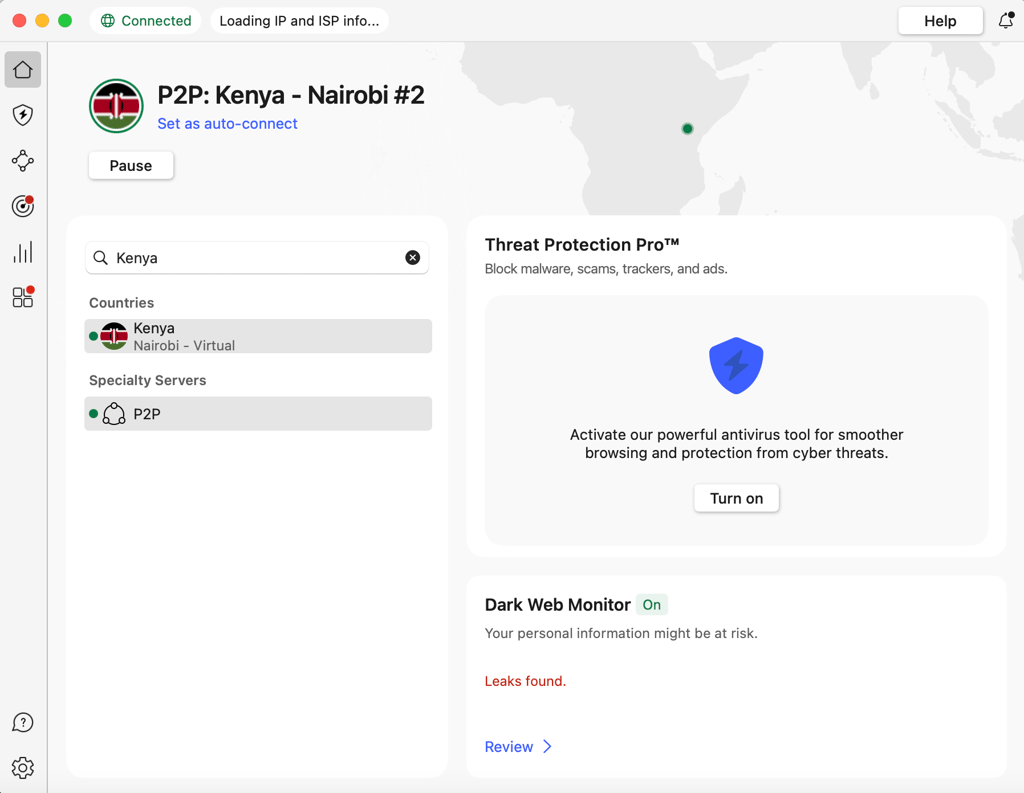
Step 4. Launch Warzone and start a match
When you open the game, check if the country is the same as your VPN server. You can check the region in the Settings menu under the Network section.
How to use a VPN on PS5 for Warzone?
You can use Warzone VPNs on console via two different methods. The first involves using your PC as a VPN-protected router, while the second uses your console.
Set up Warzone VPN: PC method
This isn't my preferred choice, as it can give you a slightly slower connection since your internet is being routed through your PC's hotspot network. Nonetheless, it might work well for you – here are the steps I used:
- Connect to NordVPN. I recommend choosing one of the best locations for bot lobbies I've identified, including Kenya, Nigeria, and Cambodia.
- Go to your PC’s Network settings. Enable your Mobile Hotspot.
- Connect to the hotspot with your console. If you're already using a LAN connection like me, switch your PS5 or Xbox over to the hotspot connection.
- Now, your console is using NordVPN. Since your console is using the VPN-protected hotspot to connect, you'll be able to find bot lobbies in your chosen server location.
Set up Warzone VPN: Router method
Personally, I prefer this option because it can give you a faster connection. Not to mention, it means that my phone is simultaneously protected so long as I use Wi-Fi. Here's how you can install a VPN on your router, using NordVPN as the perfect example:
- Download the VPN server configuration files you'll need. I found NordVPN really helpful because they publish a website page with all the details you'll need.
- Go to your router's IP address. This is usually 192.168.1.1, but if that doesn't work, check the back of your router.
- Log in to your router using the credentials on the back. This will let you access the VPN configuration settings you'll need.
From here, I recommend checking out my team's well-written guide to setting up a VPN on your router. This contains all the steps you'll need to use Warzone VPN on console and all your other devices at the same time.
Conclusion
Wondering how to get bot lobbies in Warzone? Using a reliable and secure VPN is one of the most effective methods. By connecting to a region with lower player density, you can bypass strict SBMM and enjoy a more relaxed gaming experience. All you need is the best VPN for Warzone to start landing in easier lobbies and having more fun.
I recommend NordVPN as the best Warzone VPN. It offers unlimited bandwidth, top speeds, and tight security, all required for safe and lag-free gaming. Throughout my tests with Warzone on PS5, I had instant, easy access to bot lobbies, and my connection never suffered.

![Surfshark weekly deals logo [IN USE]](https://media.vpnpro.com/surfshark-weekly-deals.svg)
![Proton VPN winner logo [IN USE]](https://media.vpnpro.com/2025/05/protonvpn-winner.png)
You may also like to read:
Best VPN for CS2
Best VPN for Valorant
Best VPN for Lost Ark
Best VPN for Apex Legends
Best VPN for Fortnite
Best VPN for Destiny 2
FAQ
Does VPN work on Warzone 3?
Yes, a VPN works on Warzone 3 and can even help you access easier bot lobbies. To do so, all you have to do is connect to a VPN server in a country with fewer skilled players. Additionally, by using a VPN for Warzone, you’ll be able to protect yourself from DDoS attacks, which are very common when gaming online.
What is the best VPN location for Warzone bot lobbies?
The best places to get easier bot lobbies in Warzone are Central Africa (Kenya, Ghana), Asia (India, Cambodia), or South Africa. These regions have fewer skilled players online, resulting in more bot lobbies. Other options to try are Hawaii and the Central Pacific due to their geographical isolation and lower player densities.
How to use a VPN for Warzone bot lobbies?
To find easier bot lobbies in Warzone with a VPN, simply connect to a VPN server in a country with fewer active players. A VPN will change your IP address, which will make you appear as if you’re in a different location. To access Warzone bot lobbies with a VPN, try connecting to servers in Nigeria, Cambodia, or Kenya.
What VPN do streamers use for Warzone?
For Warzone, streamers use VPNs that guarantee stable connections and low latency, such as NordVPN. NordVPN is the best VPN for Warzone that delivers fast speeds without any ping issues. It also has servers in 137 countries, including ones where you can find bot lobbies. Additionally, due to NordVPN’s robust security toolkit, you will be protected from DDoS attacks.
Can you get banned for using a VPN on Warzone?
Using a VPN with Warzone is safe and will not get you banned. However, there are clauses in the Terms of Service against spoofing and using unauthorized software for cheating, modding, or hacking. Still, bans for using a VPN are very rare, and many top players use them daily.
How to get bot lobbies in Warzone 2 without a VPN?
To get bot lobbies in Warzone 2 without a VPN, you will need to change your game style preferences. To do so, find a Party and go to Preferences. Once you’re there, change your primary and secondary play style from Competitive to Casual.
Will a VPN for Warzone increase ping?
Using the best VPNs for Warzone won’t increase your ping noticeably. However, this depends on the distance to a nearby server and whether it’s overcrowded. All VPNs have more than one server in each location, so you can find one with the lowest latency. Anything between 15-50 milliseconds is considered a good ping and more than acceptable for smooth gaming.
Does VPN help with SBMM?
Yes, a VPN can help you avoid SBMM in Call of Duty: Warzone by spoofing your location and putting you into easier Warzone bot lobbies. It won’t get rid of the matchmaking system completely, but at least you’ll be able to jump to countries with fewer, less-skilled players.
Can I use NoLag VPN for Warzone?
While you can use NoLag VPN for Warzone, I don’t recommend it. From what I could see, the website has little information about the security features and speeds available, and it’s very expensive. What’s more, NoLag VPN's website says that NordVPN and CyberGhost are not compatible, but that's not true. The best VPN speeds for Warzone that I’ve personally seen have come from NordVPN.


