Expert analysis: how much data does a VPN use


VPNs typically add 5–15% data overhead, scaling from light browsing to heavy 4K streaming, but using modern protocols like WireGuard can significantly reduce this. Top providers like NordVPN use its NordLynx protocol to keep overhead low without sacrificing security.
🏷️ LIMITED OFFER: NordVPN deal! Get 76% OFF NordVPN + 3 months FREE 🏷️
Virtual private networks (VPNs) are no longer a niche privacy tool. Today, they sit in the middle of everyday internet use, from 4K streaming on smart TVs to mobile gaming on crowded 5G networks. Yet one practical question still confuses many users: how much extra data does a VPN actually use, and will it push you over your data cap? In this expert analysis, I break down the real numbers behind VPN data usage, showing how different protocols, devices, and online activities impact your monthly traffic.
Using recent statistics and realistic scenarios, I quantify how much overhead encryption adds for streaming, gaming, browsing, and downloads, and explain why the increase usually falls in the 5–15% range. We’ll also look at how growing global VPN adoption and always‑on mobile connections are changing overall data consumption, and what you can do to keep your VPN secure while minimizing unnecessary data usage.


Since 2018, VPNpro has delivered unbiased, expert-backed insights through in-house research and thorough VPN testing. Our team ensures every review is fact-checked and reliable. Learn how we maintain these high standards in our testing methods.
What counts as VPN data usage?
When we talk about “how much data a VPN uses,” we’re really looking at two components working together:
- The baseline traffic of what you’re doing online, such as streaming Netflix in HD, downloading files, or playing online games.
- The VPN overhead, which is the extra data created by encryption, tunneling headers, and control packets that keep the secure connection alive.
A simple example makes this clearer. If you stream 1 hour of 1080p video without a VPN, you might use roughly 3 GB of data. With a VPN on and a 10% overhead, the same hour of streaming would use around 3.3 GB instead.
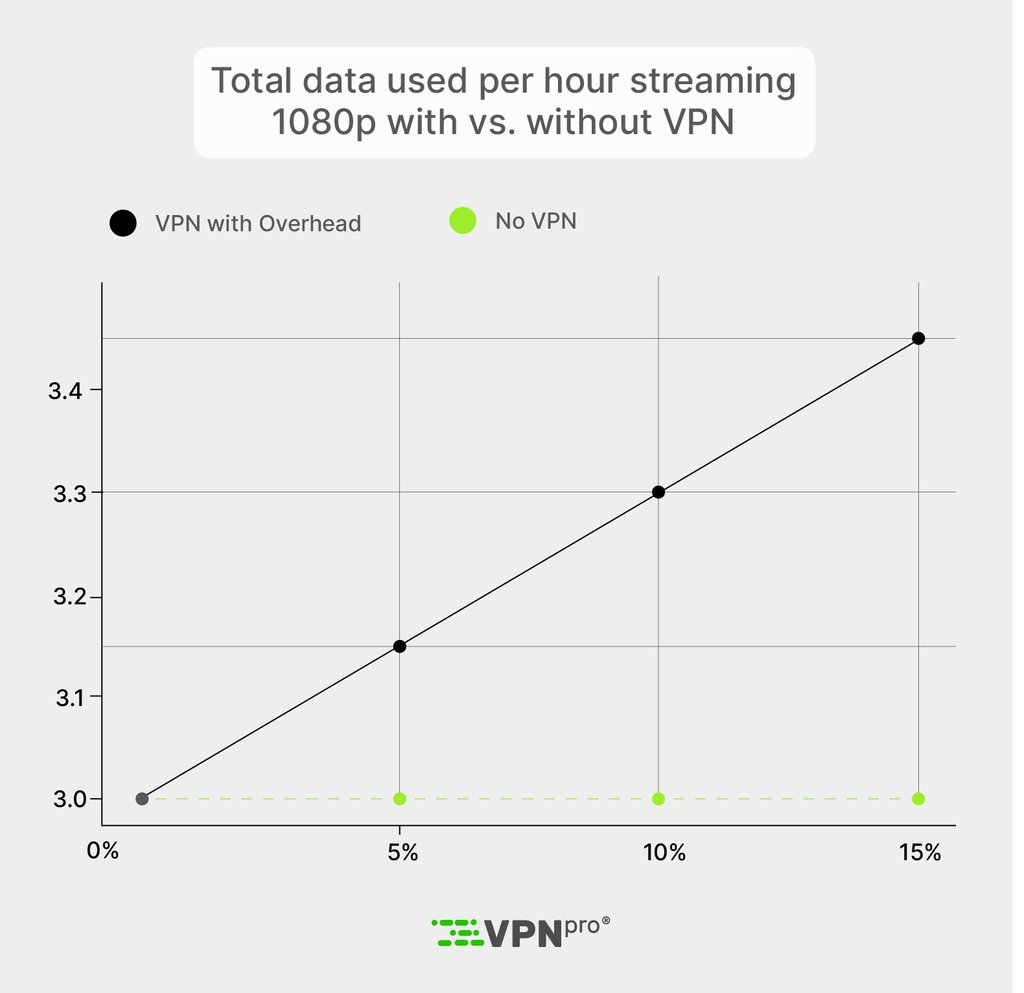
You can think of it with a straightforward formula:
Total data used=Baseline data×(1+overhead)
In real-world conditions, the overhead factor typically falls between 0.05 and 0.15, meaning a 5-15% increase on top of your normal data usage.
How much extra data does a VPN use overall?
In most real-world scenarios, turning on a VPN increases your data usage by roughly 5-15%, compared to browsing without one. The exact figure depends on factors like the VPN protocol, encryption strength, and how efficiently the VPN service handles your traffic.
This extra “overhead” comes from three main sources:
- Encrypted packets are larger than unencrypted ones
- Tunneling adds additional headers (for example, IPSec or SSL)
- Ongoing control traffic to set up and maintain the secure connection.
For the average user, that means data usage typically rises by 5%-15% when a VPN is enabled. It’s significant enough to matter on tight or capped mobile plans, but not so large that it will double your usage under normal conditions.
How much data do different VPN protocols use?
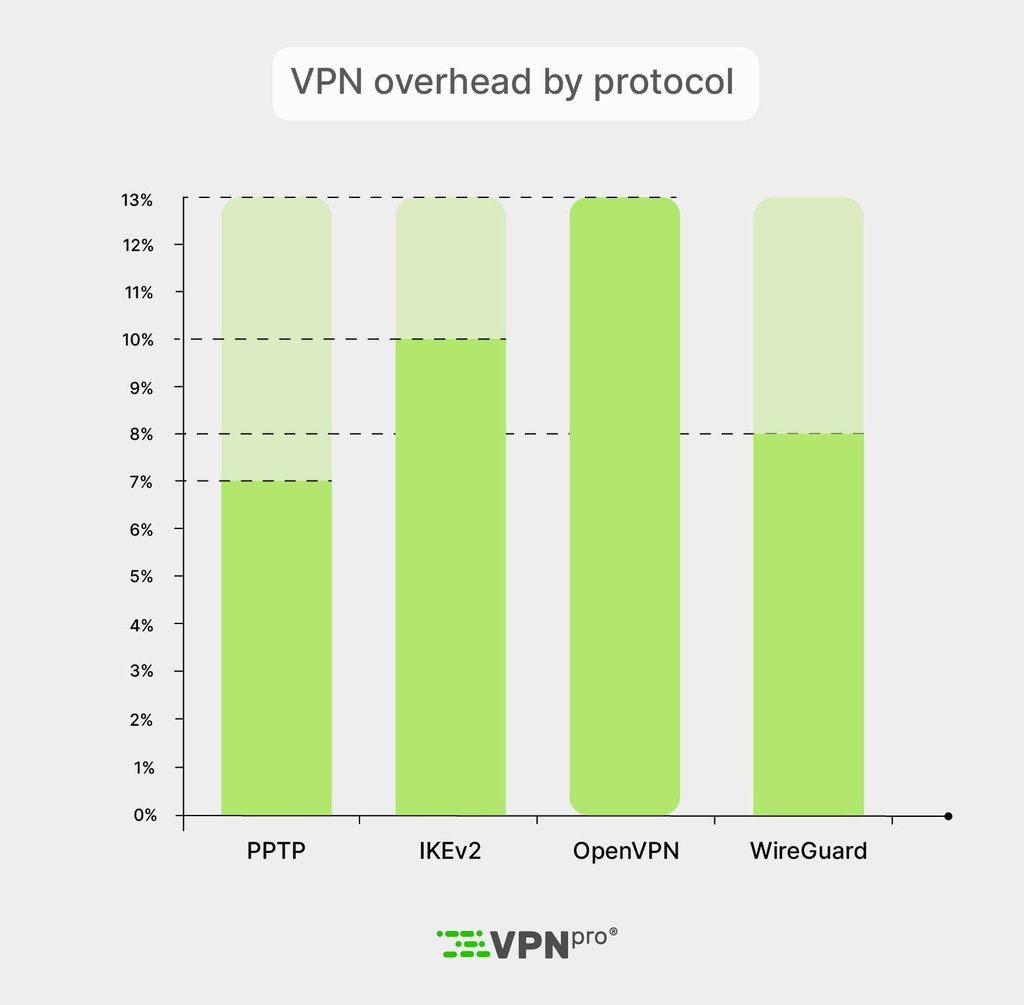
Different VPN protocols add different amounts of overhead on top of your normal traffic, mainly because they wrap and encrypt data in slightly different ways. Older protocols tend to be less efficient, while modern designs aim to keep both latency and packet size as low as possible for the same or better security.
Here’s an overview of typical overhead ranges:
| Protocol (typical settings) | Relative data overhead vs no VPN | Security level | Notes |
| PPTP with 128‑bit encryption | ~5-8% | Low | Considered outdated and insecure today, but relatively light in terms of added data. |
| IKEv2/IPSec (AES‑128/256) | ~8-12% | High | Well‑suited for mobile devices; IPSec headers add some overhead, but it handles roaming and “always‑on” use efficiently. |
| OpenVPN UDP (AES‑256) | ~10-15% | Very high | Provides strong encryption and flexibility; extra overhead comes from TLS plus encapsulation layers. |
| WireGuard and similar modern UDP | ~5-10% | High | Built for simplicity and low overhead, it measures as more data‑efficient than traditional OpenVPN in real‑world tests. |
In practical terms, switching from a legacy protocol like PPTP to a modern option such as WireGuard can trim several percentage points off your VPN overhead while also improving security. Over the course of hundreds of gigabytes per month, that difference can translate into many gigabytes of data on capped or metered connections.
A good real-world example is NordVPN, which avoids outdated protocols like PPTP and focuses on modern options. It uses OpenVPN for security and NordLynx (WireGuard-based) for lower overhead and faster speeds.
In my tests, NordLynx delivered better speeds and less data usage than OpenVPN, especially for streaming and downloads. Choosing a VPN like NordVPN that prioritizes lightweight protocols can help you save data over time while still getting top-tier security.
Use NordVPN for the best protocol performance
How much data does a VPN use for different activities?
When you turn on a VPN, your baseline data usage for streaming, gaming, browsing, downloading, or torrenting stays the same, but each activity gets multiplied by an extra overhead of roughly 5-15%. This overhead comes from encryption and tunneling, which add extra bytes to every packet on top of your normal traffic. In the examples below, we assume a mid‑range 10% overhead to keep the numbers simple.
Hourly VPN data usage by activity:
| Activity & quality | Baseline data per hour (no VPN) | Typical VPN overhead range | Approx. total with VPN (10% overhead) |
| Web browsing, email | 50-150 MB | 5-10% | 55-165 MB |
| Social media (mixed images and short video) | 300-800 MB | 5-10% | 330-880 MB |
| Music streaming | 40-150 MB | 5-10% | 44-165 MB |
| 720p video streaming | ~1-2 GB | 5-15% | 1.1-2.3 GB |
| 1080p video streaming | ~3 GB | 5-15% | 3.3-3.45 GB |
| 4K (UHD) video streaming | 7-10 GB | 5-15% | 7.7-11.5 GB |
| Cloud gaming (1080p stream) | 8-15 GB | 5-15% | 8.8-17.25 GB |
| Online multiplayer gaming (non‑cloud) | 40-300 MB | 5-15% | 44-345 MB |
| Large file download (per 10 GB transferred) | 10 GB | 5-15% | 10.5-11.5 GB |
These figures illustrate how a seemingly small percentage of overhead turns into meaningful extra gigabytes over time. For example, if you stream 2 hours of 4K video every day through a VPN and your baseline usage is around 8-10 GB per hour, a 10% overhead can add roughly 14-20 GB of extra data over a month purely due to encryption and tunneling. On a tight mobile or 5G fixed wireless plan, that overhead alone can be enough to hit fair‑use thresholds or trigger throttling sooner than you expect.
Try NordVPN for fast VPN performance
Mobile vs desktop VPN data usage
When you compare mobile vs desktop VPN data usage, the biggest difference isn’t how the VPN works, but how people use their devices. Surveys and market research show that VPNs are now used heavily on smartphones and tablets as well as on laptops and PCs, with mobile often slightly ahead or at least on par in terms of adoption and frequency of use. That shift matters because mobile connections are far more likely to be metered or capped, so any extra VPN data overhead translates directly into potential costs.
On a technical level, the VPN overhead on mobile and desktop is similar: the same protocol and encryption settings will typically add about 5-15% extra data in both cases. What changes on mobile is context. Mobile VPN sessions frequently switch between Wi‑Fi, 4G, and 5G, which can trigger additional handshakes and control traffic, though this is small compared to the data used by streaming video or cloud gaming.
In practical terms, if you run your entire 50 GB monthly phone plan through a VPN with roughly 10% overhead, you’re effectively getting about 45 GB of “real” content plus around 5 GB consumed purely by encryption and tunneling.
Why VPN data usage matters
Understanding how much data a VPN uses and current VPN trends isn’t just a technical curiosity – it directly affects your bills, your speeds, and even how businesses design their networks. When VPN overhead adds 5–15% to every gigabyte, that extra traffic quickly shows up in your monthly usage.
Data caps
For everyday users, the biggest issue is data caps and overage fees. Many mobile and home broadband plans still enforce hard or soft caps, so a 10% VPN overhead effectively turns a 500 GB monthly allowance into roughly 450 GB of “real” content and about 50 GB of encryption and tunneling. On tight mobile plans, that can be the difference between staying within your limit and paying extra or having speeds reduced.
Throttling
VPN data usage also matters for bandwidth throttling. Internet providers often slow connections after you cross specific thresholds, even on “unlimited” plans. Because VPN overhead pushes your total data higher, you can hit those thresholds earlier in the billing cycle, especially if you stream a lot of HD or 4K video through a VPN.
Corporate networks
On corporate and enterprise networks, the stakes are even higher. Companies that route remote workers’ traffic through central VPN gateways pay for all of that bandwidth. At a multi‑gigabit scale, an extra 5-10% overhead translates into a substantial increase in required capacity and cost, especially for organizations supporting thousands of remote employees.
What’s important to note is that user behavior amplifies this effect. Many people turn on a VPN specifically for high‑bandwidth tasks like streaming geo‑restricted content or avoiding tracking while watching video. That means some of the most popular VPN use cases, like HD/4K streaming and cloud gaming, are also the ones where VPN data overhead adds the most gigabytes to your total usage.
How VPN usage is changing globally
Global VPN adoption has grown rapidly, affecting hundreds of millions worldwide and amplifying the impact of VPN data overhead.
Here are key insights and trends from recent surveys:
- US adult usage varies by survey. One 2025 study found 32% of adults actively used a VPN, down slightly from 46% in 2024; another reported 43% had used one at least once.
- Younger generations lead. Gen Z and millennials show the highest rates, with around 50% adoption in both groups, driven by mobile streaming and public Wi-Fi needs.
- Global scale is massive. Estimates range from hundreds of millions to over 1 billion active users, with especially high penetration in Indonesia, India, and other mobile-heavy markets.
As VPN usage migrates from desktops to always‑on mobile and smart‑TV apps, the total amount of VPN‑encrypted traffic is set to grow faster than the number of users. Even if per‑connection overhead is trimmed from 15% to closer to 5–8% with modern protocols, the cumulative effect on mobile and fixed networks will be enormous through 2030.
How to reduce VPN data usage without losing security
Want to reduce VPN data usage and optimize VPN data consumption while keeping your connection fully encrypted? Here are proven, practical steps backed by protocol specs and performance benchmarks. Each one targets the 5-15% overhead without compromising protection.
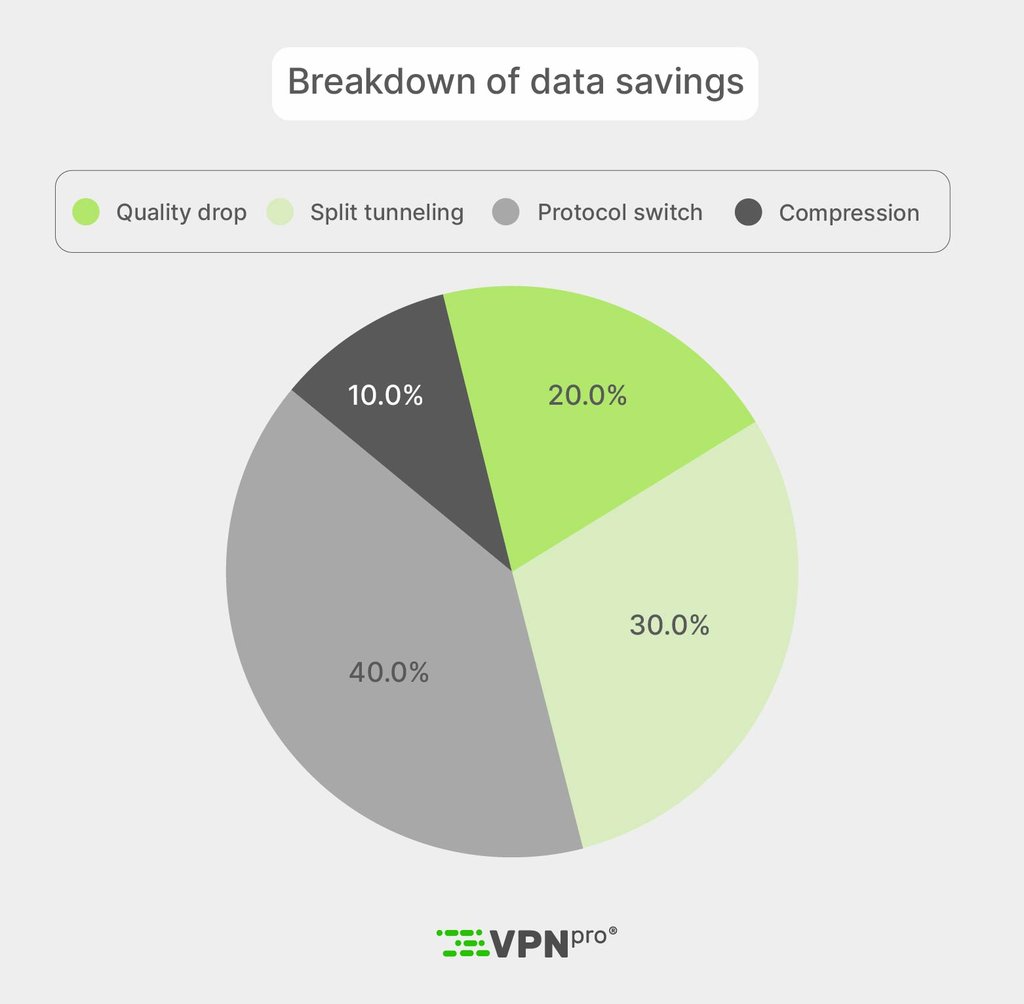
- Switch to modern, efficient protocols. Use WireGuard or optimized IKEv2/OpenVPN setups, which cut packet overhead to 5-10% compared to older options like PPTP or heavy TLS configurations. This alone can save several gigabytes monthly on high-traffic plans.
- Skip unnecessary double encryption. Turn off multi-hop routing or Tor-over-VPN unless you face extreme threats. These features can double the overhead to 20-30%, eating far more data than standard single-hop encryption.
- Enable split tunneling. Route low-risk, data-heavy apps (like local Netflix streams or software updates) outside the VPN tunnel, while keeping sensitive traffic (banking, email) protected. This bypasses overhead for up to 50% of your usage in mixed workflows.
- Lower streaming and download quality. Drop from 4K (7-10 GB/hour) to 1080p (~3 GB/hour) – the VPN's percentage overhead applies to a smaller baseline, slashing total data by 60%+ per session without quality loss for most eyes.
- Activate compression where available. Use built-in VPN or device-level compression for text-based tasks like browsing and email, which can trim another 10-20% off light workloads by shrinking redundant data before encryption.
Here’s a real-world savings example: A user streaming 60 hours of 1080p video monthly (180 GB baseline) with 15% overhead wastes ~27 GB on encryption. Switching protocols to 8% overhead or split-tunneling local content drops that to 14 GB, which is a 13 GB monthly win, enough to avoid overages on most 50 GB mobile plans.
Since 2018, VPNpro has delivered unbiased, expert-backed insights through in-house research and thorough VPN testing. Our team ensures every review is fact-checked and reliable. Learn how we maintain these high standards in our testing methods.
Conclusion
VPNs add a predictable 5-15% data overhead that scales with your usage, from light browsing (50-165 MB/hour) to heavy 4K streaming (7.7-11.5 GB/hour), but smart choices like WireGuard protocols, split tunneling, and quality adjustments can cut that burden significantly without sacrificing security.
As global VPN adoption surges, with hundreds of millions of users (over 60% now on mobile), the cumulative impact on data caps, throttling, and network costs will only grow, even as efficiency improves toward 5-8% overhead through 2030. For most, this means weighing privacy gains against real bandwidth trade-offs, and optimizing your setup to stay under limits while staying protected.

![Surfshark weekly deals logo [IN USE]](https://media.vpnpro.com/surfshark-weekly-deals.svg)
![Proton VPN winner logo [IN USE]](https://media.vpnpro.com/2025/05/protonvpn-winner.png)
Sources and methodology
This analysis draws from technical standards and recent VPN research, including protocol overhead breakdowns from different data usage reports, usage statistics from VPN consumer surveys, ElectroIQ VPN adoption stats, insights from Forbes, protocol comparisons via IETF RFCs (2637, 2784, 2661, 9347, 7296), WireGuard documentation, and OpenVPN specifications, plus real-world benchmarks. All statistics reflect original data from these trusted sources without modification, ensuring readers receive accurate insights into VPN overhead, activity comparisons, and usage trends.
FAQ
Does a VPN use more data?
Yes, VPNs increase data usage by 5-15% due to encryption and tunneling overhead. This adds up on capped plans but stays modest for most activities, and also depends on a combination of other factors.
How much data does a VPN use for streaming?
As an example, 1 hour of 1080p streaming uses ~3 GB without VPN, rising to 3.3-3.45 GB with 5–15% overhead. 4K streaming jumps from 7-10 GB to 7.7-11.5 GB.
Does VPN affect gaming data usage?
Online multiplayer gaming uses 40-300 MB/hour without VPN, while with 5-15% overhead, you can expect 44-345 MB. Cloud gaming (8-15 GB) sees an even higher impact.
Which VPN protocol uses the least data?
WireGuard (5-10% overhead) and IKEv2/IPSec (8-12%) are typically most efficient. Avoid multi-hop features that can double usage.
How can I reduce VPN data consumption?
To reduce VPN data consumption, you can use a data-efficient protocol like WireGuard, enable split tunneling, and lower stream quality. You can also skip double encryption and other extra data-heavy features to cut overhead by up to 50% on heavy use.


- What counts as VPN data usage
- How much extra data does a VPN use
- Data usage across different VPN protocols
- Data usage across different activities
- Mobile vs desktop VPN data usage
- Why VPN data usage matters
- How VPN usage is changing globally
- How to reduce VPN data usage
- Conclusion
- Sources and methodology
- FAQ