Best YouTube TV VPNs in 2026: How to watch YouTube TV internationally



When traveling internationally, you won’t be able to use YouTube TV since it’s geo-restricted to the United States. However, a reliable VPN can help you access it by masking your location. Based on our tests, NordVPN is the best VPN for YouTube TV in 2026 due to its 3,383 US servers and incredibly fast connection speeds. Surfshark follows closely as a reliable and more affordable alternative, while Proton VPN stands out for its strong privacy features and solid streaming performance.
🏷️ LIMITED OFFER: NordVPN deal! Get 76% OFF NordVPN + 3 months FREE 🏷️
YouTube TV availability of local channels, including Regional Sports Networks, changes depending on the state you’re in. This is known as the ‘Home Area’ in your YouTube TV settings.
To watch YouTube TV internationally, you need a reliable VPN for YouTube TV. A VPN hides your real location, making YouTube TV think you’re in the US. However, YouTube TV actively blocks VPN use to enforce its regional content restrictions. This makes numerous VPNs unsuitable for YouTube TV.
For streaming YouTube TV in June 2026, the most reliable VPNs should use obfuscation to hide VPN traffic and GPS spoofing to match the location requirements of mobile devices.
Based on our tests, NordVPN, Surfshark, and Proton VPN work best with YouTube TV, as they regularly refresh their IP addresses to avoid detection. Surfshark is especially useful on mobile thanks to its GPS spoofing feature. Meanwhile, most free VPNs and privacy-focused options like Mullvad tend to fail, as YouTube TV quickly detects and blocks their servers.
| VPN for YouTube TV | Rating | Best for | US servers | Price | Free-trial |
| 1. NordVPN | 9.8 ⭐⭐⭐⭐⭐ |
Overall best YouTube TV VPN | 3,383+ servers in 39 cities | $3.09/month | ✅ Yes (only on Android) |
| 2. Surfshark | 9.5 ⭐⭐⭐⭐⭐ |
Affordable VPN for YouTube TV | 600+ servers in 24 cities | $1.99/month | ✅ Yes (only on mobile) |
| 3. Proton VPN | 8.6 ⭐⭐⭐⭐ |
Privacy-focused VPN | 3,500+ servers in 19 cities | $2.99/month | ✅ Yes (free version) |
| 4. TotalVPN | 8.2 ⭐⭐⭐⭐ |
Easy-to-use VPN | Undisclosed number of servers in 24 cities | $1.59/month | ✅ Yes |
| 5. Norton VPN | 7.3 ⭐⭐⭐⭐ |
Fast and secure YouTube TV VPN | Undisclosed number of servers in 18 cities | $3.33/month | ✅ Yes |
Try before subscribing: NordVPN is the overall best YouTube TV VPN in 2026, and it offers a 3-day free trial for Android devices via the Google Play Store. I recommend taking advantage of it and testing NordVPN completely risk-free before you commit long-term.
Read on to learn how to watch YouTube TV when travelling internationally!
Can I watch YouTube TV while traveling internationally?
No, you can't watch YouTube TV while traveling internationally because YouTube TV is only available within the United States due to strict geo-restrictions. If you travel outside the US, YouTube TV will block access completely and show this message: "It looks like you are outside the United States. YouTube TV is only available in the US."

The most effective way to watch YouTube TV outside your Home Area is by using a VPN. This technology changes your IP address, making it appear as though you’re accessing YouTube TV from a different location – one where YouTube TV is geographically available.
However, if you’re watching YouTube TV on a mobile device, just changing your location via VPN isn’t enough. Since YouTube TV monitors your geo-location, you’ll need to use a GPS spoofer, which additionally changes your GPS coordinates to a place where YouTube TV is available. This is what tricks YouTube TV into giving you access to its streaming services.
Using a VPN to bypass YouTube TV's location restrictions is legal in most countries, but it does violate the YouTube TV Terms of Service, which could result in account suspension.
How to watch YouTube TV internationally with a VPN
To trick YouTube TV location and watch shows, live TV, or sports from other parts of the US, you need a VPN. A reliable YouTube TV VPN changes your IP address, lets you adjust your Current Playback Area, and gives you full access to YouTube TV from anywhere. Here’s how to watch YouTube TV when traveling internationally:
- Select a reliable YouTube TV VPN. I recommend NordVPN, now 76% off, as it offers servers in 16 US locations.
- Download and install the VPN on your device.
- Connect to a US server location.
- Log in to YouTube TV and start streaming!
If you want to trick YouTube TV's location on a mobile device, you need to know that YouTube TV checks both your IP address and your GPS location. To watch YouTube TV internationally on mobile, you’ll need a VPN and a GPS spoofing app. In this case, I recommend using Surfshark, as it incorporates a GPS spoofing tool with its VPN, making it the best choice for watching YouTube TV on a smartphone from anywhere.
Best YouTube TV VPNs in 2026
- NordVPN – the overall best YouTube TV VPN in 2026
- Surfshark – the best VPN for YouTube TV with GPS spoofing
- Proton VPN – a freemium VPN that works with YouTube TV
- TotalVPN – an affordable VPN to watch YouTube TV internationally
- Norton VPN - secure and easy-to-use YouTube TV VPN
I tested 27 premium services to determine which YouTube TV VPN is the best for speed, security, and bypassing location restrictions. The trials also focused on device compatibility, support, and additional features to help you avoid annoying password-sharing restrictions. Ultimately, I found the top 5 best-performing YouTube TV VPNs to be NordVPN, Surfshark, Proton VPN, TotalVPN, and Norton VPN. They’ll reliably let you change your location and access any channel or live sports broadcast from anywhere in the US.
Top 1. NordVPN – best VPN for YouTube TV overall
![NordVPN mobile logo [IN USE]](https://media.vpnpro.com/images/170x89/2025/08/nord-rreview.jpg)


137

9300

Yes
-
3,383+ servers in US to unblock YouTube TV
-
Fastest VPN we tested: 809Mbps
-
SmartPlay feature
-
No unlimited free version
NordVPN is the best VPN for YouTube TV in 2026, due to its extensive US server network (3,383+ servers in 20+ cities) and advanced SmartPlay feature that helps bypass strict location detection. From my experience, it worked great at streaming American content from outside the US when I connected to one of its Florida servers to access YouTube TV.
Servers. NordVPN covers 137 countries with 9,300+ servers, of which 3,383+ are in the US. With server options in Texas, California, Florida, Arizona, Colorado, Utah, Illinois, and Virginia, you can easily change your virtual location to bypass YouTube TV regional restrictions. On top of that, you can get a dedicated IP, which is unique to only you - this avoids potential bans resulting from using a very busy server that gets flagged as a VPN connection.

For seamless access to YouTube TV, I had the most success using NordVPN servers in New York, Florida, and Atlanta. These servers delivered fast speeds and instant access to the platform without detection issues. If you’re outside the US, connecting to one of these will let you easily stream YouTube TV.
Performance. Thanks to the proprietary NordLynx tunneling protocol, NordVPN is the fastest VPN on the market. During my tests, it retained around 91% of the original speed even when connected to distant servers, so I had no lag or buffering on YouTube TV.
Streaming. I had no problem bypassing geo-blocks on YouTube TV using NordVPN. Furthermore, it’s compatible with various streaming devices (Android TV, Amazon Fire TV, Apple TV), computers, and phones. For Android TV and Amazon Fire TV, NordVPN even has a dedicated app, which makes the process of unblocking YouTube TV even simpler.
As for devices that don’t support VPNs (consoles and smart TVs), you can utilize the SmartDNS feature. It lets you access content on your smart TV that might otherwise be restricted in your region. Alternatively, simply install NordVPN on your router for instant protection on any household device.
Additional features. NordVPN's SmartPlay feature and obfuscated servers help to bypass YouTube TV’s VPN filters seamlessly, allowing users to stream global content securely on any device.
NordVPN is the best VPN for YouTube TV, starting at $3.09/month, and you can try it completely risk-free with a 3-day free trial and a 30-day money-back guarantee. Use our NordVPN coupon to get the best available deal.
Top 2. Surfshark – affordable YouTube TV VPN
![Surfshark mobile logo [IN USE]](https://media.vpnpro.com/images/170x89/surfshark-review-logo-2.jpg)
100
4500
Yes
-
Unlimited simultaneous connections
-
GPS spoofing for Android
-
Fast speeds with WireGuard
-
Some features cost extra
Surfshark is an excellent VPN to watch YouTube TV outside the US, as it has blazing-fast servers and a feature to change your phone’s GPS location data. By simply toggling on the GPS spoofing feature in the settings and connecting to the Georgia server, I unblocked YouTube TV on mobile without any hiccups.
Not to mention, Surfshark is the most affordable VPN for YouTube TV, offering unlimited simultaneous connections, a 7-day free trial, and a 30-day money-back guarantee at just $1.99/month.

Servers. Surfshark offers 4,500+ servers in 100 countries. Plus, 600+ servers are in the US, so you’ll have plenty of YouTube TV locations to choose from. I, for one, was able to tune in to my favorite E! channel when travelling abroad just by connecting to Surfshark’s New York server.
Performance. Surfshark is the second fastest YouTube VPN, averaging 763Mbps, thanks to the WireGuard tunneling protocol and Nexus technology. I tried streaming live channels with Surfshark and experienced no lag or buffering on YouTube TV, even on distant servers.
Streaming. Besides being a great YouTube TV VPN, Surfshark works well with other streaming services. It lets you enjoy shows and movies on a wide range of devices. Even if your smart TV doesn’t support VPNs, you can always use the Smart DNS feature.
Additional features. Surfshark’s GPS spoofing feature for Android will make it much easier to trick YouTube TV locations, while CleanWeb will help you avoid ads and malware while browsing the web. They can be activated in settings by toggling GPS spoofing and CleanWeb on
Surfshark is the top value VPN for YouTube TV at just $1.99/month, and you can try it risk-free with a 7-day free trial and a 30-day money-back guarantee. Get up to 87% off with our Surfshark discount coupon.
Top 3. Proton VPN – freemium VPN that works with YouTube TV
![Proton VPN mobile logo [IN USE]](https://media.vpnpro.com/images/170x89/proton-vpn-review-logo-2.jpg)
145
20075
Yes
-
A massive fleet of 9900+ servers to unblock YouTube TV
-
Also unblocks US Netflix, Prime Video, Disney+
-
Supports rapid streaming protocol, WireGuard
-
Limited support outside business hours
Proton VPN is a perfect open-source VPN choice that allows you to watch YouTube TV while travelling. It offers affordable prices, excellent security, and advanced security protocols. While the free version struggles to unblock YouTube TV, the premium tier smashed through those geo-blocks in my tests.
Servers. Proton VPN's free tier is a modest offering that has VPN servers in 10 countries, including the US. The limited servers in Proton VPN's free tier make unblocking YouTube TV a bit harder, but manageable nevertheless.
For me, it was no problem unblocking YouTube TV’s most popular channels like CNN, Fox News, E! NFL Network and NBA TV from California’s server, which was randomly selected for me when using the Proton VPN free version.
However, as soon as you upgrade to premium Proton VPN, you get smooth access to all YouTube TV channels and a massive 20,075 servers in 145 countries. Servers are explored in more detail in my colleague’s Proton VPN review.

Performance. Using the powerful WireGuard protocol, I saw download speeds averaging 737Mbps with Proton VPN. Given that even a connection of around 5 Mbps can support HD streaming quality, with this VPN, I had no issue streaming YouTube TV in uninterrupted high definition.
Streaming. Proton VPN can also unblock Prime Video, Disney+, Max, BBC iPlayer, and more. Just note that such robust unblocking power is only possible with the premium tier. That said, Proton VPN still remains the best free VPN for YouTube TV, as it has servers in the US, solid privacy features, and unlimited data.
Proton VPN is a privacy-focused choice for YouTube TV, starting at $2.99/month, and backed by a 30-day money-back guarantee, so there’s no risk in trying it out.
Top 4. TotalVPN – cheapest VPN to trick your YouTube TV location
![TotalVPN mobile logo [IN USE]](https://media.vpnpro.com/images/170x89/totalvpn.jpg)
90
1800
Yes
-
Super-cheap subscriptions
-
82% speed retention, averaging 737Mbps
-
Can unblock YouTube TV, Netflix, and numerous others
-
Lacks a SmartDNS feature
TotalVPN is the cheapest YouTube TV VPN at $1.59/month, perfect for those on a tight budget. It works well whenever you’re traveling abroad or simply want to access content from another state.
Servers. TotalVPN provides 1,800 servers in 90 countries. Regarding the US, you can connect to servers in Texas, San Francisco, Washington, Las Vegas, and a few other locations. For me, it was a breeze to manually select TotalVPN’s server in Chicago and tune in to Saturday Night Live on NBC. I didn’t have any problems with unblocking or buffering either.

Performance. The VPN works best with the OpenVPN tunneling protocol – unfortunately, TotalVPN lacks WireGuard right now. While testing, TotalVPN retained 82% of my original connection speed, which was more than enough for uninterrupted 1080p streaming. You can also learn more about its excellent performance in my colleague’s TotalVPN review.
Streaming. TotalVPN works well on almost any streaming device. And you can use it on 5 devices simultaneously or 8 if you have TotalAV.
TotalVPN is an affordable VPN for YouTube TV, starting at just $1.59/month, and offers a 30-day money-back guarantee to try it risk-free.
Top 5. Norton VPN– secure and easy-to-use YouTube TV VPN

65
2000
-
Has servers across 18 states
-
Good streaming speeds
-
Offers Mimic protocol for obfuscation
-
Connection speeds can be inconsistent
As one of the top YouTube TV VPNs, Norton VPN delivers advanced protection, respectable speed, and a user-friendly experience. It’s best for beginners seeking a secure and easy-to-use VPN service with minimal risk.
Servers. Norton VPN has over 2,000 servers in 65 countries, including 25 cities in 18 US states, which helps access geo-restricted platforms like YouTube TV.
However, Norton VPN doesn’t always unblock YouTube TV on the first try, as it happened to me when I tried accessing it through a New York server. Only after I changed my location was I able to stream YouTube TV. So if you face a similar issue, try doing what I did, or clear your browser cookies, as they may be interfering with your VPN’s unblocking abilities.
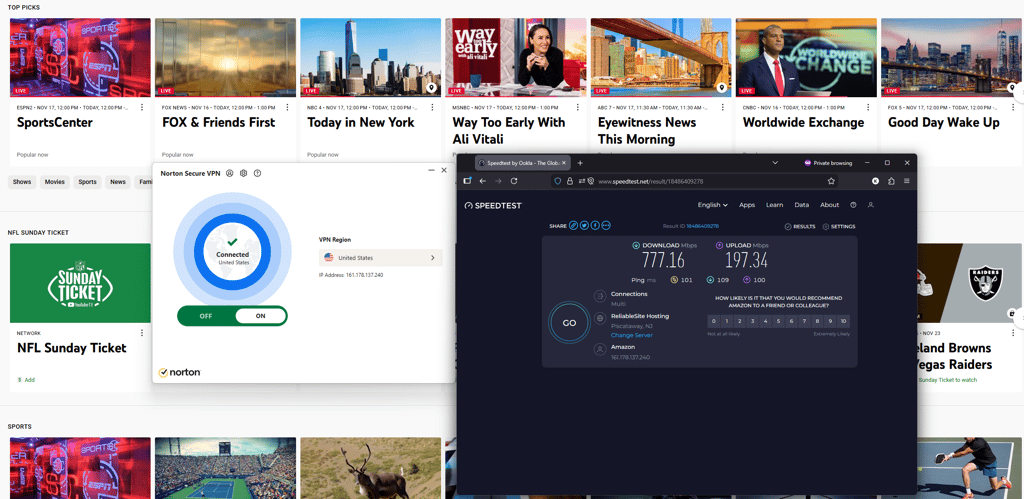
Performance. Norton VPN’s speed is generally fast – 746Mbps on average – making it a good choice for daily browsing and streaming. Modern and secure protocols, like WireGuard and OpenVPN, ensure your connection is stable for consistent streaming and browsing, so you shouldn’t have any buffering issues, especially with servers that are closer to your location.
Streaming. Besides YouTube TV, Norton VPN can unblock a few other platforms, such as Netflix, Hulu, HBO Max, and Disney+. Its wide server network in the US helps to find a working IP address for geo-restricted content.
Additional features. Norton VPN offers various security features, such as double VPN, kill switch, ad tracker blocking, and IP rotation, all of which increase your anonymity online. Plus, it has dedicated apps for smart TVs, like Apple TV and Android TV, which make for an easier streaming setup.
Norton VPN is a secure YouTube TV VPN starting at just $3.33/month, with a 7-day free trial and an extended 60-day money-back guarantee for a risk-free testing period.
How I tested the best VPNs for YouTube TV
I researched extensively to find and test the best VPNs for YouTube TV. The process involved 27 of the most popular services to sift out the top 5 services that can actually do the job right. Here are the criteria that I used to choose the top YouTube TV VPNs:
- Regional restriction bypassing (30%). The VPN's ability to bypass geo-blocks and provide seamless access to YouTube TV from unsupported regions was crucial. I tested access from various locations to ensure effectiveness.
- Server network and locations (25%). I compared the number of US servers each VPN provider offered and their proximity to major streaming servers. A robust server network ensures that users can reliably access YouTube TV content from various locations worldwide.
- Streaming speed and quality (25%). I conducted speed tests to evaluate the impact on connection speeds and video quality. Only the fastest VPNs with stable connections were selected.
- Device compatibility (10%). A YouTube TV VPN should work on nearly any device. My top 3 choices are compatible with Windows, macOS, iOS, and Android. Some even have VPN apps for Apple TV, Fire TV, and other dedicated streaming devices.
- Additional features (10%). Extra features like Smart DNS for easy streaming on smart TVs, Meshnet for sharing accounts, and GPS spoofing for Android users were also taken into consideration.


Since 2018, VPNpro has delivered unbiased, expert-backed insights through in-house research and thorough VPN testing. Our team ensures every review is fact-checked and reliable. Learn how we maintain these high standards in our testing methods.
Why do I need a YouTube TV VPN to watch NFL and MLB games?
A YouTube TV VPN lets you change your virtual location, helping you avoid regional broadcasting restrictions. This means you can watch NFL games and bypass MLB blackouts that are normally blocked in your area.
- Local market restrictions. A YouTube TV VPN helps you get around local market restrictions that block certain MLB games in specific regions. This is usually due to the broadcast network protecting its streaming rights. By using a VPN and connecting to a server in another US state, you can change your location, unblock regional blackouts, and watch any MLB game live on YouTube TV from anywhere.
- Blackouts. Out-of-market MLB games are often blacked out to specific audiences if a regional network has an exclusivity deal or tickets don’t sell out. Changing your location with a YouTube TV VPN can help bypass these blackouts.
- Channel availability. Due to licensing agreements, some channels on YouTube TV with MLB streams, such as ESPN, can be inaccessible from your state or region. Using a YouTube TV VPN can help bypass these regional restrictions by connecting to a server in a state where the channel is available.
Get the best YouTube TV VPN – NordVPN
YouTube TV home area workaround
YouTube TV uses Home Area settings, linked to your zip code or device location, to determine which shows and networks you can access. You can only change your Home Area twice every 12 months, which means the available channels vary by location within the US.
Here’s how to change your YouTube TV Home Area:
- On Android, open the YouTube TV app and select your profile photo. Head to Location and then click on Home Area. Select Update Home Area and press Change Home Area.
- On iOS, log in to YouTube TV on a mobile web browser or a regular browser on your laptop. Select the profile photo and then Home Area. Click Update next to Home Area and change it.
- On a laptop or a computer, head to tv.youtube.com and select your profile photo. Click Location and then Update next to Home Area.
Meanwhile, to access different YouTube TV channels or live sports broadcasts, including NFL, MLB, and NBA, I strongly recommend using a VPN to change your location and update your current settings on YouTube TV. That way, you can easily access content from another state. Note that you must sign into YouTube TV at least once every 90 days within your Home Area.

How to watch YouTube TV while traveling
You can’t watch YouTube TV outside the US because of licensing restrictions. However, you can use one of the best YouTube TV VPNs to change your IP address and avoid corporate rules on who should be able to access sports content.
To change your VPN location on YouTube TV, follow these steps:
Step 1. Get a VPN that works with YouTube TV
Based on our tests, NordVPN is the best for YouTube TV, as it has 3,383 high-speed US servers. These features eliminate throttled speeds and allow you to quickly switch servers if yours is detected by YouTube TV and blocked. Another excellent option is Surfshark, particularly for mobile users, thanks to its GPS spoofing feature.
Step 2. Download the VPN app on your device
What makes NordVPN great for YouTube TV is that it’s compatible with a wide range of devices and systems, such as Windows, macOS, Linux, Android, iOS, Smart TVs, and gaming consoles. Though with a mobile device, you have to take an extra step to unblock YouTube TV – use a GPS spoofing app.
Step 3. Connect to a US server
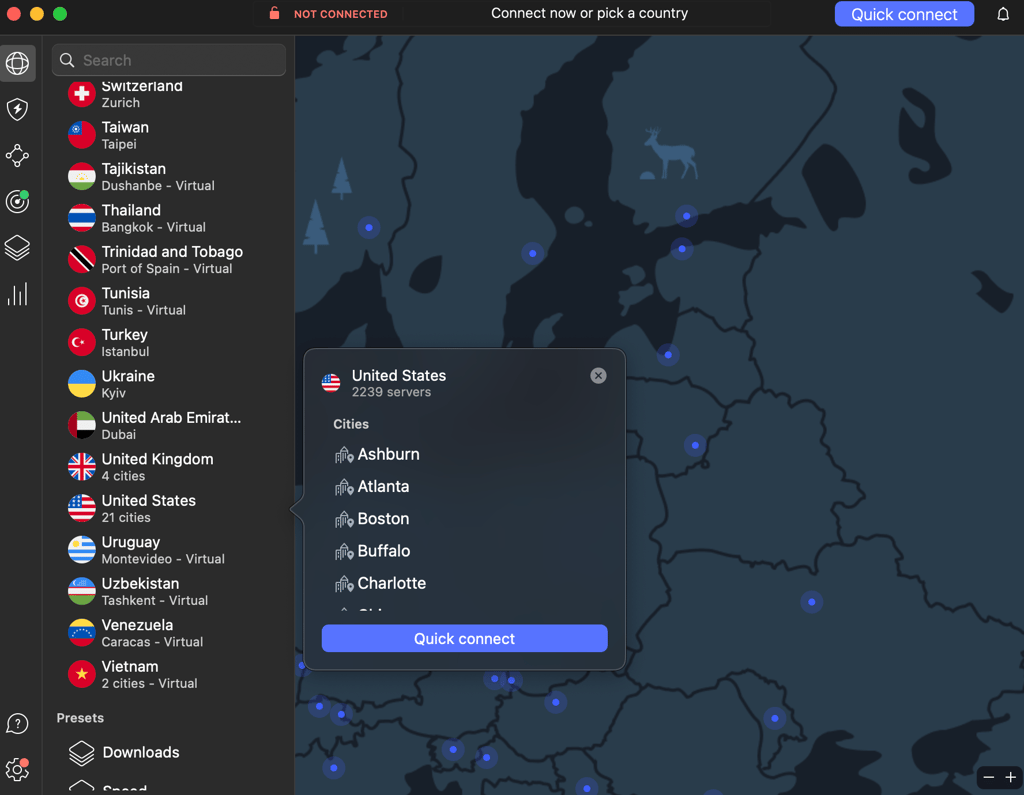
If you want to watch YouTube TV outside the US, you will need to connect to a US server using your VPN app. I recommend manually choosing a server in less-popular cities, such as Dallas, TX, or Phoenix, AZ, as these servers are less likely to have been blacklisted by YouTube TV, making them the most reliable.
Step 4. Watch YouTube TV while connected to VPN
Now all that’s left is to open the YouTube TV platform and enjoy what it has to offer. With NordVPN and its nearly 2,000 servers across 16 US locations and the advanced NordLynx protocol to boost long-distance connection speeds, accessing YouTube TV even from Mexico is as easy as picking up your TV remote at home.
How to watch YouTube TV on different devices
Like any other excellent streaming service, YouTube TV offers apps for all major operating systems. You can easily stream on computers, tablets, mobile devices, and smart TVs. However, each device has its own specific quirks, so the process of using a VPN with different gadgets varies. Nevertheless, start with these steps:
- Get a robust YouTube TV VPN. My go-to choice is NordVPN, now 76% off
- Download the VPN app and install it on your device
- Launch the application and connect to a server in the US
After that, the following actions depend on the device you plan to stream YouTube TV.
- Watch YouTube TV on PC. Once connected to a VPN server in the US, simply open YouTube TV, create an account or log in, and enjoy live TV online from anywhere.
- Watch YouTube TV on iPhone or Android smartphones. After connecting to a US server, you must activate the GPS spoofing feature to change your phone's virtual location entirely. Then, if your account is not registered in the US, create a new Google or Apple ID account and choose the USA as your country. Finally, open YouTube TV, log in, and watch YTTV internationally.
- Watch YouTube TV on Smart TV. In case you’re not using Android TV, you must install a VPN on your router and then connect to a US server. Then, download the YouTube TV app, log in, and enjoy.
- Watch YouTube TV on Fire TV Stick. After connecting to a server in the USA, download the YouTube TV app, log in, and stream effortlessly outside the US.
- Watch YouTube TV on Apple TV. Go to Settings > Network > Wi-Fi. Select your network, then choose Configure DNS > Manual Configuration. When prompted, enter the VPN's DNS address and restart Apple TV.
- Watch YouTube TV on Kodi and Roku. The easiest way to use these platforms with a VPN is to install it on the router. Once connected to a US server, just log in or create a new YouTube TV account and stream from anywhere.
YouTube TV not working with VPN: quick troubleshooting steps
Because of YouTube TV’s strong security measures, users often see the “YouTube TV proxy detected” error instead of being able to access their channels. When this happens, try switching to a different server or clearing cookies from your device.

Another hurdle YouTube TV viewers outside the US may come across is the infamous message: ‘It looks like you’re outside of the United States. YouTube TV is only available in the US.’ While our Top 5 YouTube TV VPN providers usually have no such issues, using a subpar VPN often results in the ‘YouTube TV VPN proxy detected’ error.
Here’s how to fix YouTube TV when it’s not working with a VPN:
- Try a different US server. If you still get the ‘YouTube TV VPN proxy’ error message, try connecting to different US server locations until you find one that successfully bypasses the block.
- Check for IP and DNS leaks. Sometimes, a VPN can leak your real IP address or DNS requests if not configured correctly, preventing you from watching YouTube TV and other geo-blocked streaming services. Make sure that your kill switch and leak protection are on.
- Clear the cache. For those streaming YouTube TV via browser, clear out your web browser’s cookie cache. Internet cookies contain information about your actual whereabouts that can prevent you from accessing YouTube TV.
- Contact customer support. If the above tips don't solve the issue, I suggest contacting customer support. Chances are, there are some problems with the service they’re currently fixing.
Getting a solid YouTube TV VPN might be the best solution if all else fails. After extensive testing, I recommend NordVPN. It easily unblocks YouTube TV, offers top performance, and has resourceful 24/7 customer support.
Bottom line
YouTube TV is unavailable outside the US, so you’ll need a reliable VPN to access it while travelling abroad. A VPN masks your real IP address, replacing it with one from a region where YouTube TV is available.
I found NordVPN to be the best VPN for YouTube TV for its 3,383+ fast servers across 20 US locations and advanced security features. Surfshark is a close second, offering reliability and affordability, while Proton VPN stands out for its focus on privacy and solid YouTube TV streaming performance.

![Surfshark weekly deals logo [IN USE]](https://media.vpnpro.com/surfshark-weekly-deals.svg)
![Proton VPN winner logo [IN USE]](https://media.vpnpro.com/2025/05/protonvpn-winner.png)
You may also like to read:
- How to watch out of market NFL games
- How to get a YouTube Premium discount
- How to bypass YouTube adblock detection
- How to block ads on the YouTube app
- How to watch YouTube without ads
FAQ
Does YouTube TV work internationally?
No, YouTube TV does not work internationally. To access the site from anywhere in the world, you will need to use a VPN, like NordVPN, to change your virtual location and bypass the restrictions. If you plan to stream YouTube TV on your mobile device, I recommend using Surfshark, as it has the necessary GPS spoofing feature to trick YouTube TV location.
What countries is YouTube TV available in?
YouTube TV is only available in the United States. If you’d like to watch YouTube TV when traveling or access the service from another country, you will need to use a VPN to bypass YouTube TV location restrictions. From my experience, NordVPN works the best for streaming YouTube TV internationally, thanks to its lightning-fast connection speeds and close to 2000 servers in the US alone.
Does YouTube TV work with VPN?
Yes, but only the top VPNs can bypass YouTube TV’s geo-blocks and avoid VPN detection systems. I recommend using NordVPN to stream YouTube TV, as it has a strong record of bypassing unblocking YouTube TV, thanks to its wide US server network and advanced features like SmartPlay and NordWhisper Protocol.
How to watch YouTube TV in Europe?
YouTube TV only works in the United States and is blocked in Europe. To access it from Europe, you need a VPN to connect to a US server, which lets you bypass geo-restrictions. Start by downloading a VPN with lots of US servers. I recommend NordVPN, now 76% off! Then, set up your VPN with a streaming device. Afterward, connect to a US server and head on to YouTube TV to enjoy your favorite content from anywhere!
Does YouTube TV blackout NFL games?
Yes, the NFL games on YouTube TV are subject to regional blackouts. You can bypass these restrictions and stream all NFL games by changing your Home Area location in YouTube settings and masking your real location with a VPN. A VPN can easily change your virtual location, bypass YouTube TV location restrictions, and unlock blackout NFL games in your location.
How to get around the YouTube TV location?
To get around the YouTube TV location, you will need to use a VPN and a GPS spoofing tool if you want to stream on mobile. YouTube TV location restrictions are based on your IP address if you stream it on a laptop browser. This is easily fixed with a reliable VPN, like NordVPN, which can mask your real IP address. For mobile devices, YouTube TV also uses GPS location. To bypass this, I recommend using Surfshark, as it has a built-in GPS spoofer.
What VPN works with YouTube TV?
NordVPN is the best VPN for YouTube TV because it easily bypasses location restrictions with its huge US server fleet, fast speeds, and strong IP masking. Surfshark is also a great choice, especially if you stream YouTube TV on mobile, as it has a built-in GPS spoofer feature.
Does YouTube TV block VPNs?
Yes, YouTube TV detects and blocks VPN usage, resulting in an error on your screen. However, with a reliable VPN, like NordVPN, you shouldn’t have this issue, as its obfuscated servers and NordWhisper protocol are specifically designed to access heavily restricted networks by making VPN traffic indistinguishable from everyday internet browsing.
Is there a way to trick YouTube TV location without a VPN?
Yes, you can try to trick YouTube TV location with GPS spoofing, smart DNS services, or browser extensions. However, none of these methods is as reliable as VPN, since YouTube TV actively checks both IP address and GPS location. For the best experience, I recommend using NordVPN for laptops and PCs or Surfshark for mobile devices due to its GPS spoofing capabilities.


