How to watch Hulu outside the US using VPN


Hulu is a streaming platform, geographically restricted to the US. If you are traveling or live abroad, its content will be unavailable to you due to licensing agreements. Luckily, there is a way to access Hulu without being physically located in the US.
A VPN is the most effective way to bypass geo-restrictions. When you connect, you are assigned a new IP address from a server in the country you have chosen. If you select the US server, your virtual location can switch to the US, granting access to Hulu. According to my tests, the best VPNs for this task are NordVPN, Surfshark, and Proton VPN.
Keep reading to learn more about VPNs and how to use them to watch Hulu outside the US.
Even if you access Hulu outside the US using a VPN, you may face payment issues since Hulu requires a US-based card. The easiest solution is to buy a US Hulu gift card and redeem it during sign-up - but more on that later.
🏷️ LIMITED OFFER: NordVPN deal! Get 76% OFF NordVPN + 3 months FREE 🏷️
Step 1. Choose a reputable VPN provider
Hulu actively blocks VPNs and flags IP addresses that it suspects to belong to VPN providers, as its content is licensed strictly for US audiences. However, reliable VPN services like NordVPN are known to work with Hulu. You can try it yourself with NordVPN’s 7-day free trial for Android or its 30-day money-back guarantee, which may also be enough to cover you for shorter trips.

Step 2. Download and install the VPN app on your device
Once you've chosen your VPN provider, visit their official website to create an account and subscribe to a plan. Download the appropriate app for your device from the official website or the respective app store, whether it's for Windows, Mac, Android, or iOS. Open the app and log in using your account credentials.
If prompted, allow necessary permissions, such as VPN configuration or device access, to enable a secure connection. Make sure to download only from the provider’s official sources or app stores to avoid malicious software. Keep the app updated for the latest features and security patches.
Step 3. Connect to a US Server
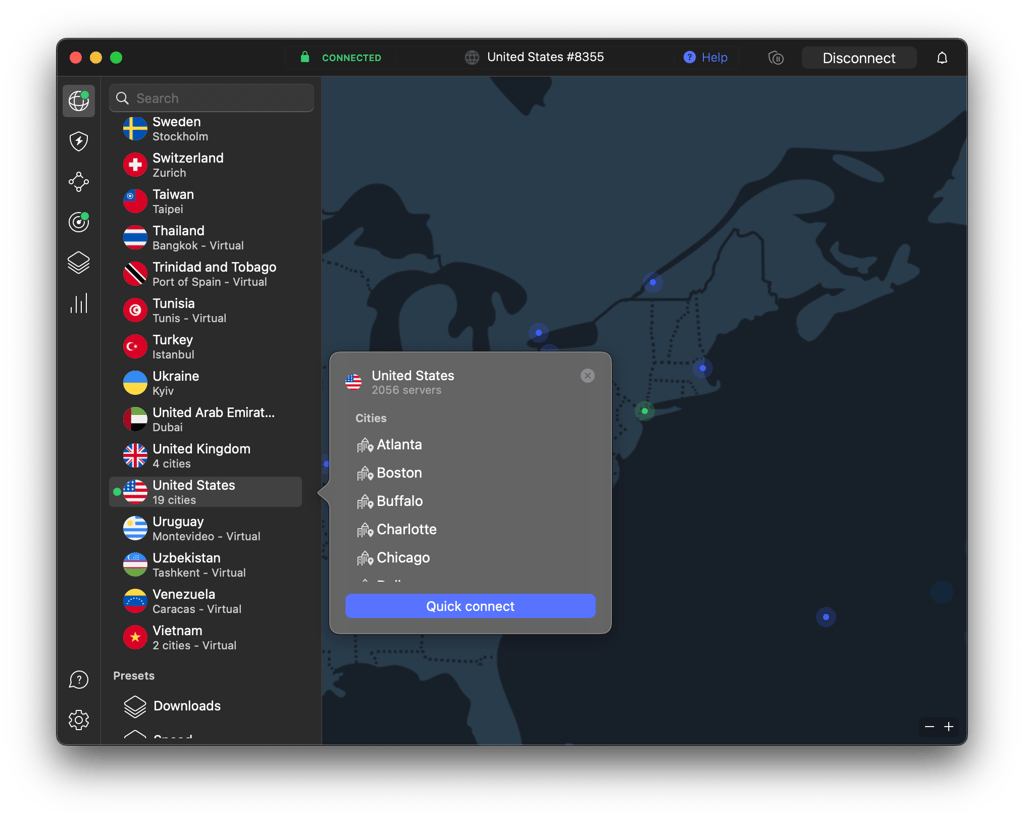
To access Hulu, connect to a VPN server located in the United States. This is essential, as Hulu only allows streaming from US-based IP addresses. Open your VPN app and browse the server list for US locations.
Some streaming VPNs label certain servers as “Hulu-optimized”, “Streaming,” or similar – these are specifically designed to bypass detection and improve performance. Select one of these for the best results. If no labels are visible, try different US servers until you find one that works with Hulu smoothly. A successful VPN connection will mask your real location, making it look like you're browsing from within the country.
Step 4. Open the Hulu app or website and log in to your account
Now that you’re connected to a US server, open the Hulu app on your device or go to the Hulu website in your browser. Log in using your existing Hulu account details. If you don’t have an account yet, you’ll need to create a Hulu subscription using a US-based payment method. This could be a US-issued credit card, a PayPal account registered in the US, or a Hulu gift card available with various online retailers.
Once logged in, you should have full access to Hulu’s content library, including both live TV and on-demand shows and movies.
If Hulu still detects that you’re outside the US, don’t worry, as this can happen due to Hulu’s strong VPN-blocking systems. Just disconnect from your current VPN server and try a different US server. You may also need to clear your browser’s cache and cookies, switch browsers, or reinstall the Hulu app if you're on a mobile device.

Watch Hulu outside the US with NordVPN
How to pay for Hulu outside the US?
To subscribe to Hulu outside the US, you’ll need a US-issued credit or debit card, as Hulu doesn’t allow VPNs to go around this payment method. Accepted cards include American Express, Visa, Mastercard, and Discover, all issued within the US. However, there are a few unofficial workarounds you can try, such as using a Hulu gift card (purchased online), a US PayPal account, or a virtual prepaid card from services like StatesCard. These methods are not officially supported by Hulu and may not always work, but many users report having success with them.
Method 1: Hulu gift cards
Hulu gift cards are a popular and straightforward method for international users to pay for Hulu subscriptions. These digital cards can be purchased from trusted online retailers such as Amazon, Best Buy, and eGifter. To redeem a Hulu gift card, first make sure your VPN is connected to a US-based server. Then, go to the Hulu gift card redemption page. Enter the 12-digit gift card code you received. After that, follow the on-screen instructions to create your Hulu account.
This method is particularly beneficial for international users, as it doesn't require a US billing address or credit card. Once redeemed, the gift card balance will cover your subscription until it's exhausted.
Method 2: Third-Party billing options
Another way to pay for Hulu internationally is through third-party platforms that offer Hulu subscriptions as part of their service bundles or as standalone add-ons. Services like Apple (via iTunes), Google Play, Amazon, or Roku may allow you to subscribe to Hulu directly through their own billing systems.
To use this method, you’ll need to access Hulu through one of these platforms and choose to subscribe via their respective app. This can simplify the process, especially if you already have payment details set up.
Note that this method may require a US-based Apple ID or Google account and a matching payment method.
Method 3: Prepaid Visa/Mastercard
Another option for paying for Hulu outside the US is by using a prepaid US-issued Visa or Mastercard. These cards (virtual or physical) can be purchased from online providers that supply you with both a US-based billing address and a valid card number.
Once you’ve obtained one, connect to a US server using your VPN, go to the Hulu sign-up page, and enter the card details when prompted for payment. This method mimics a regular US credit card transaction.
Keep in mind that not all virtual cards are accepted, so it’s best to choose providers that specialize in US-based digital services.
Is it legal to use a VPN to watch Hulu abroad?
Technically, using a VPN to watch Hulu outside the US is not illegal, but it does go against Hulu’s terms of service. Hulu is licensed to stream content only within the United States and its territories, and its terms clearly state that the service is intended for use by viewers in those regions.
Accessing Hulu through a VPN to bypass geographic restrictions may be considered a breach of these terms. If Hulu detects VPN use, it might block your connection and show an error message like “Hulu is not available in your region.”
However, Hulu does not typically ban or penalize users simply for attempting to connect via a VPN. The most likely outcome is that your current VPN server will be blocked. In that case, switching to a different US server, clearing your cache, or trying a different browser often resolves the issue.
Best VPNs for watching Hulu outside the US in 2026
-
Best overall VPN for Hulu with strong US server coverage
-
Affordable Hulu VPN with unlimited device connections
-
Privacy-first VPN with a free version
![NordVPN mobile logo [IN USE]](https://media.vpnpro.com/Nord-VPN-review.jpg)
![Surfshark mobile logo [IN USE]](https://media.vpnpro.com/surfshark-60x60-1.jpg)
![Proton VPN mobile logo [IN USE]](https://media.vpnpro.com/ProtonVPN-small.jpg)
If you're looking to stream Hulu from outside the US in 2026, these three Hulu VPNs stand out as the most reliable providers available. All three are great options, so you can choose based on your budget, streaming needs, and device preferences.
NordVPN is my top Hulu VPN pick thanks to its extensive network of US servers, including ones optimized for streaming. From personal experience, it consistently unblocks Hulu with fast speeds and minimal buffering, even in HD and 4K. Its SmartPlay technology also improves reliability when accessing geo-restricted content.
Surfshark is a strong, budget-friendly alternative. While it's more affordable, it still delivers excellent performance, with reliable access to Hulu and unlimited simultaneous connections, which is perfect for families or multiple-device households. Its clean interface and fast speeds make it a user favorite.
Proton VPN is ideal for privacy-first users. Its free version offers access to US servers, although it doesn't always unlock Hulu due to limited server options and a lack of streaming optimization. However, the premium version significantly improves access and speed, making it a solid VPN for those prioritizing both security and streaming capability.


Since 2018, VPNpro has delivered unbiased, expert-backed insights through in-house research and thorough VPN testing. Our team ensures every review is fact-checked and reliable. Learn how we maintain these high standards in our testing methods.
What to do if Hulu blocks your VPN: troubleshooting tips
If you’re trying to stream Hulu from outside the US, you will probably encounter the “Hulu is not available in your region” error message, which is normal.

Hulu has some of the strongest VPN detection systems around, but there are several effective ways to bypass these geo-blocks and unlock access. Here are the most reliable troubleshooting steps to follow if Hulu is not working with a VPN:
- Switch to a different US server. Hulu may have blacklisted your current server’s IP. Try connecting to another US location like New York, Chicago, or Los Angeles.
- Clear the browser cache and cookies. Stored cookies can reveal your previous location. Clear your cache, cookies, and history from your browser settings, then restart and try again.
- Use a dedicated IP address. A shared IP is more likely to be flagged. Some VPNs like NordVPN or Surfshark offer dedicated IPs, which are less likely to be blocked by Hulu.
- Change VPN protocols. Switching between different protocols like OpenVPN, WireGuard, or IKEv2/IPSec can help you avoid detection. Typically, you can find this option in your VPN settings.
- Enable stealth mode or obfuscated servers. Some VPNs provide features that disguise VPN traffic as normal internet traffic. Turning on stealth mode or connecting to an obfuscated server can often bypass Hulu’s filters.
If one method doesn’t work, try combining a few. Persistence and a reliable VPN with the right settings should eventually do the trick.
Final recommendation: The best method for watching Hulu abroad in 2026
The best method for watching Hulu abroad in 2026 is with a trustworthy VPN. It can unblock Hulu from anywhere in the world, allowing you to enjoy its content if you are traveling or living abroad. Despite this convenient ability, VPNs also keep you secure during browsing and other activities.
The best VPNs to unblock and watch Hulu from anywhere are NordVPN, Surfshark, and Proton VPN. They all offer reliable US servers, strong unblocking capabilities with advanced features, and compatibility across various devices. To use a VPN, simply connect to a US server and head to Hulu. If you don’t have an account, create one by choosing a subscription and paying for it. In case you run into some issues, troubleshooting tips include switching servers, cleaning cookies, or enabling stealth features. Nevertheless, with a reliable VPN, watching Hulu abroad becomes easy.

![Surfshark weekly deals logo [IN USE]](https://media.vpnpro.com/surfshark-weekly-deals.svg)
![Proton VPN winner logo [IN USE]](https://media.vpnpro.com/2025/05/protonvpn-winner.png)
FAQ
Where is Hulu available outside the US?
Hulu is officially available only in the US, its territories, and US military bases. However, a separate service, Hulu Japan, is available in Japan. Due to licensing agreements, Hulu is not available as a standalone service in other countries. The only reliable way to access it from abroad is with a VPN.
Can I use my Hulu account while traveling?
Yes, you can use your Hulu account while traveling with a VPN. Since access to Hulu is geographically limited, a VPN allows you to bypass such restrictions. Simply select a trustworthy VPN, connect to a server in the US, and use Hulu as usual.
How to use Hulu outside the US?
You can use Hulu outside the US with a VPN. It allows you to get around the platform’s geo-restrictions and stream the content from anywhere. The most reliable VPNs for this task are NordVPN, Surfshark, and Proton VPN. They reliably circumvent geo blocks and grant access to many streaming platforms, not only Hulu.
Does Hulu work with a VPN?
Yes, Hulu works with a VPN. However, since it is a geo-blocked service, Hulu has a VPN detection system that restricts access even with a VPN. For this reason, the VPN you choose should be effective and secure enough to circumvent detection. Therefore, opt for reliable and tested services like NordVPN.
How to watch Hulu on Firestick outside the US?
To watch Hulu on Firestick outside the US, you will need a VPN like NordVPN. Install it on your Firestick, connect to a US server, and head to the Hulu app. If the app is still unavailable in your region, change your Amazon account’s region to the US and restart Firestick. Then, log in to Hullu with your account, or create one, and stream its content without restrictions.


- Choose a reputable VPN provider
- Download and install the VPN app on your device
- Connect to a US Server
- Open the Hulu app or website and log in to your account
- How to pay for Hulu outside the US?
- Is it legal to use a VPN to watch Hulu abroad?
- Best VPNs for Hulu outside the US
- Hulu blocks VPN: troubleshooting tips
- Final recommendation
- FAQ