
How to watch YouTube TV in Mexico with a VPN in June 2026



YouTube TV is a widely used streaming platform that offers live and on-demand content, including various sports events, news, and shows. However, not everyone is able to use it as YouTube TV is only available in the US. If you’re in Mexico and want to watch content on YouTube TV, you will need a robust streaming VPN.
By connecting to a VPN server in the US, your IP address will be changed, which will trick YouTube TV into thinking that you’re currently located in the country. This way, you’ll be able to bypass geo-restrictions and access YouTube TV in Mexico. After extensive testing, I identified NordVPN as the best YouTube TV VPN in 2026 as it can unblock various services, delivers fast speeds, and guarantees privacy. Continue reading and learn how to watch YouTube TV in Mexico with a VPN.
🏷️ LIMITED OFFER: NordVPN deal! Get 76% OFF NordVPN + 3 months FREE 🏷️
How to watch YouTube TV in Mexico with NordVPN
- Download the NordVPN app. You can get a subscription, now 76% off.
- Install the NordVPN app on your smart TV or other streaming devices.
- You might need to clear your cookies for YouTube TV to forget your previous IP address and location.
- Connect to a US server to get a US IP address,
- Log in to your YouTube TV account or buy a YouTube TV subscription while connected to a US server.
- Enjoy full access to YouTube TV in Mexico!


Since 2018, VPNpro has delivered unbiased, expert-backed insights through in-house research and thorough VPN testing. Our team ensures every review is fact-checked and reliable. Learn how we maintain these high standards in our testing methods.
Why is YouTube TV not working in Mexico?
YouTube TV is not available in Mexico because of content licensing restrictions. The platform has agreements with various broadcasters and content creators, which limit the service strictly to the United States. That’s why when you’re trying to access YouTube TV from outside the US, it detects your location through your IP address and imposes geo-restrictions.

Rights holders can earn more by licensing their content separately for different countries. So, if a US studio wants to sell its show to a European broadcaster, using YouTube TV as a middleman makes no sense.
Complying with the broadcasting laws of different countries can also be quite expensive and complex. Just imagine trying to satisfy the content censorship rules of each country in the world.
Abandoning the US-only approach would also mean investing in new infrastructure, marketing, customer support, and localized content. The profitability of this undertaking would be questionable at best.
Fortunately, using a VPN is a relatively easy fix for geo-restrictions. A good VPN will mask your real IP address. Simply connect to any VPN server in the US to trick YouTube TV's IP checks.
Since channel lists vary greatly in different areas, I recommend checking your ZIP code on YouTube TV's website. You'll have to play around with different VPN servers until you hit the ZIP code with all the channels you want; just make sure you do this BEFORE creating an account.
Best VPNs to watch YouTube TV in Mexico in 2024
- NordVPN - overall best VPN for streaming YouTube TV anywhere
- Surfshark - best family VPN for YouTube TV with servers in the US
- Proton VPN - fast VPN for streaming YouTube TV without interruptions
- IPVanish - private YouTube TV VPN without connection limits
- TotalVPN - secure and user-friendly VPN for YouTube TV
As mentioned, I tested 28 VPNs to find the best options for YouTube TV in Mexico. My ranking criteria included speed, servers in the US, unblocking potential, dedicated IPS in the US, and the ability to hide VPN traffic (obfuscation). Read more about my top picks below.
Top 1. NordVPN - overall best VPN for YouTube TV in Mexico
![NordVPN mobile logo [IN USE]](https://media.vpnpro.com/images/170x89/2025/08/nord-rreview.jpg)


137

9300

24/7, email
-
2,873+ servers in the US
-
Fastest speeds on the market
-
Robust unblocking capabilities
-
Only 10 simultaneous connections
NordVPN is the best VPN for watching YouTube TV in Mexico, as it has around 2,873+ high-speed servers in 16 US cities. I like the option to pick specific US servers – it gives you more control over your streaming experience. You can also get a dedicated IP to lower the chances of YouTube TV flagging you for suspicious activity.
I mostly used Nord's proprietary protocol, NordLynx, which kept 90+% of my original speed on most US servers. I accessed YouTube TV and streamed its catalog without any lag. For obfuscation tests, I switched to OpenVPN TCP, which resulted in slightly higher speed drops.

I ran my tests on Windows and had zero issues accessing YouTube TV. However, you'll have to install NordVPN on your router if you want to use it on a smart TV.
After such a seamless experience, NordVPN is my top pick for streaming YouTube TV in Mexico. I recommend reading our full NordVPN review to learn more about this unique service.
Finally, a NordVPN subscription won’t break your bank, starting at an affordable $3.09/month for its 2-year plan. And you can get it at 76% off if you use its Coupon. The generous 30-day money-back guarantee and a 7-day free trial mean you can try it risk-free before committing.
Top 2. Surfshark - best family VPN for YouTube TV with servers in the US
![Surfshark mobile logo [IN USE]](https://media.vpnpro.com/images/170x89/surfshark-review-logo-2.jpg)
100
4500
24/7, FAQ
-
600+ servers across the US
-
Unlimited simultaneous connections
-
Advanced privacy toolkit
-
Some features cost extra
Surfshark is another of the best VPN for watching YouTube TV in Mexico, thanks to its extensive US server fleet: 600+ servers in 24 major US cities. Options include Los Angeles, Denver, Miami, Atlanta, Chicago, New York, and more. You can add a dedicated US IP address to your plan for just a few dollars per month.
Surfshark has a good WireGuard implementation, and I had no issues watching YouTube TV with it. If you're getting blocked with WireGuard, I suggest switching to OpenVPN (TCP or UDP). This protocol will activate obfuscation or "Camouflage mode" and hide your VPN traffic.
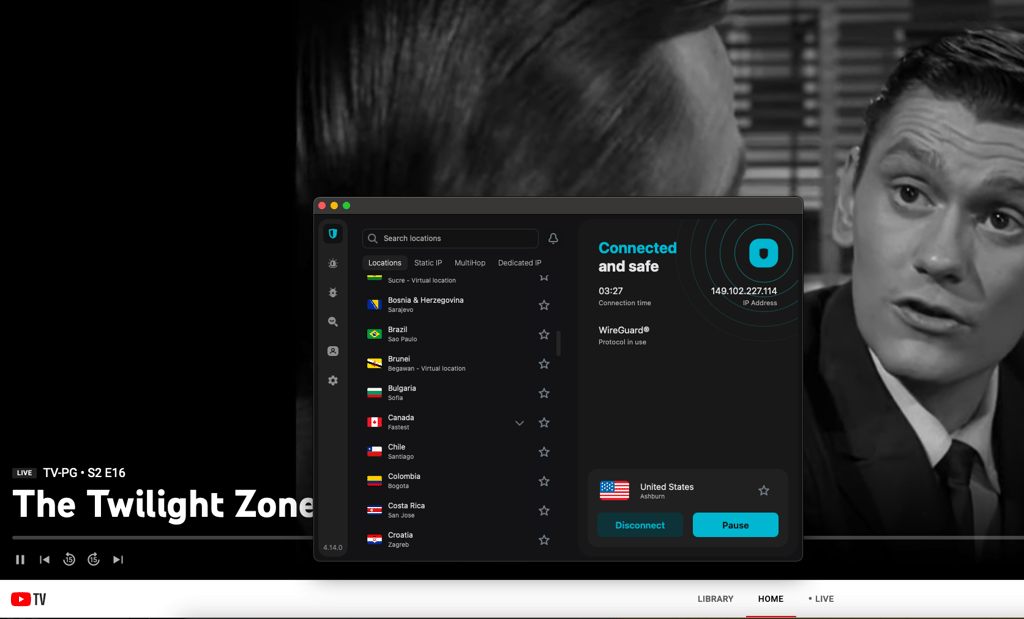
Surfshark is one of the fastest VPNs out there; It kept 80+% of my speed on the US servers. I went through my tests without a single buffer circle in sight. This VPN stands out because it supports unlimited connections; you can secure all the devices in your home with a single account.
You can get this YouTube TV VPN for just $1.99/month if you opt for its long-term plan. Before committing, you can try its 7-day free trial combined with a 30-day money-back guarantee to see whether it’s the VPN for you. And check out the Surfshark Coupon page, if you want to snatch it at an even lower price.
Read all about it in our Surfshark review and check if it's a good fit for you.
Top 3. Proton VPN - fast VPN for unblocking YouTube TV in Mexico
![Proton VPN mobile logo [IN USE]](https://media.vpnpro.com/images/170x89/proton-vpn-review-logo-2.jpg)
145
20075
-
3,576+ fast servers in the US
-
Reliable streaming speeds
-
Offers a free version
-
No 24/7 live chat
Renowned for its remarkable connection speeds, Proton VPN is one more great choice when it comes to unblocking YouTube TV from Mexico. It has 3,756+ servers in the US. They all include ad blocking, streaming support, and up to 10 Gbps connectivity. We also get five Secure Core US servers with extra security. Unfortunately, Proton only offers dedicated IPs to business users.
Note that the free version doesn't support streaming. So, if you want to spoof your YouTube TV location with Proton VPN, you must go premium. It's also important to avoid TOR servers because they won't unblock YouTube TV.
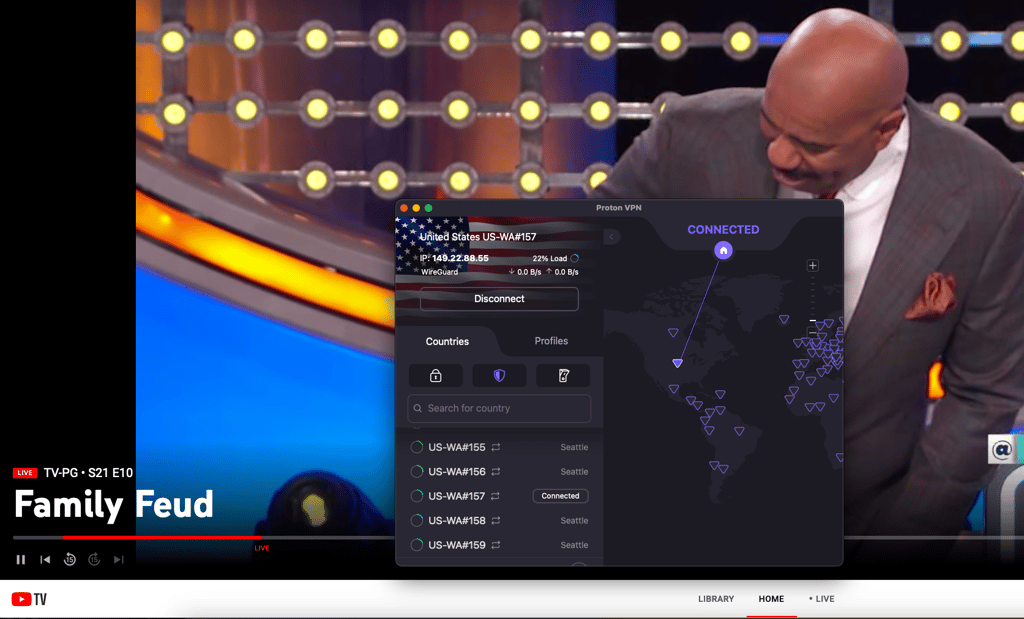
On average, Proton VPN kept 76% of my speed. Secure Core servers are much slower, so I don't recommend them. You can also try Proton's proprietary obfuscation protocol, Stealth. I had the accelerator feature turned on, but I can't be sure how much it contributed. Finally, I was able to access YouTube TV without any problems.
Proton VPN prices start at $2.99/month, but remember to grab its Coupon to get a better deal. If this sounds like a good fit, read our full Proton VPN review for more info.
Top 4. IPVanish - fast and reliable YouTube TV VPN without limits
![IPVanish mobile logo [IN USE]](https://media.vpnpro.com/images/170x89/IPVanish.jpg)
113
3200
-
RAM-only servers
-
Suitable for streaming
-
Solid speeds
-
Operates in the US, part of the Five Eyes Alliance
IPVanish is a top VPN for watching YouTube TV in Mexico as it delivers reliable speeds and successfully bypasses geo-restrictions with 1020+ servers in the US alone. It’s also a reliable VPN that doesn’t have any connection limits, allowing you to stream content on multiple devices.
While the provider also has additional features, a dedicated IP is not available. However, you can add an extra layer of protection by enabling Double Hop VPN, kill switch, and Threat Protection, which works as an ad blocker. If you only need a VPN to watch YouTube TV in Mexico, you can use its split tunneling feature, which allows you to choose which traffic to route through an encrypted VPN tunnel.
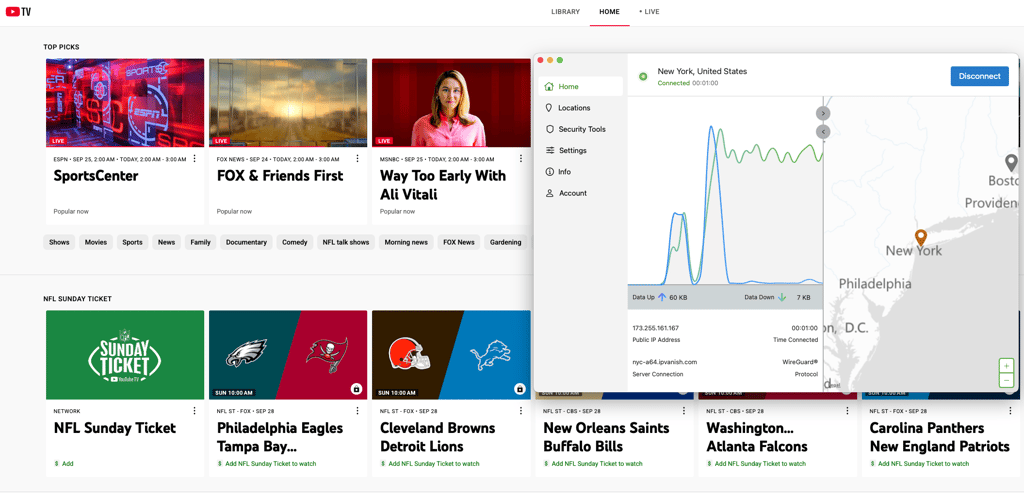
Due to IPVanish’s fast WireGuard protocol, I had no issues while streaming content on YouTube TV. I was able to bypass geo-restrictions and enjoy a lag-free streaming experience. During my tests, IPVanish retained 91% of my original speed.
You can get IPVanish for $2.99/month by using our IPVanish coupon codes. There is also a 30-day money-back guarantee and a 7-day free trial, allowing you to test the service risk-free. The best part about IPVanish is that it doesn’t limit simultaneous connections, so you will be able to use your subscription on all personal devices.
To learn more about the provider, read our detailed IPVanish review.
Top 5. TotalVPN - beginner-friendly VPN for YouTube TV in Mexico
![TotalVPN mobile logo [IN USE]](https://media.vpnpro.com/images/170x89/totalvpn.jpg)
90
1800
24/7, email
-
US-based servers in 11 locations
-
Solid speeds when connecting from Mexico
-
Specialized servers for streaming
-
The Mac version offers fewer features
TotalVPN is a great, beginner-friendly choice for unblocking YouTube TV in Mexico. It operates servers in 11 US locations, and you can also add a dedicated US IP to your account for a small fee. This would allow for an even smoother, unrestricted YouTube TV streaming.
Although Total VPN uses a bit older OpenVPN tunneling protocol, it performed surprisingly well during my testing, and I was consistently able to access YouTube TV. If you’re getting proxy or location errors, I recommend switching to IKEv2 if you’re on mobile. Unfortunately, TotalVPN doesn’t support obfuscation.

However, Total VPN is unexpectedly fast – it kept between 70 and 90% of my original speed, depending on the server. The experience was smooth without buffering, lag, or sudden disconnects. If you’re looking for a good budget option, TotalVPN offers the best deals on its long-term subscriptions.
So, if you’re looking for a great collection of streaming servers on a budget, TotalVPN is tough to beat, with prices starting at just $1.59/month. And there’s a 30-day money-back guarantee to field-test it and see whether it suits your needs. Learn more about it in our TotalVPN review.
For a deeper investigation of TotalVPN, read our TotalVPN review.
Best VPNs to watch US TV in Mexico: compared
| VPN providers | Rating | Unblocks YouTube TV in Mexico? | Servers in US | Lowest price | Free trial |
| 1. NordVPN | 9.8⭐⭐⭐⭐⭐ | ✅Yes | ✅Yes, 2000+ in 16 cities | From $3.09/month | ✅ Yes, 3-day free trial |
| 2. Surfshark | 9.5⭐⭐⭐⭐⭐ | ✅Yes | ✅Yes, 600+ in 25 cities | From $1.99/month |
✅ Yes, 7-day free trial |
| 3. Proton VPN | 8.6⭐⭐⭐⭐ | ✅Yes | ✅Yes, 3576+ in 19 cities | From $2.99/month | ✅ Yes, free version |
| 4. IPVanish | 8.4⭐⭐⭐⭐ | ✅Yes | ✅Yes, 1020+ in 22 cities | From $2.99/month | ✅ Yes, 7-day free trial |
| 5. TotalVPN | 8.2⭐⭐⭐⭐ | ✅Yes | ✅Yes, undisclosed number in 11 cities | From $1.59/month | ✅ Yes, 7-day free trial |
Get best VPN for YouTube TV in Mexico
How to use YouTube TV in Mexico: detailed guide
To watch YouTube TV in Mexico, you will need to use a VPN provider as it’s only available in the US. A VPN can easily bypass YouTube TV’s restrictions, and you can achieve this in a few minutes. Here are the steps on how to use YouTube TV in Mexico with a VPN:
Step 1. Subscribe to a reliable YouTube TV VPN
To enjoy YouTube TV in Mexico, you will need to choose and subscribe to a robust streaming VPN. The best option in 2026 is NordVPN as it guarantees access to YouTube TV with over 2873+ servers in the US. Additionally, it’s a fast and secure VPN, so you will be able to stream YouTube TV in Mexico privately without any issues.
Step 2. Download and install the VPN
After you subscribe to a VPN service, download and install the VPN app on your device. For mobile devices, you can do that via the Google Play Store or the Apple App Store. For computers, visit your provider’s official website, where you will find the app download link. No matter what device you’re using, setting up the VPN should be easy, as most providers offer in-depth guides that will help you.
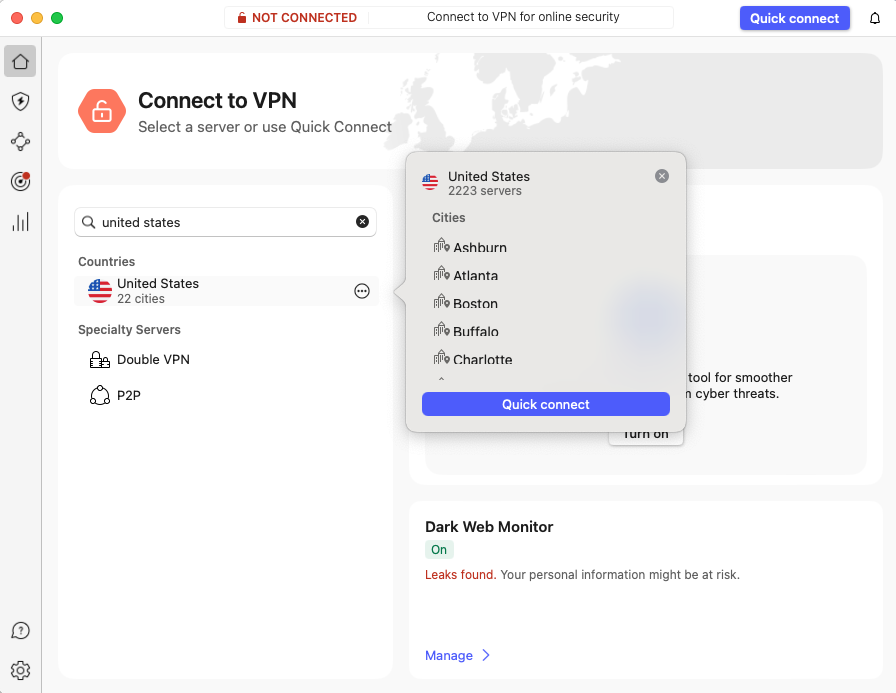
Step 3. Connect to a VPN server in the US
Once you have the VPN app up and running, connect to a VPN server in the US to bypass YouTube TV’s restrictions. I also recommend checking if the connection is successful before visiting YouTube TV to avoid any issues. To do so, use reliable services like ipleak.net and dnsleaktest.com.
Step 4. Watch YouTube TV in Mexico with a VPN
After you successfully connect to the VPN, you can now watch YouTube TV in Mexico without any restrictions. If you still encounter issues, try switching to a different US server, as this usually solves the issue. If that doesn’t help, I would also recommend clearing YouTube TV’s cache and cookies, as it might’ve previously tracked your real location.
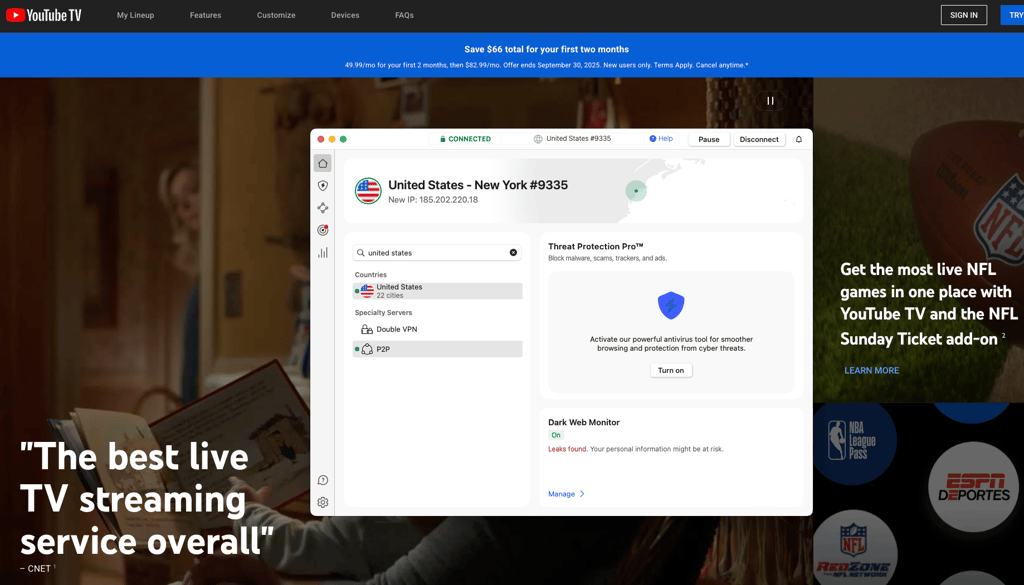
Unblock YouTube TV from Mexico with a VPN
During registration, you'll need to provide your ZIP code. If you're using a dedicated IP, I recommend finding its latitude and longitude on a site like IPLeak. Then, you can narrow it down and use the ZIP code of the specific country your IP belongs to. This little hack makes everything look more legit.
VPN not working with YouTube TV: how to fix it
Geo-spoofing YouTube TV can result in a bunch of little problems that can ruin your experience. Here are some issues I encountered with different VPNs and how I fixed them:
- VPN/proxy error: If YouTube TV flags your VPN, you can try switching to a different server. I also recommend clearing your browser cache and cookies or using incognito mode. You should also check for DNS leaks on IPLeak.net. In extreme cases, you can use obfuscation, but note that it can cause higher speed drops.
- Account issues: You can avoid unusual activity problems by using a static or dedicated IP address.
- Location problems: If you see ZIP code errors, just follow my tip from the previous section. In extreme cases, you might have to emulate your location in your browser. In Google Chrome, press Ctrl + Shift + I to access developer tools, click the three-dot menu, go to More Tools > Sensors, and switch your location.

How does YouTube TV know my location?
YouTube TV is able to determine your Mexico location using a combination of methods, including your IP address, GPS coordinates, Wi-Fi network, and device settings. Here’s how it works:
- IP address. When you connect to YouTube TV, your device’s IP address is used to estimate your approximate location. Because IP addresses are associated with geographical locations, YouTube TV can learn your location based on this information.
- GPS or location services. If you’re using a mobile device, like a smartphone or a tablet, the built-in GPS might give away your location to YouTube TV. This method can give an even clearer idea of your location.
- Wi-Fi networks. If you use a Wi-Fi network that has been registered or used by others before, the approximate location of that network can give YouTube TV clues about where you are.
- Device settings. Lastly, you might’ve granted permission for the app to access your location through device settings when first setting up your YouTube TV account.
It’s worth mentioning that YouTube TV does not keep a record of your location for any malicious purposes, but rather recommends the correct local content like news and sports. Another reason why YouTube TV is doing it is to comply with various broadcasting agreements, which can be geo-restricted. Anyway, there’s nothing a reliable VPN, such as NordVPN, isn’t capable of fixing. With a VPN, you get a secure IP in any country you choose. This tricks YouTube TV into thinking you’re accessing it from another country instead of Mexico, and so you’re capable of bypassing any geo-restrictions.
Can I watch YouTube TV in Mexico with a free VPN?
I do not recommend using free VPNs to watch YouTube TV in Mexico.
Providing users in Mexico with access to YouTube TV is a costly, never-ending battle. YouTube is constantly hunting and blocking new IPs and implementing better VPN filters.
So, where do free VPNs get the money to finance this complex endeavor? They usually steal and sell your data or hijack your system for crypto mining. Most of them (Hola VPN comes to mind) don't even provide adequate protection and won't work with YouTube TV. So, most free VPNs are not only useless but actively malicious. I strongly recommend against using them.
There are legitimate free versions of renowned VPNs, like Proton. However, all of these come with certain limitations and can't support serious long-term use. For example, the free version of Proton doesn't support streaming because the company can't afford it.
So, if you want to ensure your online safety and smooth YouTube TV streams in Mexico, I recommend using a premium service like NordVPN. And it comes with a handy 30-day money-back guarantee. So it’s risk-free.
What to watch on YouTube TV?
Your list of channels depends on several factors, including your location, subscription plan, and add-ons. For example, buying the Spanish Plus add-on will give you access to 25 Spanish channels. You can also ignore the YouTube TV Base Plan and just purchase the Spanish Plan with 28 channels.
Here's a tiny snapshot of the available channels and shows:
| Category | Popular channels | Notable shows/events |
| News | CNN, FOX News, MSNBC | Breaking news, event coverage, elections |
| Sports | ESPN, FOX Sports, NBC Sports | NFL, NBA, MLB, Premier League, Olympics |
| Entertainment | ABC, CBS, FOX, NBC | The Masked Singer, The Bachelor, Fargo, The Yellowjackets |
| Movies | AMC, TCM, FXM | Classic movies, new releases, award shows |
| Reality TV | Bravo, E!, VH1 | Keeping Up with the Kardashians, The Real Housewives, Dating Naked |
Watch YouTube TV outside US with NordVPN
Final thoughts
While YouTube TV is a popular streaming platform, it is unavailable in Mexico due to geo-restrictions. The only way to access it outside of the US is by using a robust YouTube TV VPN. Even though there are many VPN providers, not all of them are suitable for streaming.
After testing 28 providers, I found that NordVPN is the best VPN to watch YouTube TV in Mexico in 2026. NordVPN has a wide selection of US servers, which will grant you access to various services, including YouTube TV. Additionally, it’s one of the most secure providers, so your digital footprint will stay private at all times.

![Surfshark weekly deals logo [IN USE]](https://media.vpnpro.com/surfshark-weekly-deals.svg)
![Proton VPN winner logo [IN USE]](https://media.vpnpro.com/2025/05/protonvpn-winner.png)
You may also like to read:
How to watch La Casa de los Famosos Mexico
Best USA VPNs to use in and outside America
Best HBO Max VPNs in 2026
Best Amazon Prime VPNs
How to watch American TV outside US
How to watch Hulu outside US
How to watch ViX Mexico in USA
How to watch Peacock in Mexico with a VPN
FAQ
Why is YouTube TV unavailable in Mexico?
YouTube is unavailable in Mexico due to geo-restrictions and licensing agreements. The only way to use YouTube TV in Mexico is by getting a robust streaming VPN, like NordVPN. With NordVPN, you’ll be able to connect to a VPN server in the US, which will allow you access to the service from anywhere.
Can you access YouTube TV in Mexico?
No, you cannot access YouTube TV in Mexico as the service is only available in the US due to geo-restrictions. Luckily, you can bypass these restrictions by using a reliable VPN with servers in the US. For the best experience, try NordVPN as it proved to be the best YouTube TV VPN in 2026.
How to watch YouTube TV in Mexico with a VPN?
To watch YouTube TV in Mexico with a VPN, subscribe to a reliable streaming VPN, such as NordVPN. Once you have an active account, set up the VPN app on your device and connect to a server in the US. After that, you can visit the site and enjoy YouTube TV in Mexico without any restrictions.
Can I pay for YouTube TV in Mexico?
Yes, you can pay for YouTube TV in Mexico, but you will need to use a VPN. Since YouTube TV is only available in the US, you will need to be connected to a server in the US when purchasing a subscription. Additionally, you will need to provide a US-based credit or debit card information or pay using PayPal
Why is YouTube TV unavailable in Mexico?
YouTube TV is unavailable in Mexico due to geo-restrictions. Since YouTube TV is a US-based service, it is only available in the US. The only reliable way to access it in Mexico is by using a VPN with servers in the US. This way, you’ll be able to change your IP address and appear as if you're in the country, which will unblock YouTube TV in Mexico.


- Why Is YouTube TV not working in Mexico?
- Best VPNs to watch YouTube TV in Mexico in 2024
- Best VPNs to watch US TV in Mexico: compared
- How to use YouTube TV in Mexico: detailed guide
- VPN not working with YouTube TV: how to fix it
- How does YouTube TV know my location?
- Can I watch YouTube TV in Mexico with a free VPN?
- What to watch on YouTube TV?
- Final thoughts
- FAQ