What is split tunneling?

Many internet users know about VPNs (Virtual Private Networks) and their numerous benefits. The software works by redirecting your internet traffic through remote encrypted servers. That way, your true location is hidden while your online activity remains private from your ISP (Internet Service Provider).
However, there are some potential downsides to this. For example, services that rely on your real location – such as banking websites, local services, or certain streaming platforms – can become unavailable or trigger security alerts. Plus, routing all traffic through a VPN can also negatively impact speeds or increase latency for some activities. Luckily, these issues can be resolved using split tunneling.
What is split tunneling?
The split tunneling feature divides your internet traffic into two paths – one protected by VPN encryption, and one without. Users can customize which apps or websites should pass through the VPN tunnel and which should use regular internet traffic.
Traffic that isn’t routed through the VPN will be visible to your ISP and devices on the LAN (Local Area Network). Meanwhile, apps that aren’t masked with the VPN connection can still access LAN-connected devices and other local resources.
How does split tunneling work?
Normally, your device connects to the internet via a standard network route that transmits and receives data. However, once you enable a VPN, it creates an encrypted link between your device and a VPN server. This means that most or all data is sent and received through the secure VPN server, which can sometimes result in slower speeds.
That’s where split tunneling comes into play. Instead of encrypting everything, the feature allows you to choose which websites or apps should be encrypted, and which should connect directly to the internet. By routing only selected traffic through the VPN, split tunneling can improve performance for certain apps while keeping others protected.
Reaping the benefits of split tunneling is quite straightforward. You’ll have to download the VPN application, install it, and customize the settings to fit your needs. Naturally, the options you can change will vary depending on your VPN provider. Some of the best VPN services, such as NordVPN and Surfshark VPN, give extensive split tunneling controls across multiple operating systems.
What are the different types of split tunneling?
Now that we have covered what split tunneling is and how this feature works, it’s time to talk about the different types of split tunneling used by VPNs. Most VPN providers implement three main types: URL-based, app-based, and inverse.
- URL-based split tunneling. This type deals with specific websites or domains that you choose to route through a VPN, filtering the traffic tied to those sites. Such VPN split tunneling is often implemented through a browser extension. That said, NordVPN supports URL-based split tunneling via its browser extensions.
- App-based split tunneling. This type filters the traffic of specific apps. Some of the examples include your bank’s mobile app or workplace tools like Slack. When an app is routed through the VPN using split tunneling, its traffic will be encrypted, while other apps can connect directly to the internet.
- Inverse split tunneling. As the name suggests, inverse split tunneling works in the opposite way. While the other types allow specific apps or websites to bypass the VPN, inverse split tunneling routes nearly all traffic through the encrypted VPN tunnel by default. Anything you don’t want encrypted must then be specified to bypass the VPN.
Why would you use split tunneling?
Perhaps you don’t see the potential in this feature. Allow me to provide a few examples of how split tunneling benefits VPN customers.
- Staying in the loop about local news
- Unblocking geo-restricted video content on a particular browser
- Secure online gaming with a specific multiplayer game
- Researching multiple location-specific topics (e.g., prices, available movies)
- Accessing LAN-connected devices
Staying informed about local news
Regional news channels and online publications usually rely on your location to provide access to certain content or local broadcasts. This means traveling abroad or enabling a VPN can result in losing access to news about your country.
Thankfully, this isn’t a problem when you have split tunneling. Simply choose your news app to bypass the VPN tunnel and stay informed while the rest of your online activities remain hidden.
Unblocking geo-restricted content
Getting around geographical restrictions is the most popular reason for purchasing a VPN. After all, it’s a low-cost way of getting more out of a streaming service subscription. However, issues may arise if the VPN connection isn’t fast enough to stream UHD video while routing all of your internet traffic through encrypted servers.
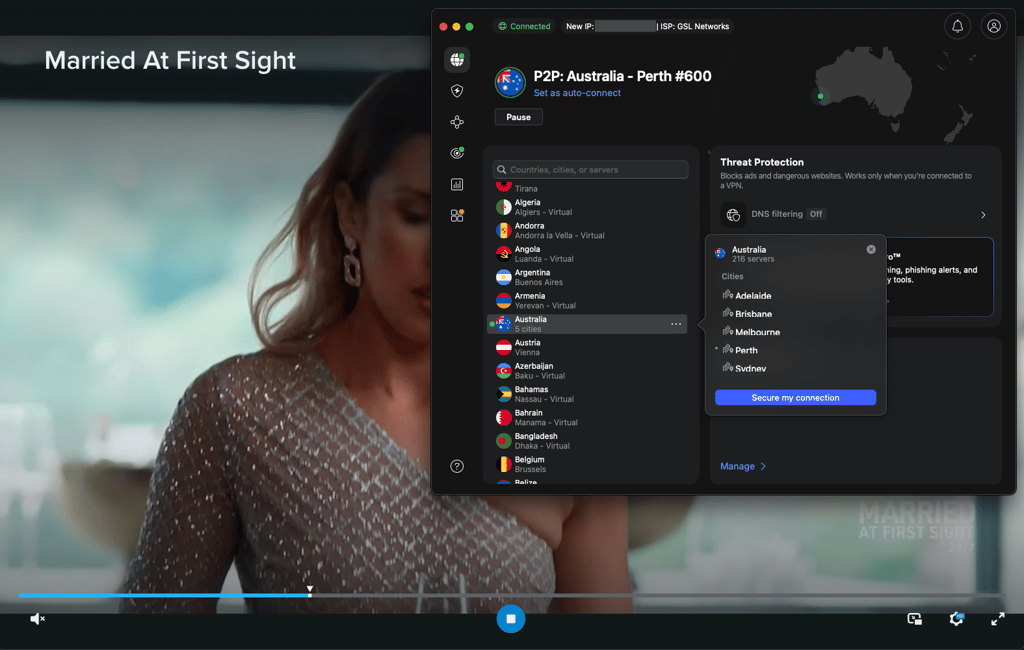
This is where split tunneling can lend a hand. You can choose your streaming app or browser to be the only application requiring a VPN connection. This can improve performance because less traffic needs to be encrypted and routed through remote servers. But if you want a full-fledged experience when bypassing geo-blocks, NordVPN is the best streaming VPN available.
Securing a particular multiplayer game
Sadly, online multiplayer video games aren’t immune to regional limitations. Additionally, they face other potential risks, including DDoS (distributed denial-of-service) attacks, IP address exposure, and more. Plus, maybe you don’t want everyone to know about your late-night gaming sessions.
Whatever the case may be, enabling split tunneling with a particular game, such as Warzone, can provide additional privacy and protection. Depending on your chosen VPN's reliability, it can also let you unlock region-exclusive items or participate in country-specific events. Best of all, limiting the VPN connection to one app with split tunneling helps reduce performance impact while the virtual private network is enabled.
Researching location-specific topics
Online services and retailers have regional versions of their websites and alter many things to suit everyone’s specific needs. Obvious changes include language and currency, but altering your virtual location can also unlock cheaper prices. For example, travelers frequently use VPNs to purchase cheaper flight tickets.
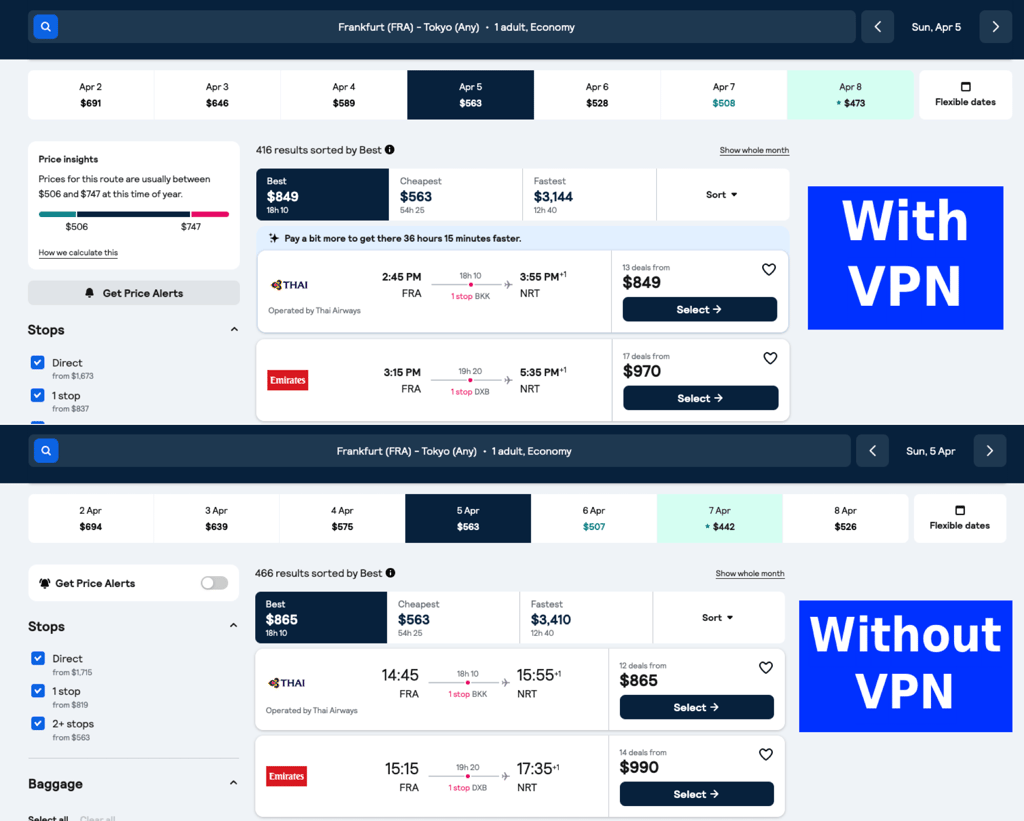
And if your VPN service offers a browser extension and split tunneling, you can simultaneously check a website from at least three different regions. To do this, you’ll need three different browsers.
- The first with your actual location and IP address
- The second routed through the VPN server using split tunneling
- The third utilizing a VPN browser extension
You can take it up a notch by running even more browsers with extensions. After all, the best VPN services allow multiple simultaneous connections with one account. Whether that’s really necessary is up to you.
Accessing LAN devices
Enabling a VPN routes your internet traffic through a remote network instead of your local one. That means you may not be able to connect to LAN-connected devices, such as your printer or NAS (network-attached storage). However, you can solve that easily using split tunneling. The solution lies in either limiting the VPN connection to selected apps that don’t need LAN access or excluding apps that will need to utilize LAN resources.
How to use split tunneling with any VPN
- Choose the split tunneling type. Firstly, you’ll have to choose the split tunneling type that suits your needs. Most VPNs support three main types: URL-based, app-based, and inverse split tunneling. With URL- or app-based split tunneling, you select specific apps or websites that should go through the VPN tunnel and receive data encryption and a different IP address. Meanwhile, inverse split tunneling works the opposite way – most of your traffic goes through the VPN by default, while selected apps bypass it.
- Select apps and websites. Once you’ve picked the split tunneling method, you’ll need to select the applications (or websites) that should be affected. Naturally, the available options will depend on your VPN provider, since some allow selecting apps, while others also support specific websites or IP addresses.
- Enable the VPN. All that’s left is to choose a VPN server and connect. It’s a good idea to use online tools like dnsleaktest.com and ipleak.net to check for DNS leaks and if your IP address has changed correctly. After that, you’re free to enjoy the web however you see fit!
Split tunneling with a VPN router
If you want to exclude devices (e.g., iPhone, Windows, game console, and smart home devices like TVs, fridges, or air conditioners) from the VPN tunnel, using a VPN router can help.
In the router’s configuration menu, you can enable or disable VPN routing for individual devices. For example, you might exclude a video game console or a streaming device, as these usually require high bandwidth and low latency.
What is the difference between a split tunnel and a full tunnel?
With these two terms circling about, it’s easy to get confused about what they mean. What is split tunneling? And what is a full tunnel? To put it simply, a full tunnel connection refers to the default VPN setup where all internet traffic is routed through the encrypted VPN tunnel. Meanwhile, split tunneling is a feature that routes part of your traffic through the VPN while the rest connects directly to the internet.
Security-wise, full tunneling offers more protection since all traffic is encrypted and routed through the VPN. On the other hand, split tunneling leaves some of that traffic outside the VPN tunnel. However, it can improve performance for certain apps by reducing the amount of traffic that travels through a VPN server. So, in a nutshell, a full tunnel is more secure, while split tunneling offers greater flexibility and potential performance benefits.
Which VPNs support split tunneling?
VPN services come in many shapes and forms. Typically, split tunneling has provider-specific benefits, settings, and naming conventions. That means there’s no one-size-fits-all guide to enabling the feature. Furthermore, the implementation can differ depending on your device and operating system.
Below, we’ll show you how some of the top VPNs implement split tunneling in their apps. Hopefully, you’ll notice some commonalities and have no trouble enabling the feature on your device.
NordVPN split tunneling
NordVPN follows a standard naming convention for split tunneling and offers the feature for Windows, Android, and Android TV devices, as well as URL-based split tunneling in its browser extensions.
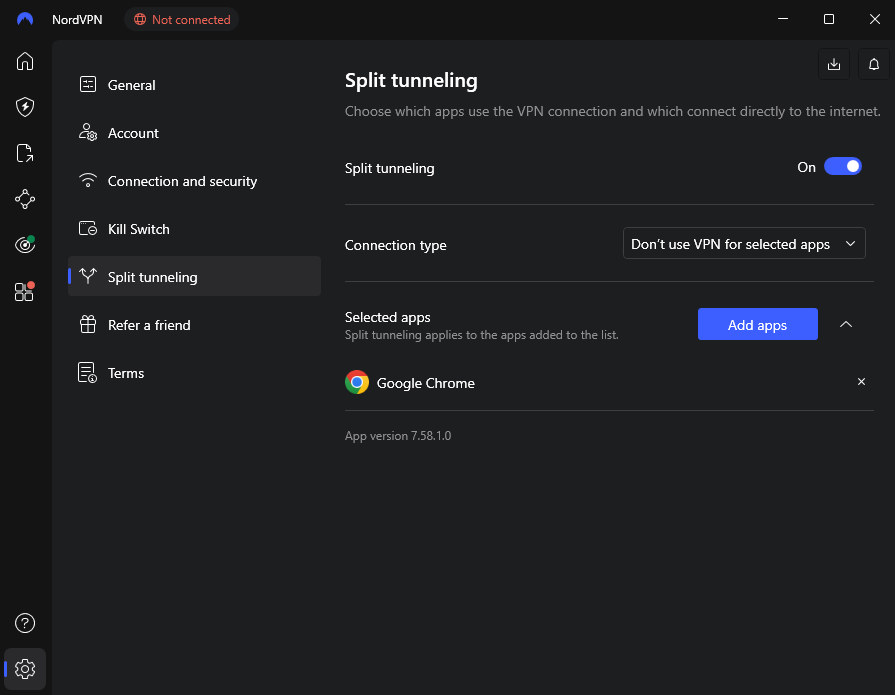
Here’s how to enable it on Windows.
- Open the NordVPN app
- Click on the settings cogwheel menu in the bottom-left corner
- Head to the Split tunneling tab and ensure the split tunneling switch is toggled on
- Pick one of the two split tunneling types (Disable or Enable VPN for specific apps)
- Choose which apps need to be affected by the feature
Surfshark VPN split tunneling (Bypasser)
With Surfshark VPN, the split tunneling feature is called Bypasser. It’s available on Windows, macOS, iOS, and Android platforms, including Android TV. Like NordVPN, Surfshark also offers split tunneling with its browser extensions.
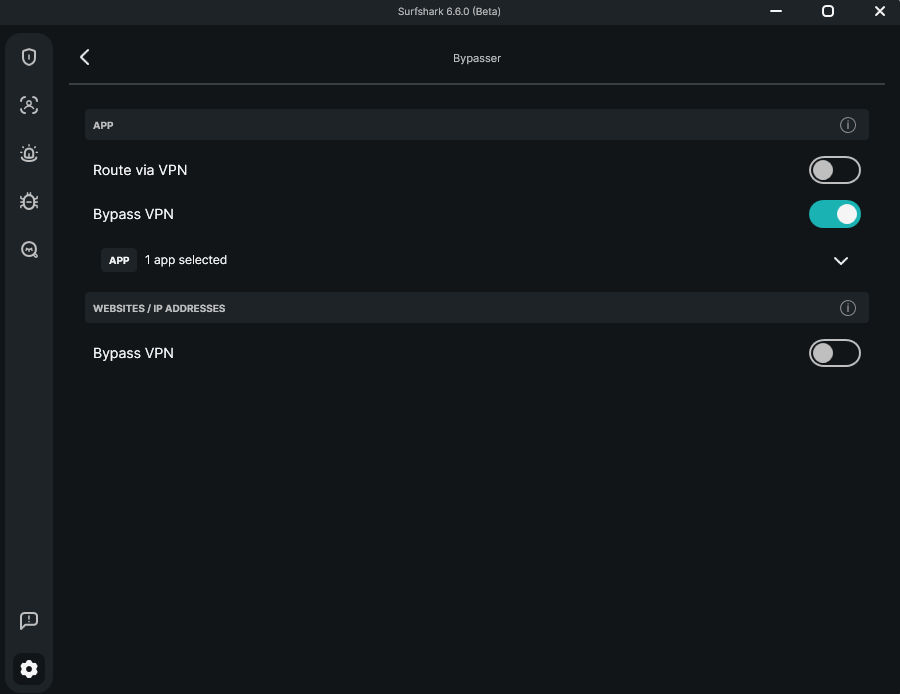
Follow these steps to use Bypasser on a Windows PC.
- Boot up Surfshark VPN
- Click the settings cogwheel icon on the left side of the app
- Go to VPN Settings and scroll down until you find Bypasser
- Select either Route via VPN or Bypass VPN
- Choose which apps should follow the Bypasser rules
- Optional: include websites (IP addresses) that should bypass the VPN
Is split tunneling secure?
There are understandable concerns even in the IT administrator circles about whether split tunneling is secure. However, it’s important to differentiate between corporate and private users. The former has well-founded concerns, since enabling split tunneling on workers’ devices can create a pathway between a corporate network and the public internet. If a device becomes compromised, sensitive corporate data could potentially be exposed.
On the other hand, private users face different risks. A printer or smart TV that’s excluded from the VPN tunnel could theoretically become a potential entry point for hackers. However, the risk depends on the security of the device itself rather than the split tunneling feature alone.
For these reasons, it might be unwise to rely on split tunneling for all your security needs, especially if sensitive private or corporate data is involved. While split tunneling can expose some traffic outside the VPN tunnel, it does not weaken the encryption that’s used by the VPN itself and can still be a useful feature when configured carefully.
What are the risks of VPN split tunneling?
As with every technology, split tunneling has a few inherent risks. It’s important to remember that split tunneling is primarily a traffic routing feature rather than a purely security-oriented one. That’s because some traffic bypasses the VPN tunnel, and certain security protections may not apply to those connections.
- Both corporate and private users may unknowingly bypass security measures meant to keep their traffic secure
- Corporate IT specialists may also have reduced visibility into employee activity if some traffic bypasses the company VPN.
- The majority of IP and DNS leaks occur due to an inadequate VPN split tunneling configuration, with users often being unaware that their sensitive data is being exposed
It is up to you, however, to weigh the risks against the benefits of split tunneling. While this VPN feature can improve performance and flexibility, users who prioritize maximum security may prefer full tunneling via a secure VPN service.
Conclusion
Split tunneling is a useful feature for optimizing your VPN connection to fit your needs. It can help minimize performance impact by limiting the number of apps that need to go through the VPN tunnel. You can also use it to research various topics from multiple regions, including prices and restrictions.
Don’t forget to opt for a reliable VPN service that provides the feature for your preferred device. For example, NordVPN has split tunneling for Windows, Android, and Android TV devices, and it’s included in browser extensions. To fit all your needs, the service includes all three types of split tunneling: URL-based (via browser extension), app-based, and inverse.

![Surfshark weekly deals logo [IN USE]](https://media.vpnpro.com/surfshark-weekly-deals.svg)
![Proton VPN winner logo [IN USE]](https://media.vpnpro.com/2025/05/protonvpn-winner.png)
FAQ
What’s the best VPN with split tunneling?
NordVPN is the best VPN with split tunneling (includes URL-based, app-based, and inverse). The feature is available on Windows, Android, and Android TV, including browser extensions. Besides that, the service provides industry-leading connection speeds, excellent security features, and access to loads of geo-restricted streaming content.
How do I use split tunneling on my VPN?
Most VPNs have split tunneling in the settings menu. Finding it varies by provider. For example, the NordVPN split tunneling settings can be found under the cogwheel icon in the app. There, you can choose the split tunneling type and which apps need to be affected by the feature.
Should I enable split tunneling?
There are many reasons why you’d want to use split tunneling. For starters, it’s useful for optimizing your VPN connection by limiting it to a handful of apps. This can potentially improve connection performance since less online traffic needs to be encrypted and rerouted.
Which protocols don't support split tunneling?
Split tunneling is not tied to a specific VPN protocol. Instead, it’s controlled by the VPN software and operating system. Popular protocols such as WireGuard, OpenVPN, and IKEv2 can support split tunneling when the VPN provider enables routing rules for apps, websites, or devices.
How can you make split tunneling safer?
You can make split tunneling VPN safer by routing sensitive apps and websites through the VPN while allowing less critical traffic to bypass the tunnel. Prioritize encrypting activities like banking, work tools, and private browsing to reduce the security risks associated with split tunneling.

- What is split tunneling?
- How does split tunneling work?
- Why would you use split tunneling?
- Staying informed about local news
- Unblocking geo-restricted content
- Securing a particular multiplayer game
- Researching location-specific topics
- Accessing LAN devices
- Split tunneling with a VPN router
- How to use split tunneling with certain providers
- NordVPN split tunneling
- Surfshark VPN split tunneling (Bypasser)
- Is split tunneling secure?
- Conclusion
- FAQ